Note:
Do NOT connect the camera to PC for charging. Instead use the 110V wall outlet.
The device will start up automatically and record as soon as power supplied, and
the device will save the last video file and power off automatically after cutting the
power supply.
14.2 Turning your camera ON/OFF
Auto Power ON: KINGSLIM D2 Pro is designed to turn ON automatically when it
receives power, i.e. when the car engine is started.
Auto Power OFF: The camera is also pre-configured to turn itself OFF automatically
within few seconds when the power gets disconnected, i.e. when the car key is
turned to LOCK position.
Note:
Some trucks/car’ s 12V cigarette outlet is always HOT, which means it provides
constant power even when the car is turned off and locked. If this is the case for
your vehicle, the auto ON/OFF feature will not work. And if you leave the camera
continuously recording when the car is turned off, the it will drain your car/truck’s
battery and you might not have enough power to start your car for next time. To
remedy this situation, you can do one of the two options:
① Hardwire your dash cam to your car’s fuse box with KINGSLIM 3 lead auto trigger
hardwire kit. Visit www.kingslim.net to purchase one separately.
② Change the connection in the fuse box for your 12V outlet socket which only
supplies power when car key is turned to ACC or ON position.
14. Charging
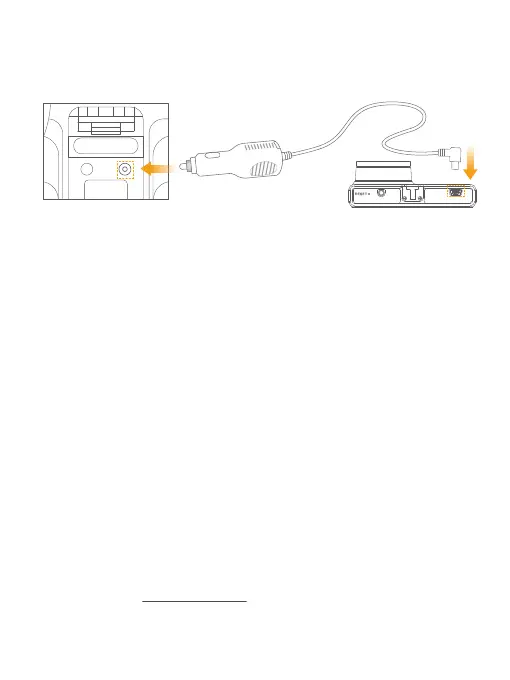
14.1 Connect the USB power cable into the USB power port of D2 Pro Dash Cam,
then plug the car charger into the cigarette lighter of your car.
Car cigarette lighter socket Car cigarette lighter plug D2 Pro Dash Cam
01 02 03 04 05 06
07 08 09 10 11 12 13
14 15 16
17 18 19 20
21 22 23 24 25 26 27
28 29 30 31 32 33



 To Next Page