1014336 Issue 01 BioTec+ Control Panel User Manual
11
8. Alarms
In the event of an alarm the red LED le of the LCD starts ashing, the buzzer beeps and an alarm message is
displayed in the rst row of the LCD
Pressing the <OK> buon acknowledges the alarm. That means, the buzzer and the ashing red LED are
switched o.
Any alarm can be deleted/reset by entering 9999 as PIN in the service menu.
Possible alarms and their reasons and messages are:
I. Mains Failure: The alarm is not active without batteries ( 2 x AA rechargeable
batteries)
II. No Battery Alarm.
III. Low Battery Alarm: Alarm starts if battery voltage is low.
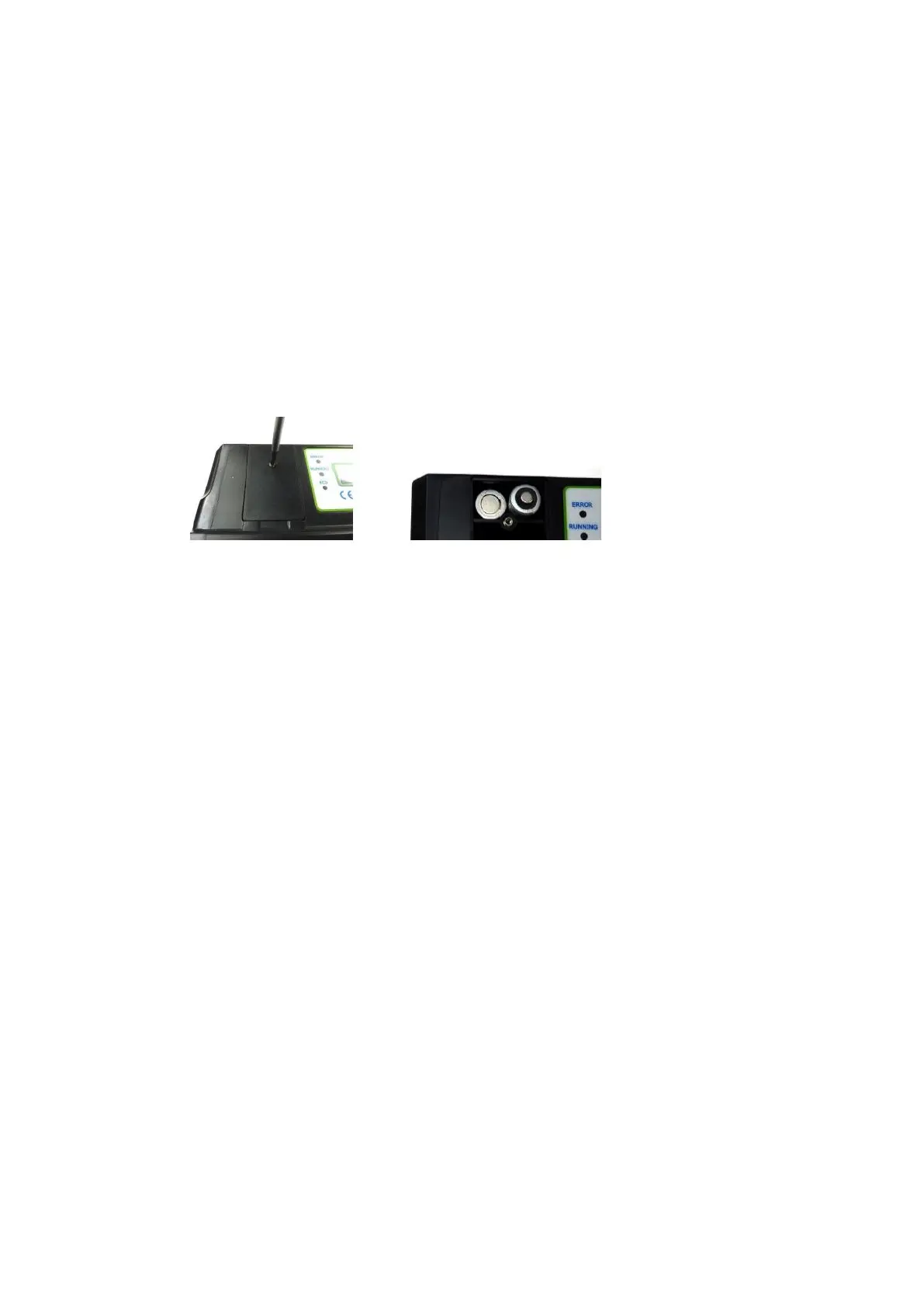
Baery Replacement
Baeries are accessible through the baery lid; it is to be unscrewed as shown below:
IV. Fuse Error: For fuse replacement refer to wiring diagram 1014183 for fuse details.
Fuse replacement may only be carried out by a qualified electrician since there are
live components 230V under the cover. The mains must be disconnected before
removing control panel cover.
V. High Level Alarm.
VI. Pressure High Alarm: This could be an indicator of either blockage in the air system or
of a valve.
VII. Pressure Low Alarm: This is an indicator that the blower needs service.


 To Next Page