Chapter 3 Error Correction 3-2
3. 1 Mis-feed Error
3. 1. 1 Deck Jam / Feeding Jam
Either of “Deck is jam” or “Feeding Jam” will be indicated when the roll paper is mis-fed in the Roll
Deck.
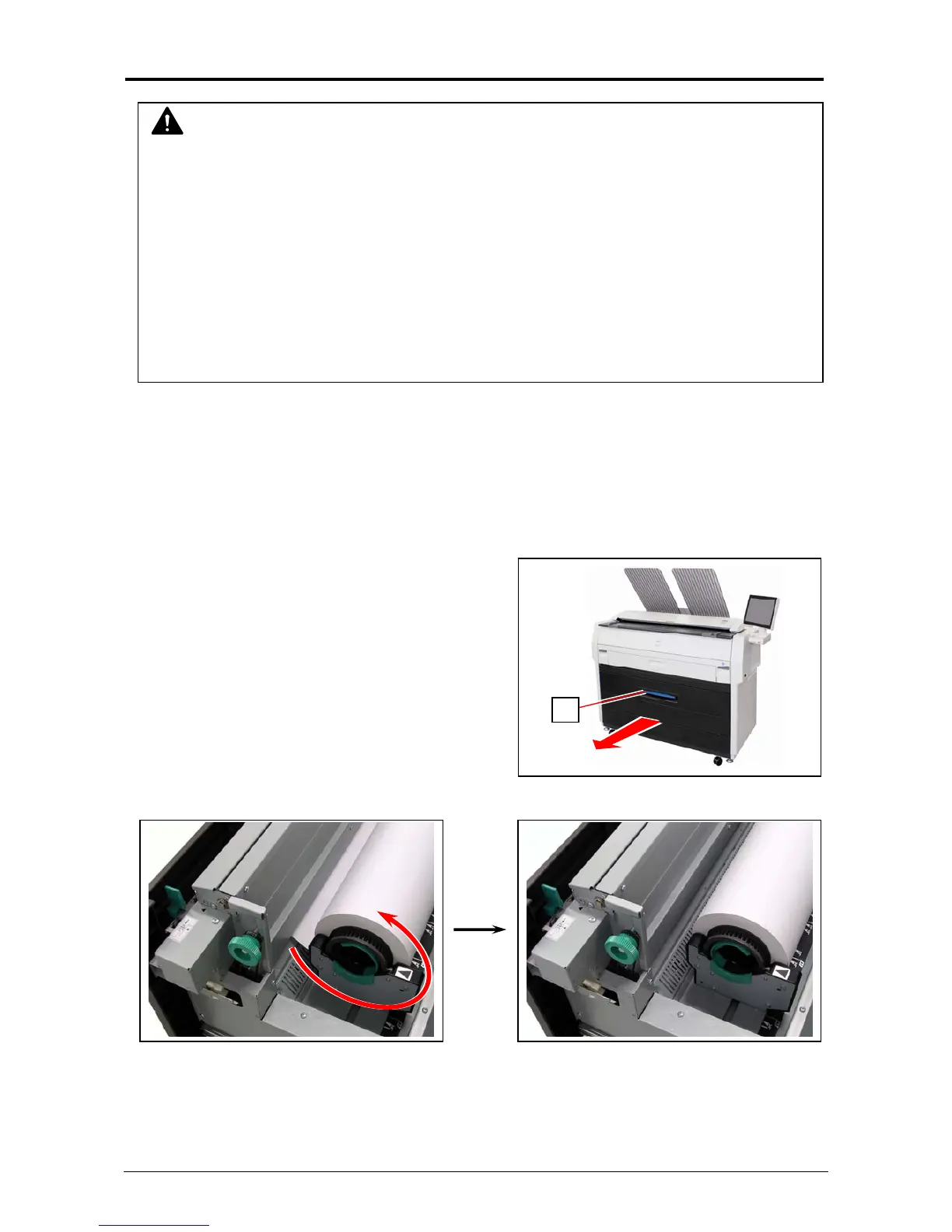
1. Pull the blue lever (1) to unlock the Roll Deck. Draw out the Roll Deck.
2. Rewind the roll media.
NOTE
(1) Be careful not to get paper cuts on your hand.
(2) It is recommended to take off your ring, bracelet or watch when removing a mis-feed
media.
(3) Gently remove a jammed paper. When it does not reach Fuser Unit, toner on it may spill
off. If toner gets into eyes or your mouth, immediately rinse them with water and contact a
doctor.
(4) Gently remove a jammed paper. When it does not reach Fuser Unit, toner on it may spill
off on your cloth.
Dust off your cloth. Use cold water to wash in out. Using hot water may leave a stain.
1



 To Next Page