7
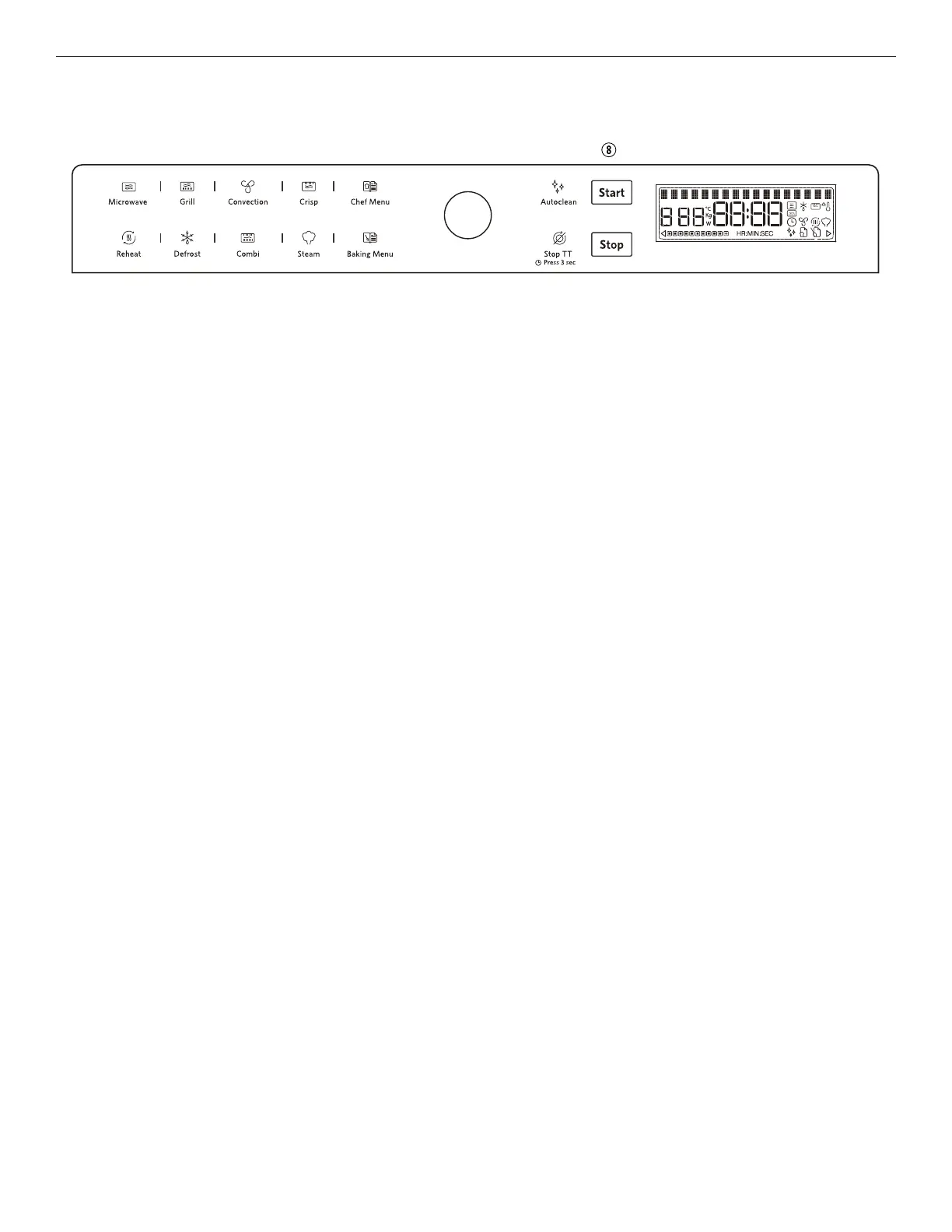
CONTROL PANEL
1. Microwave button
Use to select the Microwave function.
2. Grill button
Use to select the Grill function.
3. Convection button
Use to select the Convectionl and keep warm function.
4. Crisp button
Use to select Crisp function.
5. Chef Menu button
Use to access the automatic recipes.
6. OK button / Rotate knob
Use to confirm the selection / Use to adjust the value.
7. Auto Clean button
Use to select Auto Clean function.
8. Start button
Use to select Microwave function with Max. power
rapidly.
9. Reheat button
Use to select Sensor Reheat function.
10. Defrost button
Use to select Defrost function.
11. Combi ( Microwave + Grill ) / Combi ( Microwave +
Convection) button
Use to select Combi ( Microwave + Grill ) function or
Combi ( Microwave + Convection) function.
12. Steam button
Use to select the Steam function.
13. Baking Menu button
Use to access the convenient baking function.
14. Stop Turntable button
Use this function when you need to use very large
baking dishes that can not turn freely in the microwave
oven. It works only with the following cooking
functions:
• Convection
• Combi ( Microwave+convection)
15. Stop button
Press to stop or reset any of the microwave oven
functions.



 To Next Page