- 20 -
Installing the Cord and Surround
Housing
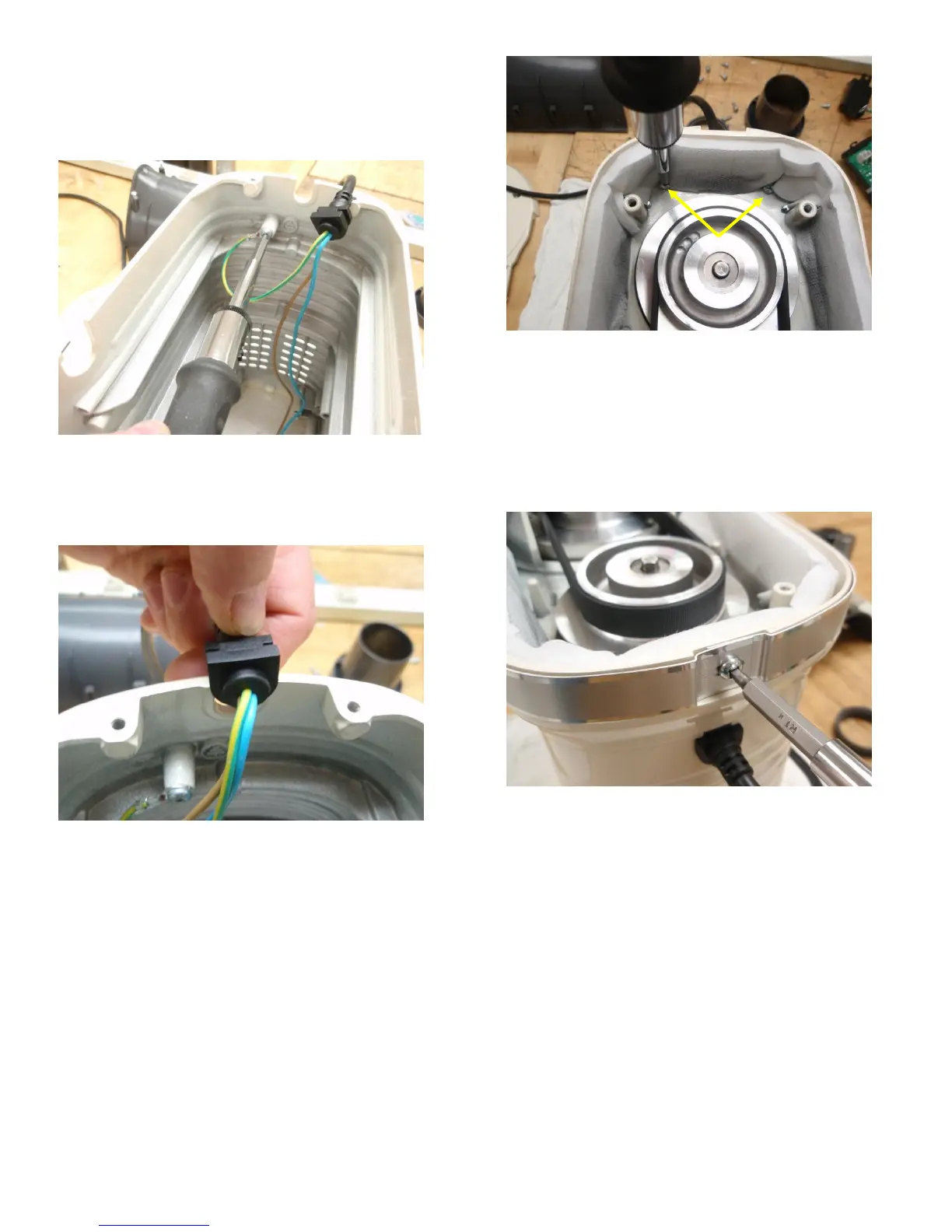
47. Attach the power cord ground wire to the surround
housing (see Fig. 47).
Fig. 47) fix the power cord ground screw to the surround
housing
48. Insert the power cord grommet into the cord slot in
the surround housing (see Fig. 48).
Fig. 48) place the cord grommet into the slot in the surround
housing
49. Invert the lower housing onto the surround housing
and secure with (2) screws (Fig. 49).
Fig. 49) Install the two screws that hold the lower housing to
the surround housing at the rear
50. Secure the trimband to the lower housing using the
6-32 x .250 trimband screws that were removed in
step 24 making sure that the text is oriented
properly. For instance, with the unit upside-down,
the trimband should be installed upside down. That
way the KitchenAid logo will be right side-up when
the unit is set upright.
Fig. 50) tighten the trimband to the lower housing with the
screw
51. Secure the (plastic) blender base to the lower
housing using the (5) 10-24 x .750 screws that were
removed in step 22 (Fig. 47).





 To Next Page