28
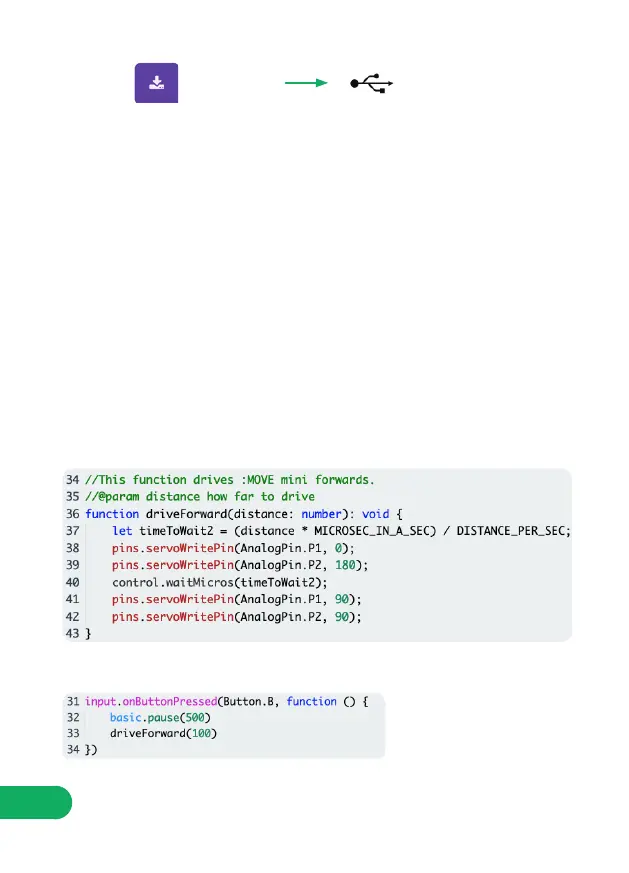
STEP 8: Add the following code under the previous code.
STEP 9: Program button B to call the ‘DriveForward’ function, like this:
Download this code to the micro:bit and press A, the :MOVE mini should wait
half a second (or 500 milliseconds) before turning through 90 degrees.
STEP 7: If :MOVE mini turns too far, or not far enough, you will need to adjust
the ‘DEGREES_PER_SEC’ variable so that the :MOVE mini accurately turns
through 90 degrees.
- If :MOVE mini turns too far, try making the value bigger.
- If :MOVE mini doesn’t turn far enough, try making it smaller.
UploadDownload
STEP 6:
Now we’ve calibrated the turns, lets code driving forwards! This code is very
similar to the block of code we used for turning, the only differences are:
- Function name - now called “driveForward’, instead of ‘turnLeft’.
- degrees - now called distance.
- timeToWait - now called ‘timeToWait2’.
- The servo output is now Right0 and Left180 instead of Right45 and Left45.
NOTE: The value after ‘driveForward’ is the distance we are telling :MOVE
mini to drive in mm.


 To Next Page