4
www.kitronik.co.uk
29
NOTE: Similar to before, if :MOVE mini drives too far/not far enough, adjust
the value of the ‘distancePerSec’ variable.
- If :MOVE mini drives too far, try making the value bigger.
- If :MOVE mini doesn’t turn drive enough, try making it smaller.
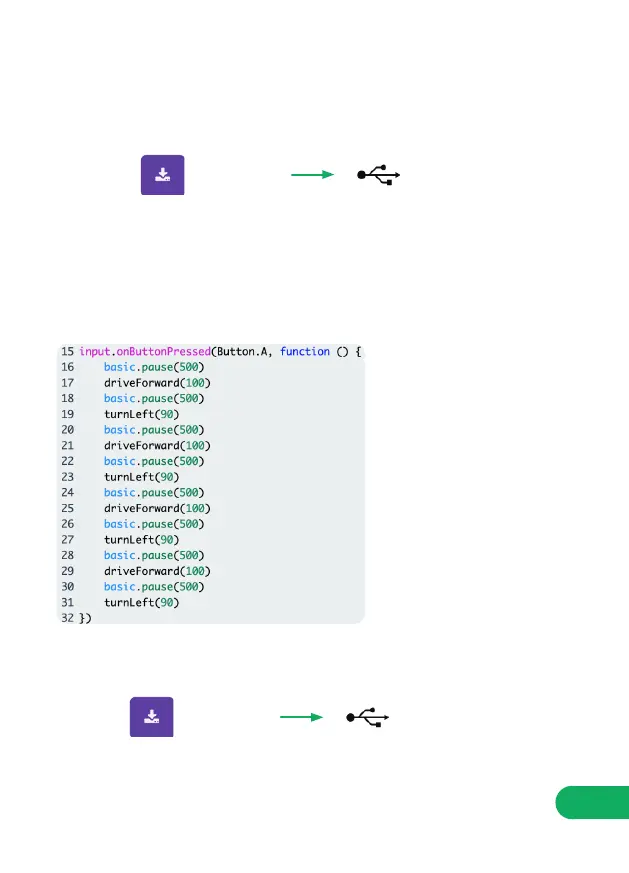
Now we have the building blocks to make the :MOVE mini draw a shape! To
draw a square, we will need to drive forward and turn left four times over.
STEP 11: Under ‘onButtonPressed(Button.A, () ’ change the code to what is
shown below:
YOUR TURN: Write code to make the MOVE mini turn right, and drive
backwards. Then combine that code to draw other shapes/pictures.
UploadDownload
UploadDownload
STEP 10:
STEP 11:


 To Next Page