36
ۣૐ ۞ইૐҴૐ ೠҴসӏѺ ಿ҃మ
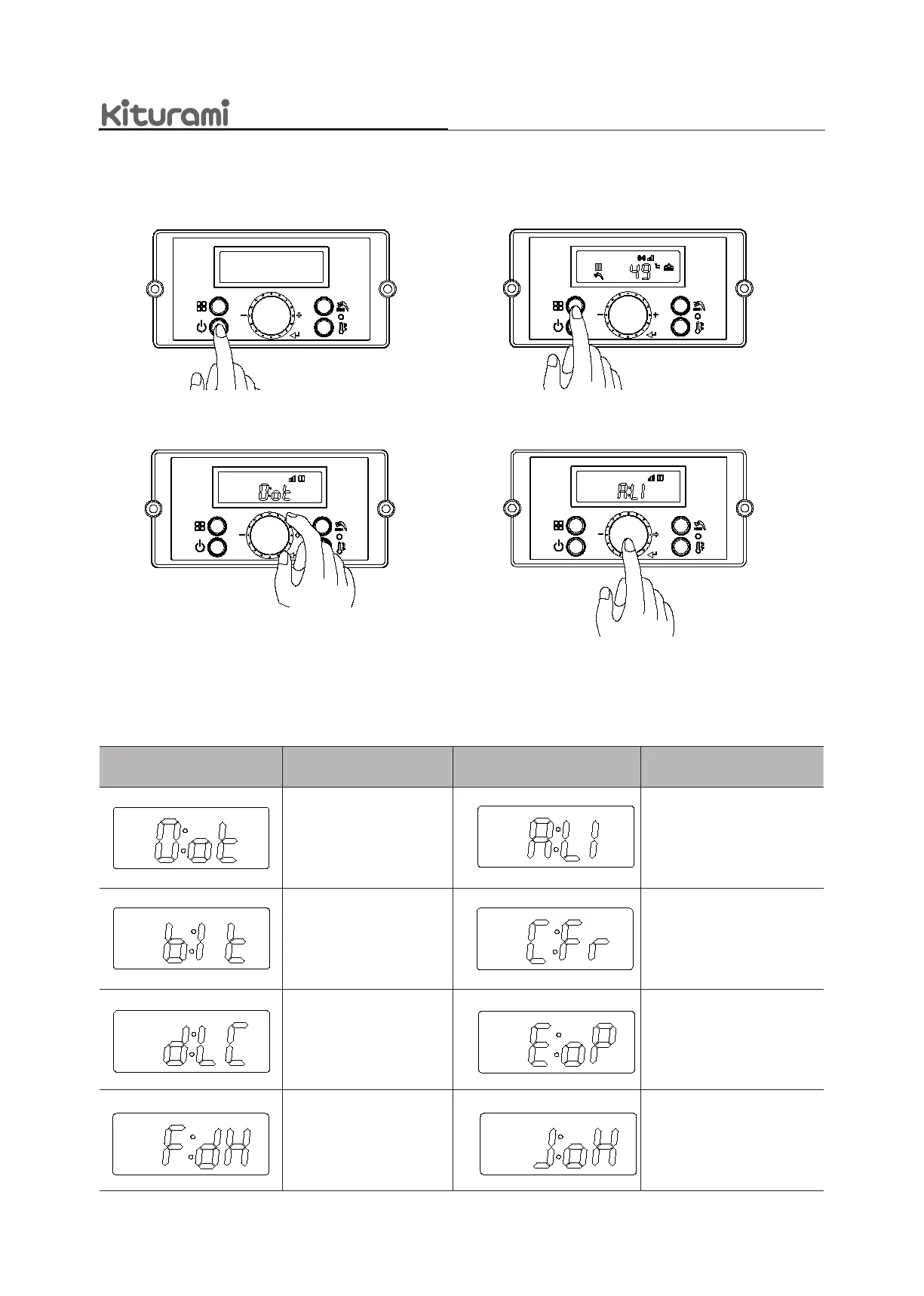
8.3StatusMode
b. Pressandholdthe‘FunctionButton’for
5secondstoenterStatusMode’.
c. ‘[O:ot]’isdisplayedonthedisplayscreen.
Turnthe‘DialButton’clockwiseorcounter-clockwise
tonavigatethroughthe‘StatusMode’.
d-1.Pressthe‘FunctionButton’toreturnto
normalmode.
8.3.1Setting the ‘StatusMode’
DisplayScreen Description DisplayScreen Description
Displayoutdoor
temperature
Displayowratevalue
(Li:L/m,GA:GPM)
Displaycoldwater
temperature
DisplayfanRPMvalue
LockedmodeON/OFF
Displaycentralheatingwater
temperature
Displayhotwater
temperature
Displayexhaustgas
temperature
a. Pressthe‘PowerButton’ON.
d. Afteradjustingdesiredstatusmenu,
if‘DialButton’ispressed,thecurrent
statusmenusettingwillbestored.


 To Next Page