SaunaP
UR
PAGE 7
5070178/07.02
4. Operating and display elements
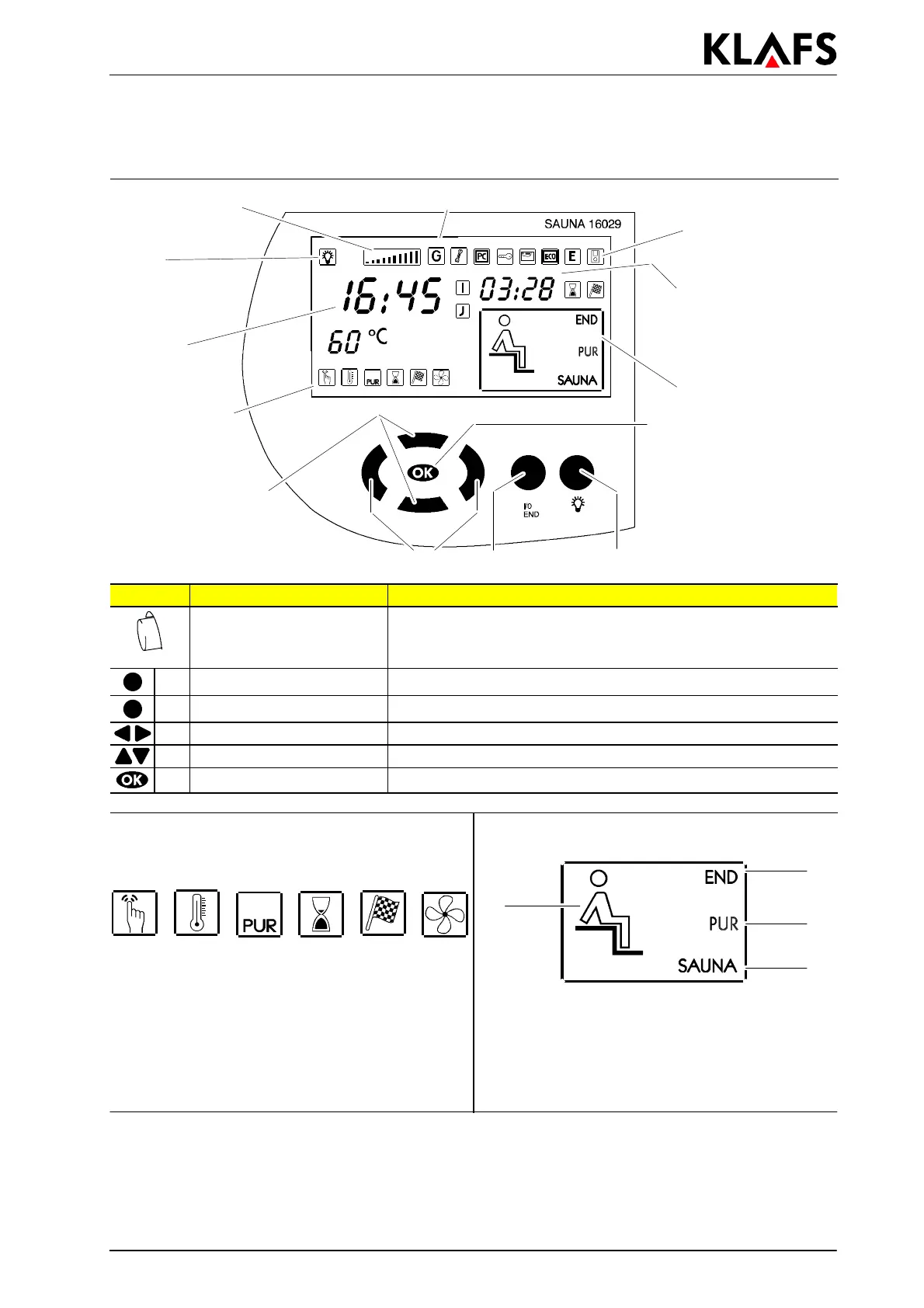
4.1. Display of Control Unit 16029
Further symbols
and additional
options
LCD display
Preselection
time/remaining
bathing time
Operating modes
Symbols for
programs and
individual
settings
Time
Light
Set value
Bar display
E
ABC
D
Button: Description: Function:
Master switch
(on left side of unit
housing)
Switches on/off stand-by mode of control unit.
When stand-by mode is on, the time appears in the display.
A Light button Switches on/off the cabin light.
B I/0 button Selects the operation: sauna or program end.
C Left/Right buttons Selects the symbols for the programs or individual settings.
D Up/Down buttons Selects a program or changes configurable values.
E OK button Accepts/stores values.
Symbols for programs and individual settings
for the sauna:
Symbols for operating modes:
123456
1
2
4
3
1. Programs
2. Temperature
3. SaunaP
UR
operation
4. Bathing duration
5. Preselection operation
6. Air extraction fan.
1. Sauna operation
2. Cabin ready for bathing
3. SaunaP
UR
operation
4. Program end.


 To Next Page