SaunaP
UR
PAGE 9
5070178/07.02
5. Operation
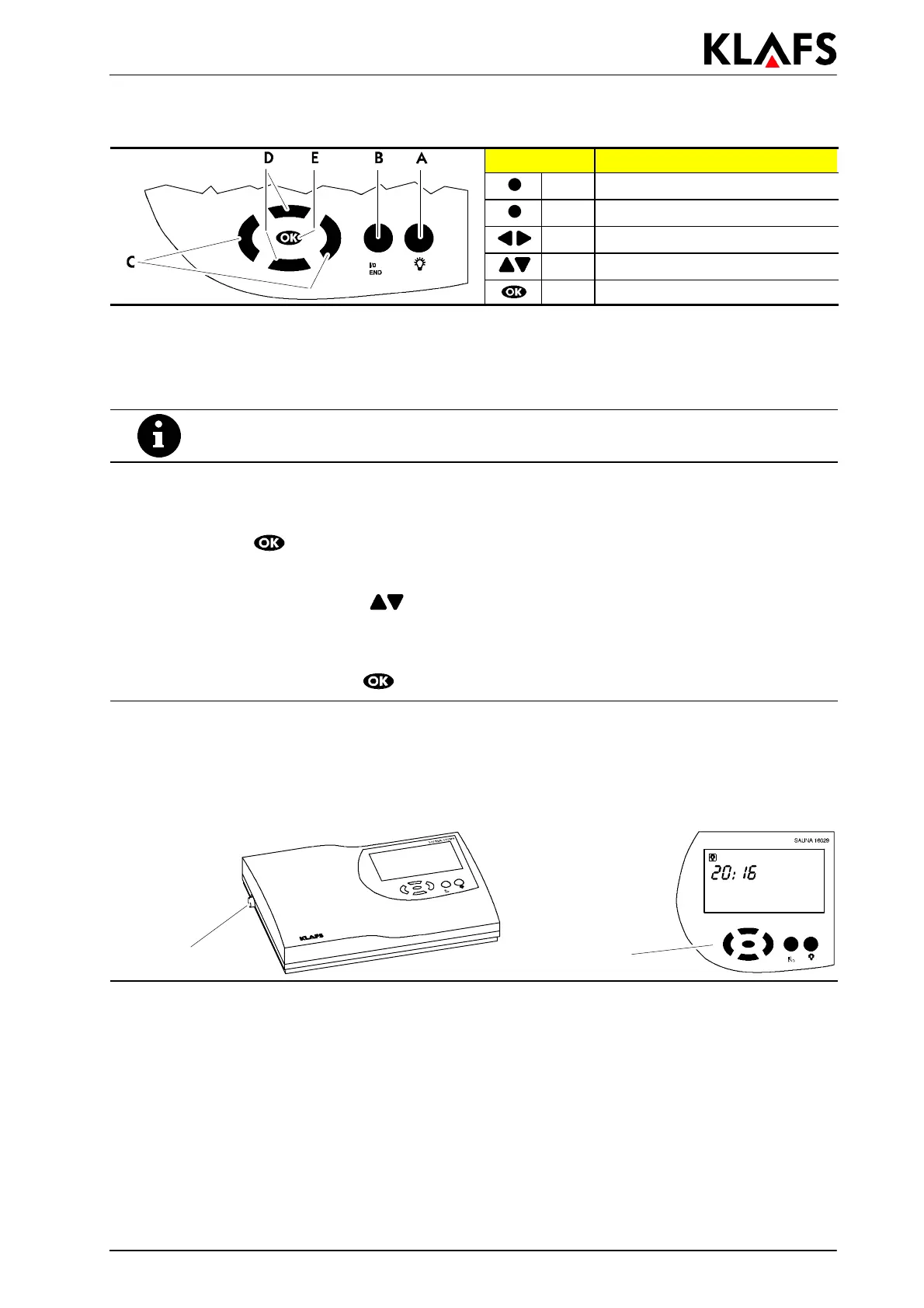
Button: Description:
A Light button
B I/0 button
C Left/Right buttons
D Up/Down buttons
E OK button
5.1. Switching on/off the cabin light.
1. Press the button A.
. The cabin light goes on and the respective symbol appears in the display.
The cabin light can also be switched on when the master switch is off (e.g. for cleaning
the cabin).
5.2. Setting the time
1. Switch off the control unit via the master switch.
2. Hold down the
button and simultaneously switch on the master switch.
. Thetimeandtheservicesymbolflashinthedisplay.
3. Set the time using the up/down
buttons.
. Each press of the button changes the value by 1 minute. If the button is held down for a
prolonged period, the value will change more quickly.
4. Confirm the set value using the
button.
5.3. Switching on/off stand-by mode
1. Press the master switch on the left side of the housing.
. When the master switch is switched on, the control unit is in standby mode and can be
operated via the control panel. The time appears in the display.
Master switch
Control panel


 To Next Page