32
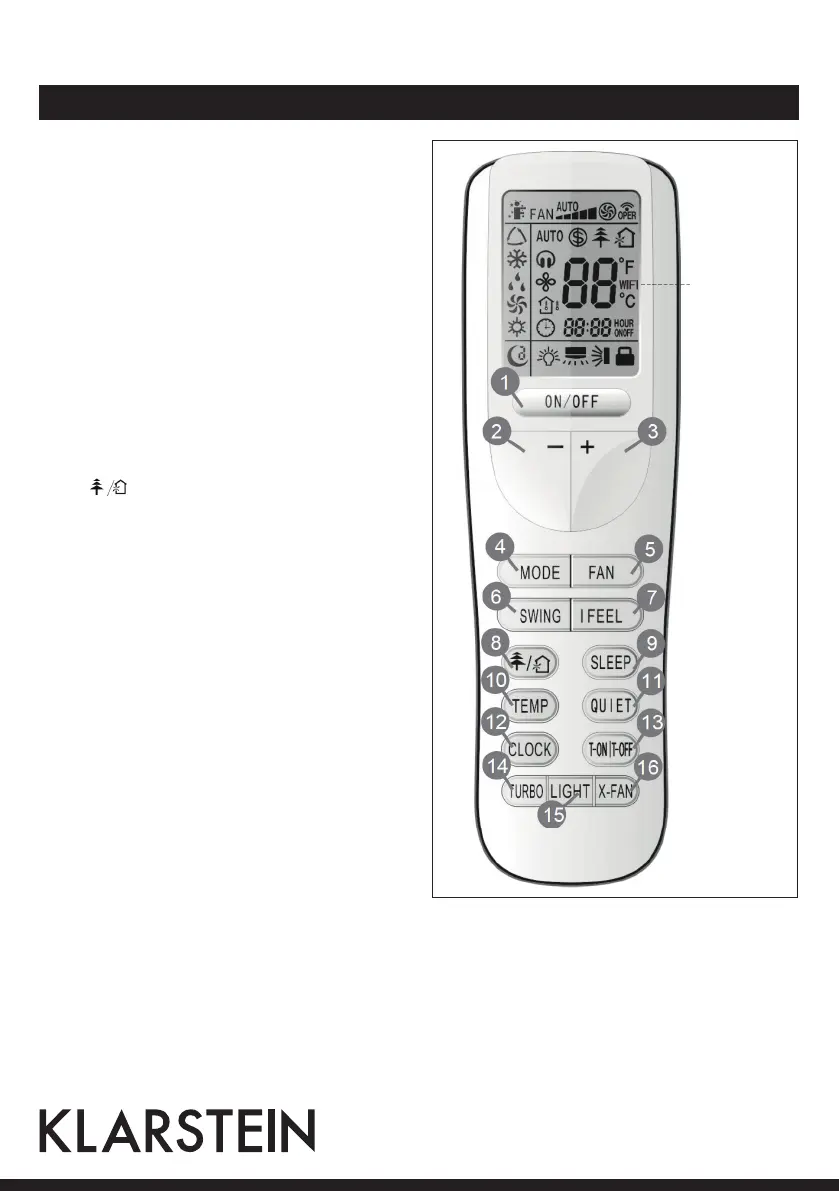
Remote Control and Functions
1 ON/OFF: Press it to start or stop operation.
2 [-]: Decrease temperature
3 [+]: Increase temperature
4 MODE: Select operation mode
(AUTO, COOL, DRY, FAN, HEAT)
5 FAN: Press it to set fan speed.
6 SWING: LPress it set swing angle.
7 I FEEL
8 HEALTH/AIR function
9 SLEEP
10 TEMP
11 QUIET
12 CLOCK: Set clock.
13 T-ON/T-OFF: Press it to set auto-off/
auto-on timer.
14 TURBO
15 LIGHT: Press it to turn on/off the light.
16 X-FAN
WiFi (no
function)



 To Next Page