5
OPERATING INSTRUCTIONS
MEASURING CABLES
Important Safety Information
• The cable to be tested should be evaluated for the presence
of voltage with a voltage measurement device by a qualified
professional before beginning work with the Cable Length Meter.
The cable should be disconnected from any voltage source before
beginning work.
• The Cable Length Meter should NOT be used on energized cable
systems.
NOTE: It is important that the included accessories be used
correctly in order to ensure quick and accurate testing. The length
of the included test leads is automatically excluded from the length
measurement. If alternate test leads are used, the length must be
manually deducted from the length displayed on the Cable Length
Meter. See SETTING PREFERENCES section to disable this option.
Measuring Coax Cable
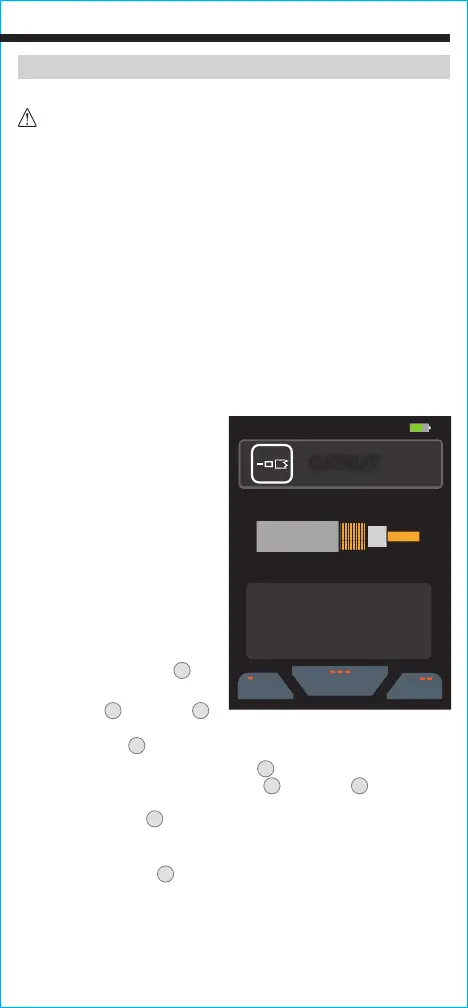
1. The cable to be tested can be
terminated with a Coaxial BNC
connector or BNC to F test lead,
or BNC to F adapter or BNC to
alligator clips lead. Connect the
cable to be tested to the BNC
port on the top of the Cable
Length Meter by inserting the
connector into the port and
turning a quarter turn clockwise
to lock in place. The opposite
end of the cable to be tested
should be left unterminated
OR terminated but left
unconnected.
2. Press the Power button
5
to
power-ON the meter.
3. Use the Up
11
and Down
12
Arrow buttons to
highlight the Coaxial option and press the "Select"
key (three dots)
8
.
4. Press the "Library" button (three dots)
8
to display stored cable
manufacturers and styles.
Use the Up
11
and Down
12
Arrow
buttons
to highlight the desired selection, and press the "Select"
button (three dots)
8
.
NOTE: If the cable you are measuring is not
in the library, refer to the Changing VoP Value / Adding New Cable
Information section.
5. Press the Test Button
9
to measure the length of the cable.
NOTE: Turn
ON the “Test Lead Subtraction” when using the included test leads.
07:30 55%
05/29/2020
Library
Type
Home
CoaxFo
VOP
68.3%
CAT4UT
VOP
68.3%
3.21 ft
Length:



 To Next Page