6
Measuring Twisted Pair (Category,
Twisted Pair, Data) Cable
1. The cable to be measured must
be terminated with an RJ45
plug on the end that will be
attached to the Cable Length
Meter. The opposite end of the
cable to be tested should be
left unterminated, or may be
terminated with an RJ45 plug
or jack, but left unconnected.
2. Insert the RJ45 plug into the
RJ45 port
2
in the Cable
Length Meter.
3. Press the Power button
5
to
power-ON the meter.
4. Use the Up
11
and Down
12
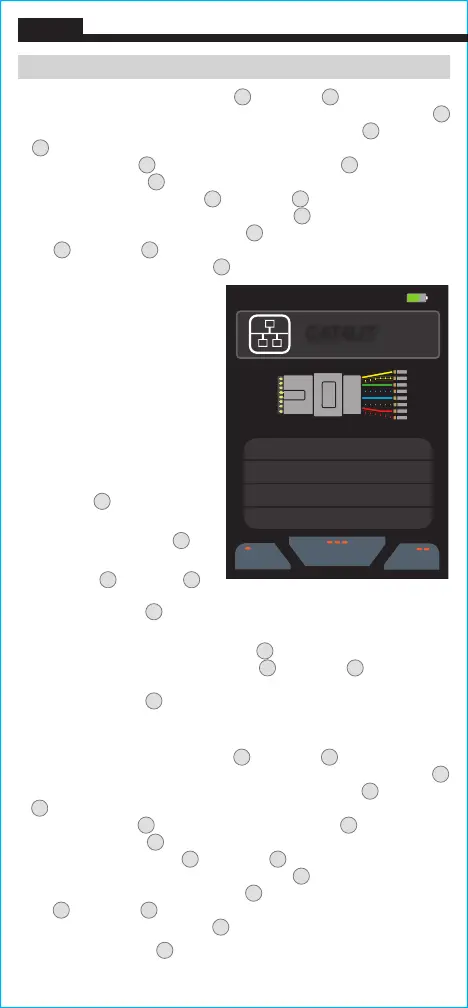
Arrow buttons to highlight the Data Cable option and press the "Select"
button (three dots)
8
. The default Data cable choice will appear on
the screen.
5. Press the "Library" button (three dots)
8
to display stored cable
manufacturers and styles.
Use the Up
11
and Down
12
Arrow
buttons
to highlight the desired selection, and press the "Select"
button (three dots)
8
.
NOTE: If the cable you are measuring is not
in the library, refer to the Changing VoP Value / Adding New Cable
Information section.
6. To edit Library entries, use the
Up
11
and Down
12
Arrow buttons to
highlight the desired selection and press the "Edit" button (two dots)
7
to enter the cable information screen. Again, use the
Up
11
and Down
12
Arrow buttons to highlight the desired field and press the "Edit"
button (two dots)
7
. Use the "Left Arrow" (one dot)
6
and "Right
Arrow" (three dots)
8
buttons to move the cursor to the desired
location, then use the
Up
11
and Down
12
Arrow buttons to select
the desired character. Press the Save button
10
to save the change or
press the "Cancel" button (two dots)
7
to discard changes. Use the
Up
11
and Down
12
Arrow buttons to select additional fields or press
the "Go Back" button (one dot)
6
to return to the Library.
7. Press the Test Button
9
to measure the length of the cable.
NOTE: Turn
ON the “Test Lead Subtraction” when using the included test leads.
ENGLISH
07:30 55%
05/29/2020
Library
Type
Home
CAT4UT
VOP
68.3%
0.0 ft
0.0 ft
0.0 ft
0.0 ft
Pair 1-2
Pair 3-6
Pair 4-5
Pair 7-8
6. To edit Library entries, use the
Up
11
and Down
12
Arrow buttons to
highlight the desired selection and press the "Edit" button (two dots)
7
to enter the cable information screen. Again, use the
Up
11
and Down
12
Arrow buttons to highlight the desired field and press the "Edit"
button (two dots)
7
. Use the "Left Arrow" (one dot)
6
and "Right
Arrow" (three dots)
8
buttons to move the cursor to the desired
location and then use the
Up
11
and Down
12
Arrow buttons to select
the desired character. Press the Save button
10
to save the change or
press the "Cancel" button (two dots)
7
to discard changes. Use the
Up
11
and Down
12
Arrow buttons to select additional fields or press
the "Go Back" button (one dot)
6
to return to the Library.
OPERATING INSTRUCTIONS



 To Next Page