10U
46
15 REMOTE CONTROL
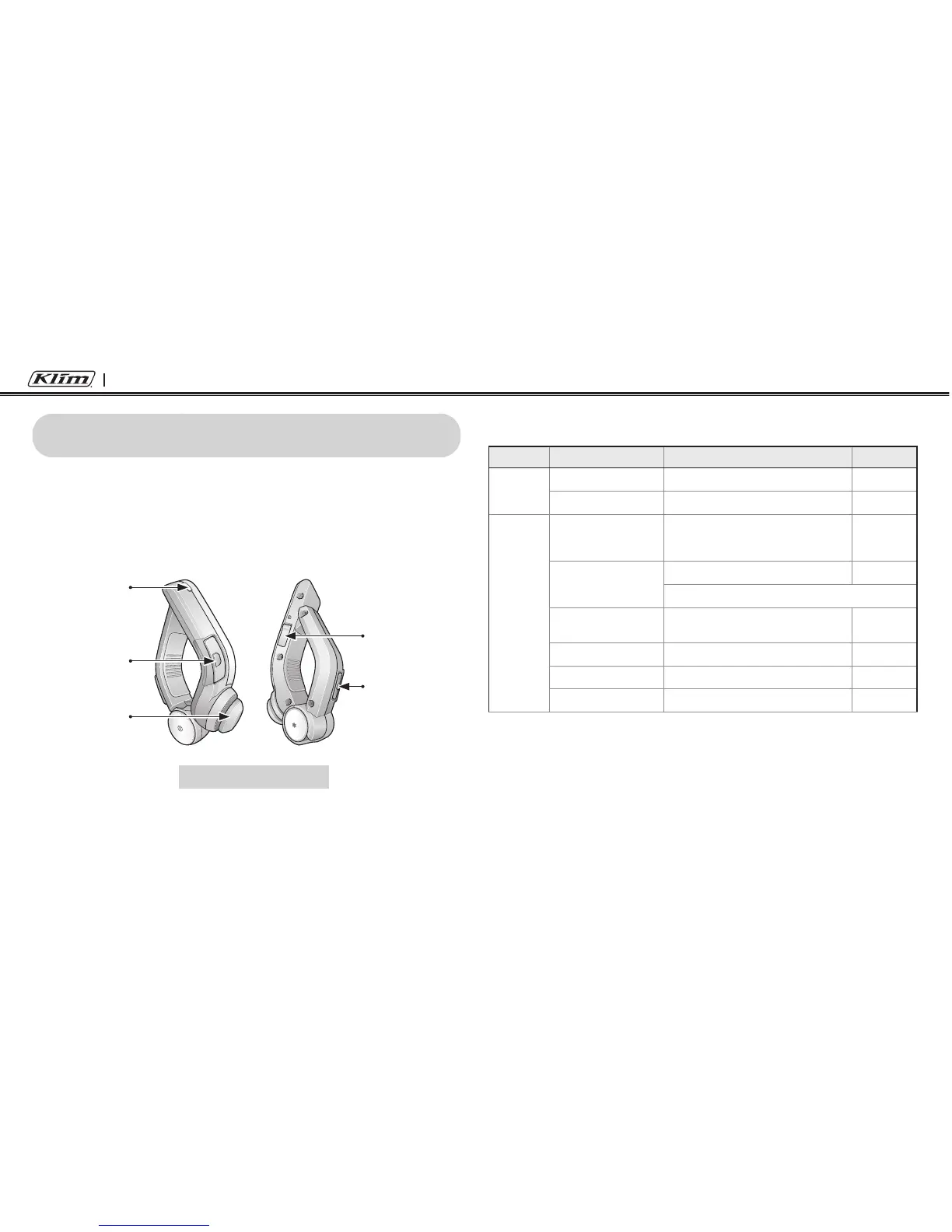
You can remotely control the 10U via Bluetooth using the Handlebar
Remote. This eliminates the need to take off your hand for button
operations. Turn on the Handlebar Remote by tapping the Front
Button. The 10U and the Handlebar Remote are paired from the factory
and are ready for immediate use.
DC Power
Charging Port
Status LED
Front Button
Joystick
Rear Button
Handlebar Remote
Handlebar Remote button operations on various functions are
described in the table below.
Type Function Handlebar Remote LED
Basic
Function
Volume adjustment Move the Joystick up or down -
Conguration menu Press the Front Button for 10 seconds -
Mobile
Phone
Mobile phone pairing Press the Joystick for 5 seconds
Blue & red
alternatively
ashing
Second mobile phone
pairing
Press the Front Button for 8 seconds Red ashing
Tap the Rear Button within 2 seconds
Answer & end phone
call
Tap the Rear Button -
Voice dial Tap the Rear Button -
Speed dial Double tap the Rear Button -
Reject incoming call Press the Front Button for 2 seconds -


 To Next Page