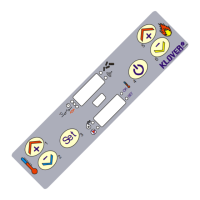
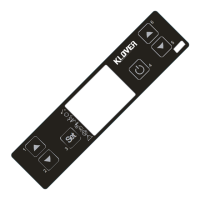
It accesses the selected menu.
It accesses to the next level of sub-
menus.
It switches on and/or off the central
heating cooker when pressed for 2
seconds.
It switches to the next submenu item by
storing the changes.
It decreases the DHW thermostat
temperature value. It decreases the
central heating cooker working output.
It moves to the next menu item.
It switches to the next submenu item by
storing the changes.
It increases the DHW thermostat
temperature value. It increases the
central heating cooker working output.
It moves to the previous menu item.
It switches to the previous submenu
item by storing the changes.
(1) It selects WATER TEMPERATURE SET “SET H2O” when first pressed.
(2) It selects ROOM TEMPERATURE SET “SET ROOM” when first pressed.
(3) It selects DHW TEMPERATURE SET “SET DHW” when first pressed.
(4) It selects WORKING OUTPUT “SET OUTPUT” when first pressed.


 To Next Page