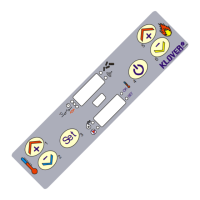
THE MENU
Access the Menu by pressing key 3 (Set).
This is divided into different items and levels that allow access to the board programming and settings.
Scroll through the menus to be changed using keys 5 and 6.
Single menus can be changed using keys 1 and 2.
The menu options allowing access to technical programming (parameters reserved for the Technical
Assistance Centre) are protected by access key.
Listed below is the list of menus available on the board, with various explanations.
1. Menu 01 – Set clock
It sets current date and time.
2. Menu 02 – Set on and off settings
Sub-menu 02 – 01 – enable on and off settings
It allows universal enabling and disabling of all on and off thermostat function settings.
Sub-menu 02 – 02 – daily program
It allows enabling, disabling and setting the daily on and off thermostat function settings.
You can set up two operating ranges bounded by the times set according to the following table where OFF
requires the clock to ignore the command:
Sub-menu 02 – 03 – weekly program
It allows enabling, disabling and setting the weekly on and off thermostat function settings.
The weekly programmer has 4 independent programs whose impact consists in the combination of the 4
individual programmings.
The weekly programmer can be enabled or disabled.
Furthermore, by setting OFF in the time field, the clock ignores the corresponding command.



 To Next Page