EasyManua.ls Logo

klover SMART 120 - Advanced Menu Options

klover SMART 120
60 pages
Print Icon
To Next Page IconTo Next Page
To Previous Page IconTo Previous Page
Loading...
45
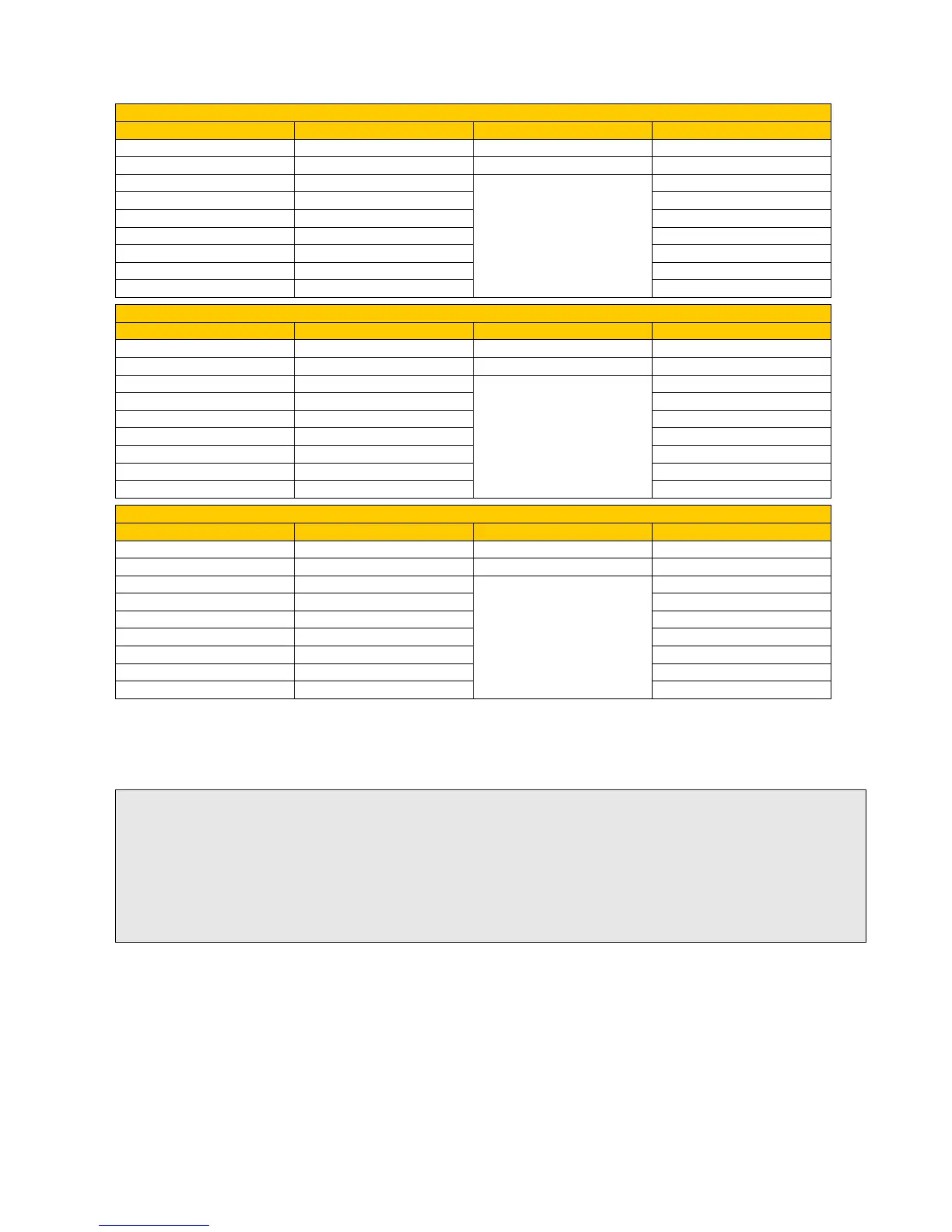
PROGRAM 2
MENU LEVEL
SELECTION
MEANING
POSSIBLE VALUES
02 03 11
START PROG 2
Ignition time
Time OFF
02 03 12
STOP PROG 2
Switch-off time
Time OFF
02 03 13
MONDAY PROG 2
Days of reference
On/off
02 03 14
TUESDAY PROG 2
On/off
02 03 15
WEDNESDAY PROG 2
On/off
02 03 16
THURSDAY PROG 2
On/off
02 03 17
FRIDAY PROG 2
On/off
02 03 18
SATURDAY PROG 2
On/off
02 03 19
SUNDAY PROG 2
On/off
PROGRAM 3
MENU LEVEL
SELECTION
MEANING
POSSIBLE VALUES
02 03 20
START PROG 3
Ignition time
Time OFF
02 03 21
STOP PROG 3
Switch-off time
Time OFF
02 03 22
MONDAY PROG 3
Days of reference
On/off
02 03 23
TUESDAY PROG 3
On/off
02 03 24
WEDNESDAY PROG 3
On/off
02 03 25
THURSDAY PROG 3
On/off
02 03 26
FRIDAY PROG 3
On/off
02 03 27
SATURDAY PROG 3
On/off
02 03 28
SUNDAY PROG 3
On/off
PROGRAM 4
MENU LEVEL
SELECTION
MEANING
POSSIBLE VALUES
02 03 29
START PROG 4
Ignition time
Time OFF
02 03 30
STOP PROG 4
Switch-off time
Time OFF
02 03 31
MONDAY PROG 4
Days of reference
On/off
02 03 32
TUESDAY PROG 4
On/off
02 03 33
WEDNESDAY PROG 4
On/off
02 03 34
THURSDAY PROG 4
On/off
02 03 35
FRIDAY PROG 4
On/off
02 03 36
SATURDAY PROG 4
On/off
02 03 37
SUNDAY PROG 4
On/off
Sub-menu 02 04 week-end program
It allows enabling, disabling and setting the week-end (Saturdays and Sundays) on and off
thermostat function settings.
3. Menu 03 Choose language
It allows selecting the dialogue language among those available (Italian, English, French, German,
and Spanish).
4. Menu 04 Enable R.T (T.A.) contact (only active if room sensor is enabled on external remote
control)
It enables the Room Thermostat contact operation if the room sensor on the external remote control
is enabled (also see the “Remote control” manual).
The Room Thermostat contact operation is always active if the room sensor on the external remote
control is not enabled.
TIP: To avoid confusion and undesired startup and shutdown operations, turn on only one program at a time if
you do not exactly know what you want to achieve.
If you want to use the weekly program, disable the daily schedule. If you use the weekly program in programs 1,
2,3, and 4, always keep the week-end program disabled.
Only enable week-end programming only after disabling the weekly schedule.

Other manuals for klover SMART 120

Related product manuals