KDC280NA QG
Quick Guide
See Reference Manual for more detailed information
Visit store.koamtac.com to purchase additional products and accessories.
QG_KDC280_20220614 p9
3.4 Using KTSync Keyboard – iOS
Once your KDC is connected to KTSync, you can use your KDC as a keyboard.
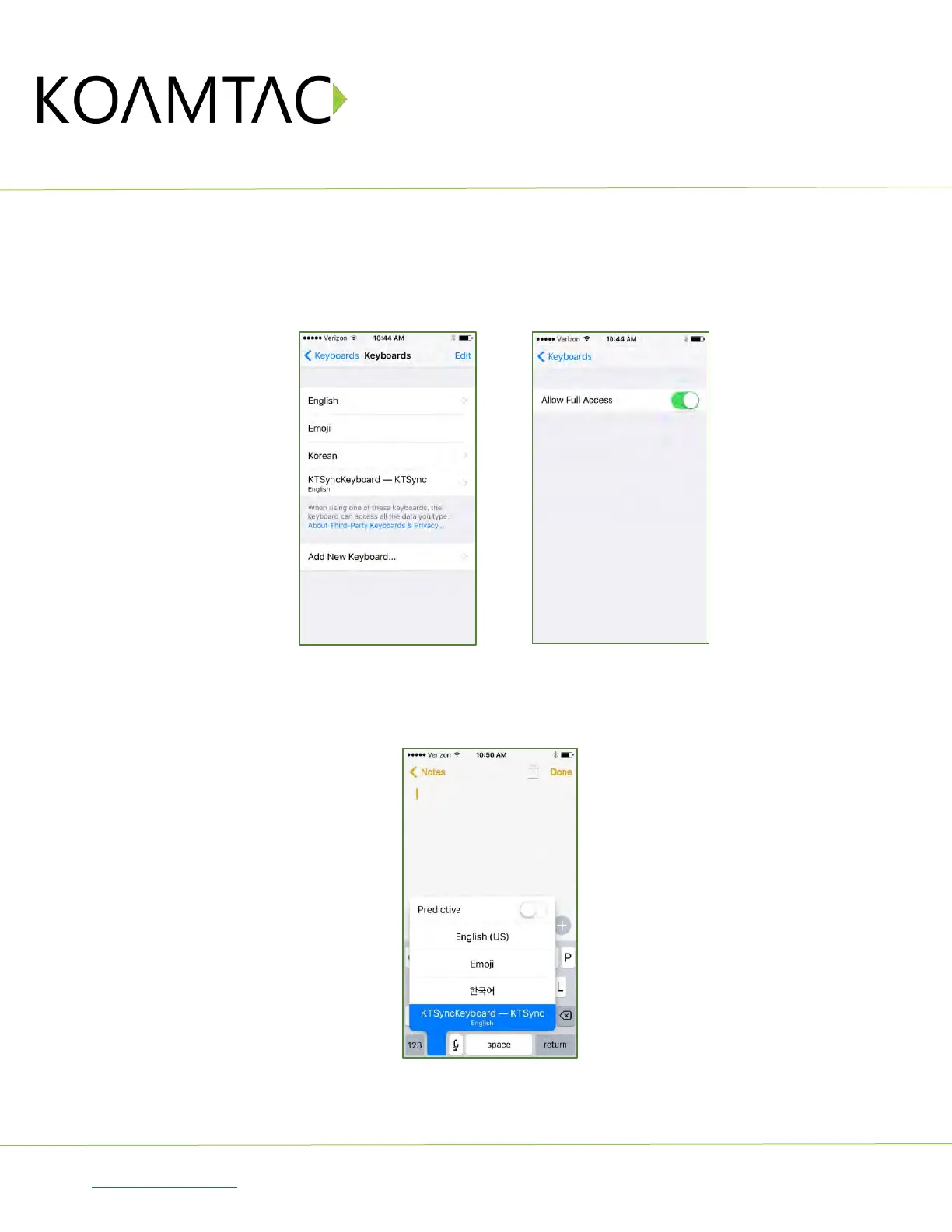
a) Navigate to the iPhone/iPad/iPod Settings > General > Keyboard > Keyboards > Add New Keyboard...
> Select the KTSync keyboard to be added. (Fig. 7)
b) Select the KTSync Keyboard and toggle the switch to Allow Full Access. (Fig. 8)
< Fig. 7 > < Fig. 8 >
c) Open the application you want to scan into and tap on the screen, so the on-screen keyboard appears.
d) Press and hold the globe icon located to the left of the spacebar.
e) Select the KTSync Keyboard and begin scanning. (Fig. 9)
< Fig. 9 >
Note: The KDC must be connected to KTSync & the KTSync keyboard must be selected for this to work.



 To Next Page