KDC280NA QG
Quick Guide
See Reference Manual for more detailed information
Visit store.koamtac.com to purchase additional products and accessories.
QG_KDC280_20220614 p15
5.4 Enabling the Social Distancing Feature via the KTSync application
The social distancing feature can also be configured in the KTSync application.
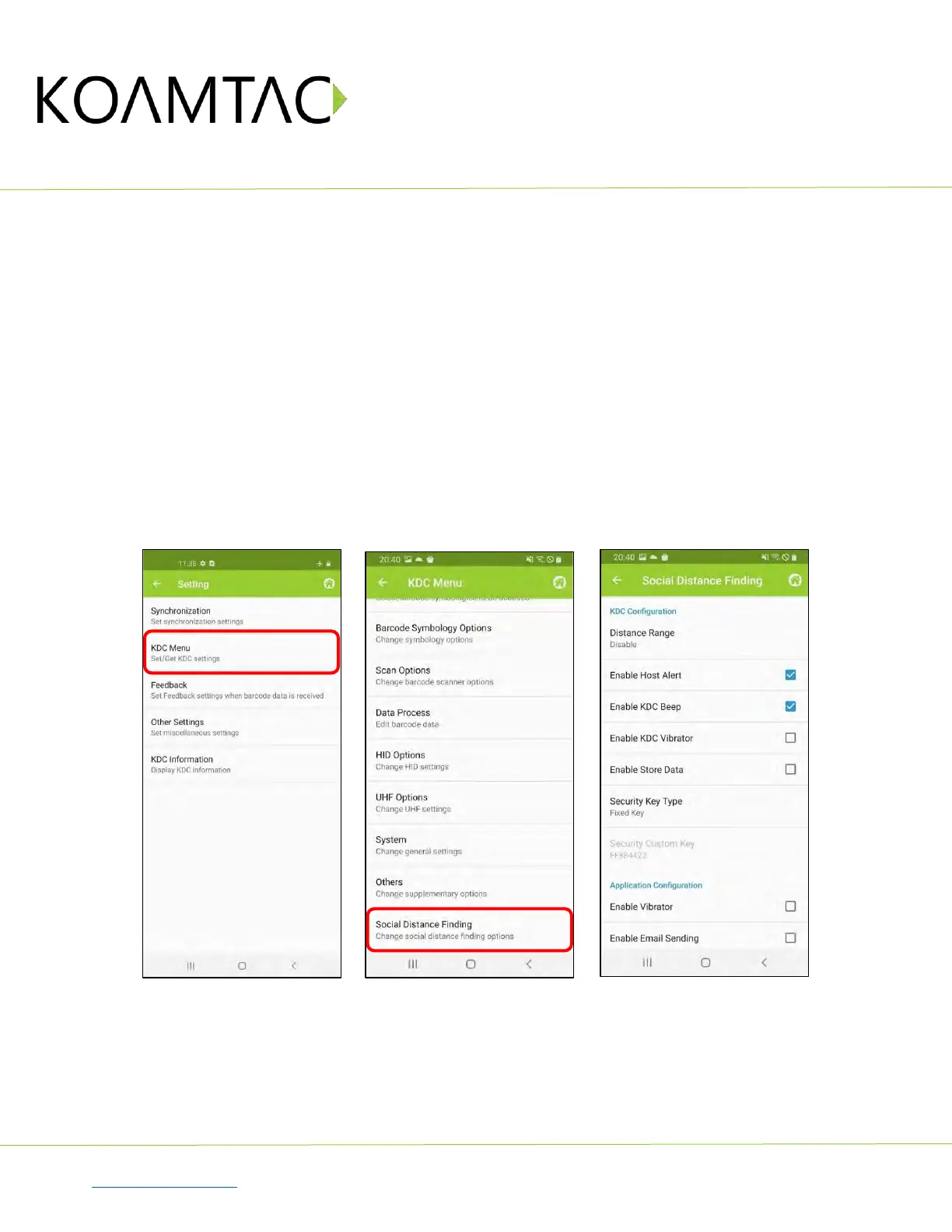
a) Open KTSync and tap the Setting icon
b) Select KDC Menu (Fig. 10)
c) Select Social Distance Finding (Fig. 11)
d) Choose your Social Distance settings. Settings listed in the KDC Configuration section are the same
settings available to you as if you were setting parameters on the KDC itself. These settings will be
saved when you exit this screen. (Fig. 12)
e) Additional Application Configuration settings can be set on this screen as well. (Fig. 12)
•
Enable Vibrator
: If enabled, the host device vibrates when receiving social distance alert data.
•
Enable Email Sending
: If enabled, email application is launched instead of a social distance
data pop up when receiving social distance alert data.
•
Email Address:
Register and email address to send social alert events.
< Fig. 10 > < Fig. 11 > < Fig. 12 >



 To Next Page