KDC280NA QG
Quick Guide
See Reference Manual for more detailed information
Visit store.koamtac.com to purchase additional products and accessories.
QG_KDC280_20220614 p2
Product Introduction
The KDC280 Bluetooth barcode scanner is a 1D Laser/CCD, or 2D Imager Bluetooth Barcode Data Collector
supporting Bluetooth Low Energy (BLE) v5.0.
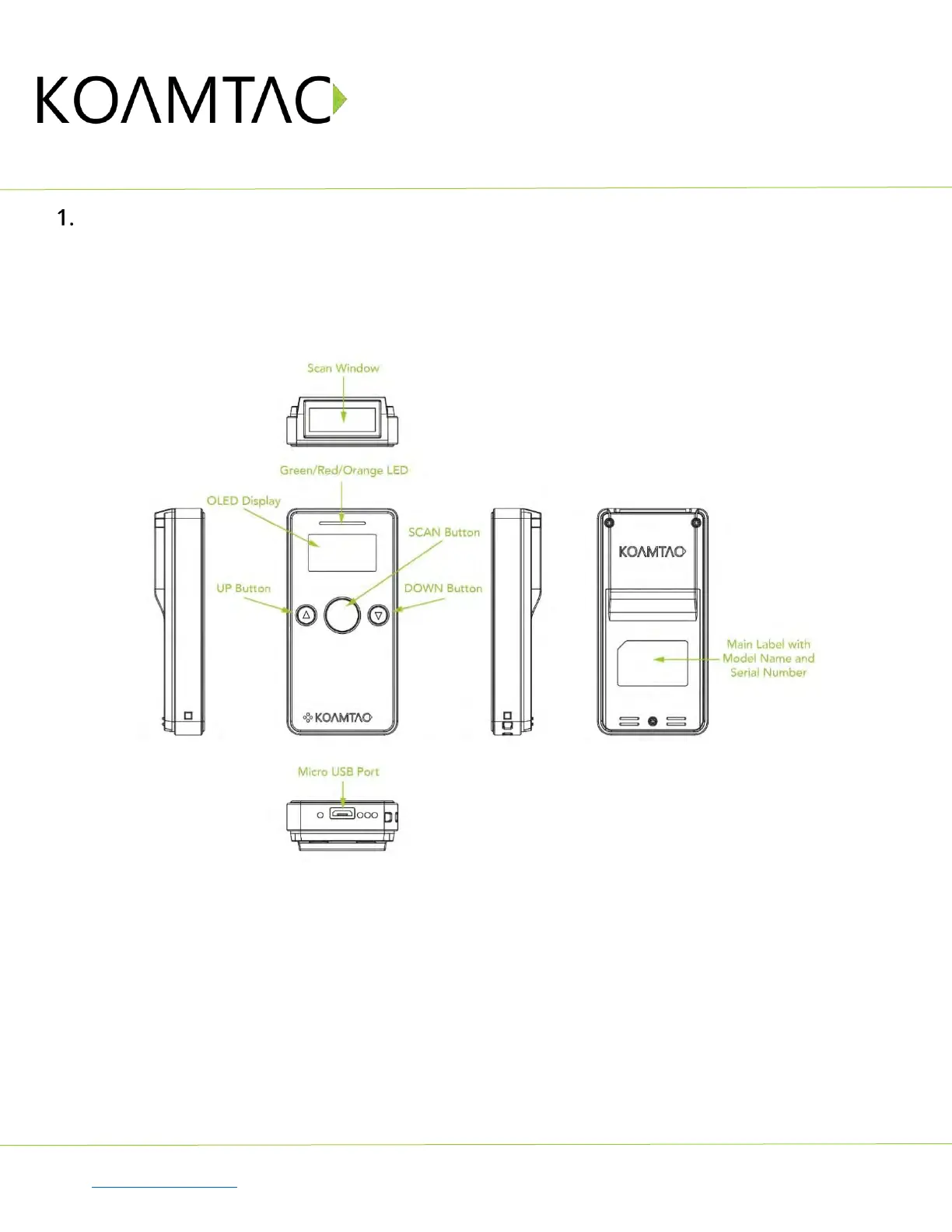
1.1 KDC280 Diagram
1.2 How to turn on and off
Refer to the figure in section 1.1 to locate the SCAN and DOWN button.
a) Press and hold the SCAN + DOWN buttons simultaneously for 3 seconds.
b) The KDC will beep when it is turned ON.
c) Press and hold the SCAN + DOWN buttons simultaneously for 3 seconds again to turn off
the KDC.



 To Next Page