EasyManua.ls Logo

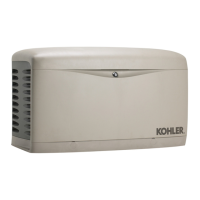
Kohler 12RESVL - User Manual

Kohler 12RESVL
76 pages
Print Icon
To Next Page IconTo Next Page
Loading...
Residential/Commercial Generator Sets
Models:
8/10/12RESV
8/10/12RESVL
Controllers:
RDC2
DC2
TP-6880 10/14a
Operation

Table of Contents

Other manuals for Kohler 12RESVL

Questions and Answers

  • D
    danielle56Aug 4, 2025
    Why is my Kohler 12RESVL Portable Generator cranking but not starting properly?
    • S
      sreedAug 4, 2025
      If your Kohler Portable Generator cranks but struggles to start, lacks power, or runs erratically, several factors could be at play. A clogged air cleaner can restrict airflow, so try cleaning or replacing it. Weak battery or poor battery connections can also cause these issues; recharge/replace the battery and ensure connections are clean and tight. Inspect the spark plug wires for secure connections. Insufficient fuel pressure could be the culprit, so verify the fuel supply and valves. Also, check the oil level and add oil if necessary, in case of a low oil pressure shutdown. If these steps don't resolve the problem, it might be due to engine malfunction, in which case you should contact an authorized Kohler distributor/dealer.
  • D
    David PetersAug 8, 2025
    What to do if my Kohler Portable Generator does not crank?
    • D
      Donald WalterAug 8, 2025
      If your Kohler Portable Generator isn't cranking, the issue could stem from several causes. First, check the battery; it might be weak or dead, requiring a recharge or replacement. Ensure the battery connections are correct and secure. If a fault shutdown occurred, check the controller display for fault messages and reset the controller after correcting the fault. Also, confirm the generator set is in the RUN or AUTO mode. Finally, check if the generator thermostat tripped and reset it.
  • K
    Kimberly DominguezAug 12, 2025
    How to fix no AC output on my Kohler Portable Generator?
    • A
      Anthony WilliamsAug 12, 2025
      If your Kohler Portable Generator has no AC output, start by checking the line circuit breaker to ensure it's in the ON position. If the breaker tripped, it might be due to an overload; reduce the load on the generator. If the breaker trips due to a short circuit or if the auxiliary winding circuit breaker tripped, contact an authorized Kohler distributor/dealer for service. If the auxiliary winding circuit breaker trips repeatedly, also contact an authorized Kohler distributor/dealer for service.
  • S
    Sharon AndersonAug 17, 2025
    What to do if my Kohler 12RESVL stops suddenly?
    • K
      kimberlymaysAug 17, 2025
      If your Kohler Portable Generator suddenly stops, several factors could be responsible. Check for low oil pressure shutdown by looking for oil leaks and verifying the oil level. Ensure the generator isn't out of fuel. If an overcrank shutdown occurred, reset the controller. Also, check the controller display for fault messages, correct the fault condition, and reset the controller. Make sure the generator set is in the RUN or AUTO mode. Check the remote switch position or OnCue Plus in case of a remote stop command. If the auxiliary winding circuit breaker tripped, reset it. If the breaker trips repeatedly or if there is an engine malfunction, contact an authorized Kohler distributor/dealer.
  • G
    gavin02Aug 21, 2025
    Why does my Kohler Portable Generator have low output voltage?
    • T
      Tara MuellerAug 21, 2025
      If your Kohler Portable Generator has low output or experiences an excessive voltage drop, it might be overloaded. Try reducing the load on the generator set.
  • L
    Lisa WilliamsAug 26, 2025
    Why is the controller display off on my Kohler Portable Generator?
    • G
      Gloria CoxAug 26, 2025
      If the controller display on your Kohler Portable Generator is off, the cause might be low or no battery voltage. Check the connections and the generator set battery.
  • R
    Robin AdamsAug 30, 2025
    Why is the backlight off on my Kohler 12RESVL Portable Generator's controller display?
    • K
      Kevin HortonAug 30, 2025
      The backlight on the Kohler Portable Generator controller display turns off after about 1 minute of inactivity. The backlight will turn on when a button is pressed or the generator set starts.

Summary

Safety Precautions and Instructions

Accidental Starting & Battery Safety

Covers safety related to accidental starting, battery acid, and explosion hazards.

Fire, Fuel, and Exhaust System Hazards

Details safety precautions for fuel systems, fire risks, and carbon monoxide exposure from exhaust.

Hazardous Noise, Voltage, and Equipment Handling

Addresses dangers of hazardous noise, voltage, moving parts, and proper lifting techniques.

Introduction

Related Literature and Manuals

Lists other available manuals and documentation for the generator sets.

Descriptions and Service Views

Generator Set Components Overview

Describes the engine, enclosure, alternator, and transfer switch of the generator set.

Controllers: RDC2 and DC2 Features

Details the features and functions of the RDC2 and DC2 controllers.

Optional Accessories Explained

Explains available accessories like Carburetor Heater, PIM, LCM, and Load Shed Kit.

Service Views and Component Identification

Illustrates the generator set with numbered service points and identifies key components.

Generator Set Operation

Prestart Checklist and Safety Procedures

Outlines essential pre-operation checks and critical safety warnings before starting the generator.

Generator Operation Modes

Explains local, automatic, and remote starting/stopping, engine cooldown, and operation with transfer switches.

Exercising the Generator Set

Details procedures for setting and performing weekly or bi-weekly generator exercises.

Faults and Controller Reset Procedures

Covers identifying, understanding, and clearing fault messages and resetting the controller.

Generator Enclosure Thermostat

Explains how to reset the generator enclosure thermostat if it trips.

RDC2 Controller Operation

RDC2 Controls, Indicators, and Display

Describes the physical controls, status LEDs, and LCD display of the RDC2 controller.

RDC2 Settings and Menu Navigation

Guides on changing settings, navigating menus, and configuring system parameters like date, time, and exerciser.

Networking and Communication Configuration

Explains how to configure network settings, RBUS devices, PIM, LCM, and event logs for the RDC2 controller.

DC2 Controller Operation

DC2 Controls, Indicators, and Display

Details the physical controls, status LEDs, and LCD display of the DC2 controller.

DC2 Controller Settings and Maintenance

Covers controller power, battery charging, exercise settings, maintenance timer, and OnCue password setup.

Scheduled Maintenance

General Maintenance Safety & Precautions

Emphasizes critical safety warnings and precautions before performing maintenance tasks.

Routine Maintenance Schedules & Procedures

Provides guidelines for routine maintenance, service schedules, and component-specific procedures.

Component Maintenance: Lubrication, Air, Spark Plugs

Details oil, air cleaner, and spark plug servicing procedures.

Battery Maintenance & Storage Procedures

Covers battery maintenance, cleaning, and procedures for storing the generator set.

Troubleshooting

Troubleshooting Introduction and USB Port Use

Introduces troubleshooting guides and explains the use of the USB port for diagnostics.

Fault Messages & Circuit Protection

Helps identify fault messages, understand circuit protection, and addresses issues like repeated breaker trips.

General Troubleshooting Chart

Provides a chart listing common problems, their possible causes, and corrective actions.

Appendix A Abbreviations

Technical Abbreviations Glossary

Lists and defines common abbreviations used throughout the publication for technical clarity.

Kohler 12RESVL Specifications

General IconGeneral
Voltage120/240 V
Rated Speed3600 RPM
Frequency60 Hz
Power Output12 kW
Starting Watts12, 000 watts
PhaseSingle

Related product manuals