Vers. 111422 38
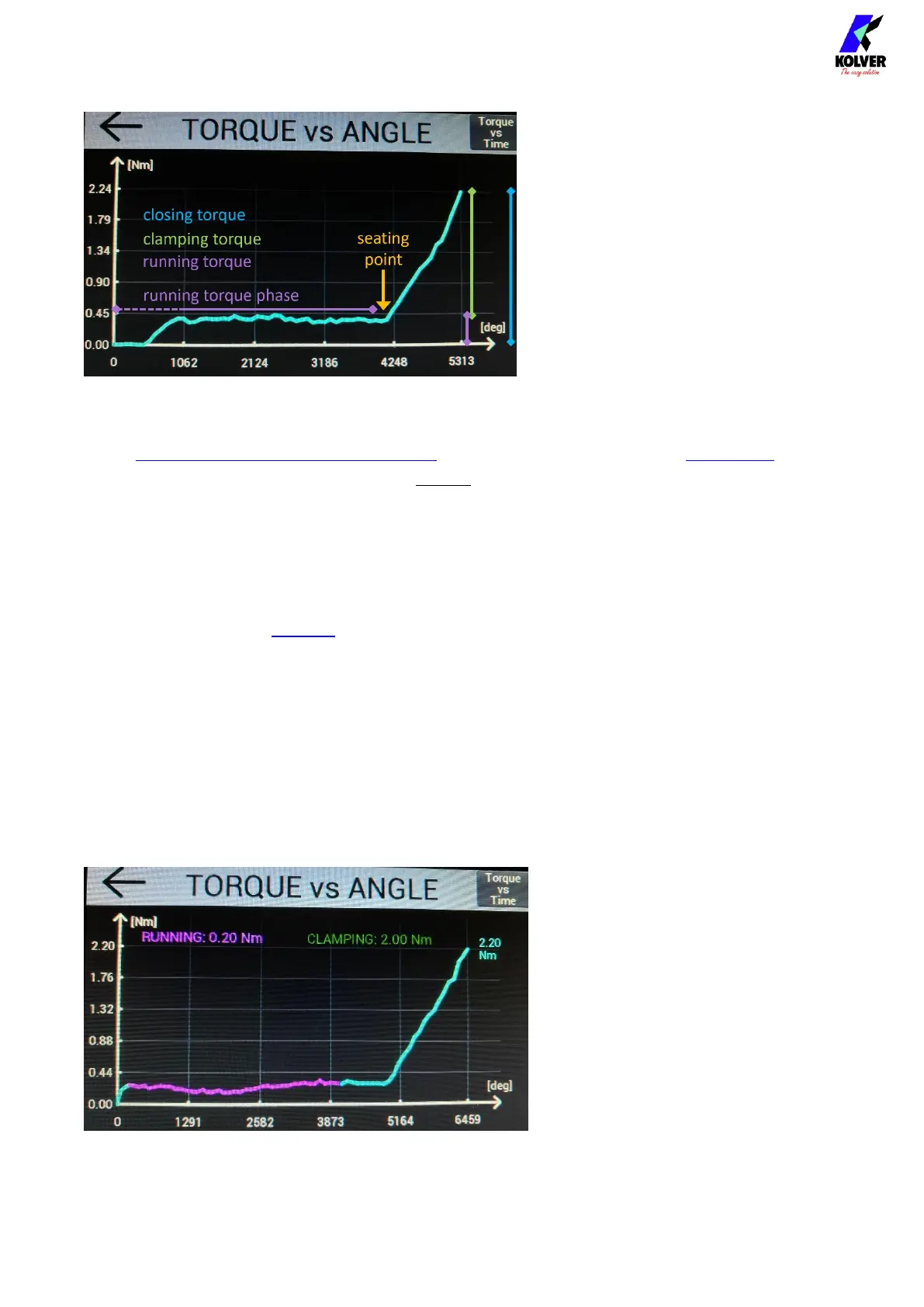
Example
Target torque: 2.22 Nm
Seating point: 4000°
Running torque estimate: 0.3 Nm
(Running torque mode OFF)
Test with running torque
In the RAMP, TIME, & PV TORQUE menu configure the running torque WINDOW by
angle (or time), such that it always ends before the seating point. Use a window max value
of at most the lowest seating angle point of the test tightening.
Select appropriate running torque MIN-MAX bounds, such that the running torques
measured fall within the bounds, while retaining the ability to detect incorrect values.
Select peak or average VALUE depending on the requirements of the application and shape
of the graph.
If the running torque slopes upward, it may be appropriate to use the peak value.
If the running torque is constant and varies a lot, for example, if it is a very low torque
value relatively to the range of the screwdriver, it may be more appropriate to use the
average value.
Perform another batch of tightenings, and check if the detected running torque value is the
one expected.
Example
Target torque: 2.20 Nm
Running torque mode:
Average - Compensate
Window: 270° – 4000°


 To Next Page