3-24
Copying Using Special Paper (Multi-Sheet Bypass Tray)
Use the Multi-sheet bypass tray to copy using special paper.
Specify the paper type to be loaded on the Multi-sheet bypass tray, as described below.
Do not use paper with any staples, or paper that conducts electricity
(silver, carbon, etc.), otherwise an accident may occur as a result of
fire.
To avoid machine trouble, do not use heat-sensitive paper, colored
transparency, or paper specifically designed for ink-jet printers, such as photo-
paper.
When loading special paper in the main body tray or in the LCT to use on a
regular basis, the paper type should be specified in the Key Operator setting.
See p. 13-28.
1. Open the Multi-sheet bypass tray, and load the copy paper.
See p. 2-23 for further details.
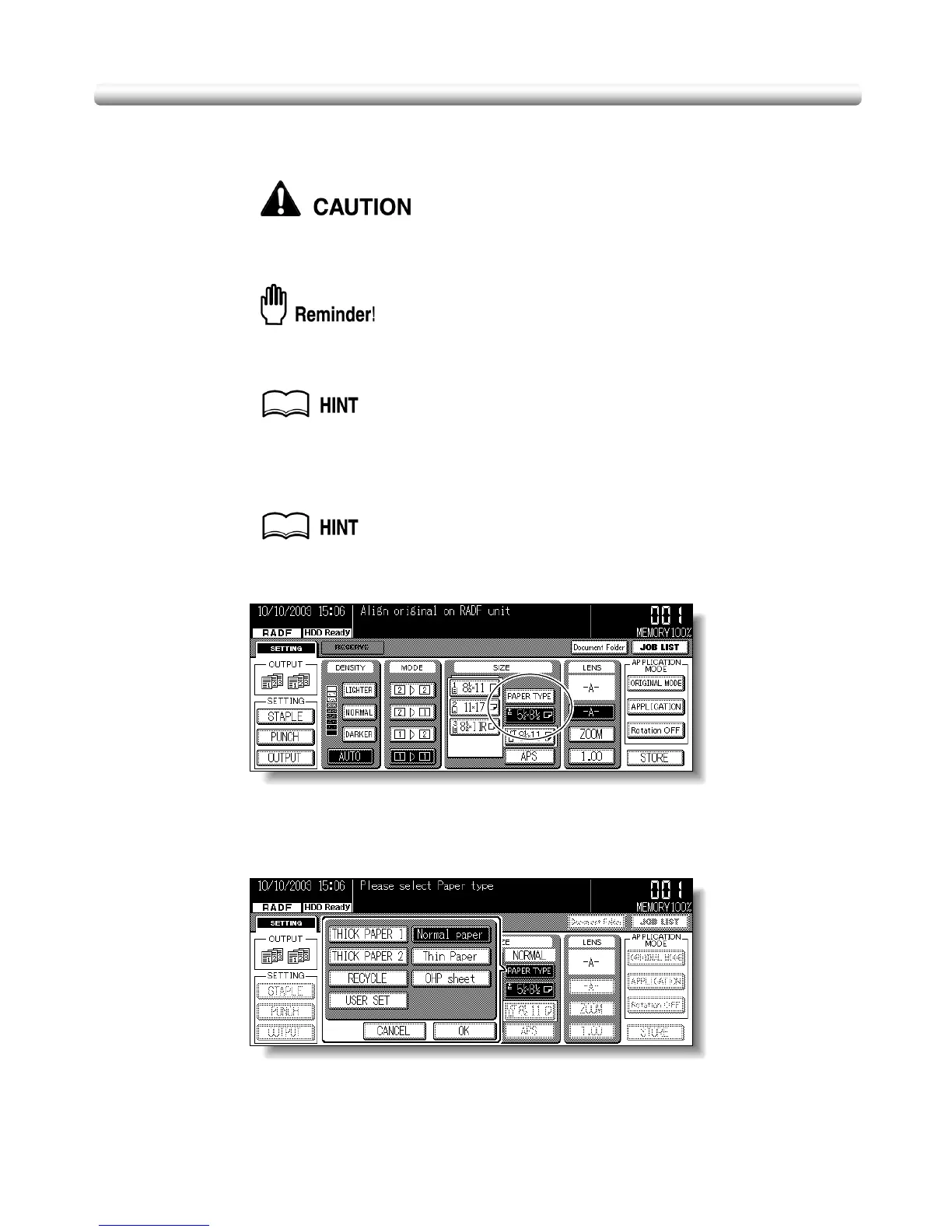
2. Touch the Bypass key to highlight it.
The PAPER TYPE key will appear above the Bypass key. APS will be deselected, and -A-
will be highlighted on the Basic Screen.
3. Touch PAPER TYPE.
The Paper Type popup menu will be displayed.











 To Next Page