REGISTRATION/ADU/REVERSE/PAPER EXIT CF5001 Field Service Ver.1.0 Sep 2003
1-106
I DIS./ASSEMBLY
10.4 Replacing the transfer
ground plate unit and the
2nd transfer roller /L
A. Periodically replaced parts/cycle
• Transfer ground plate unit: Every 1,000,000 cop-
ies
• 2nd transfer roller /L: Every 200,000 copies
B. Procedure
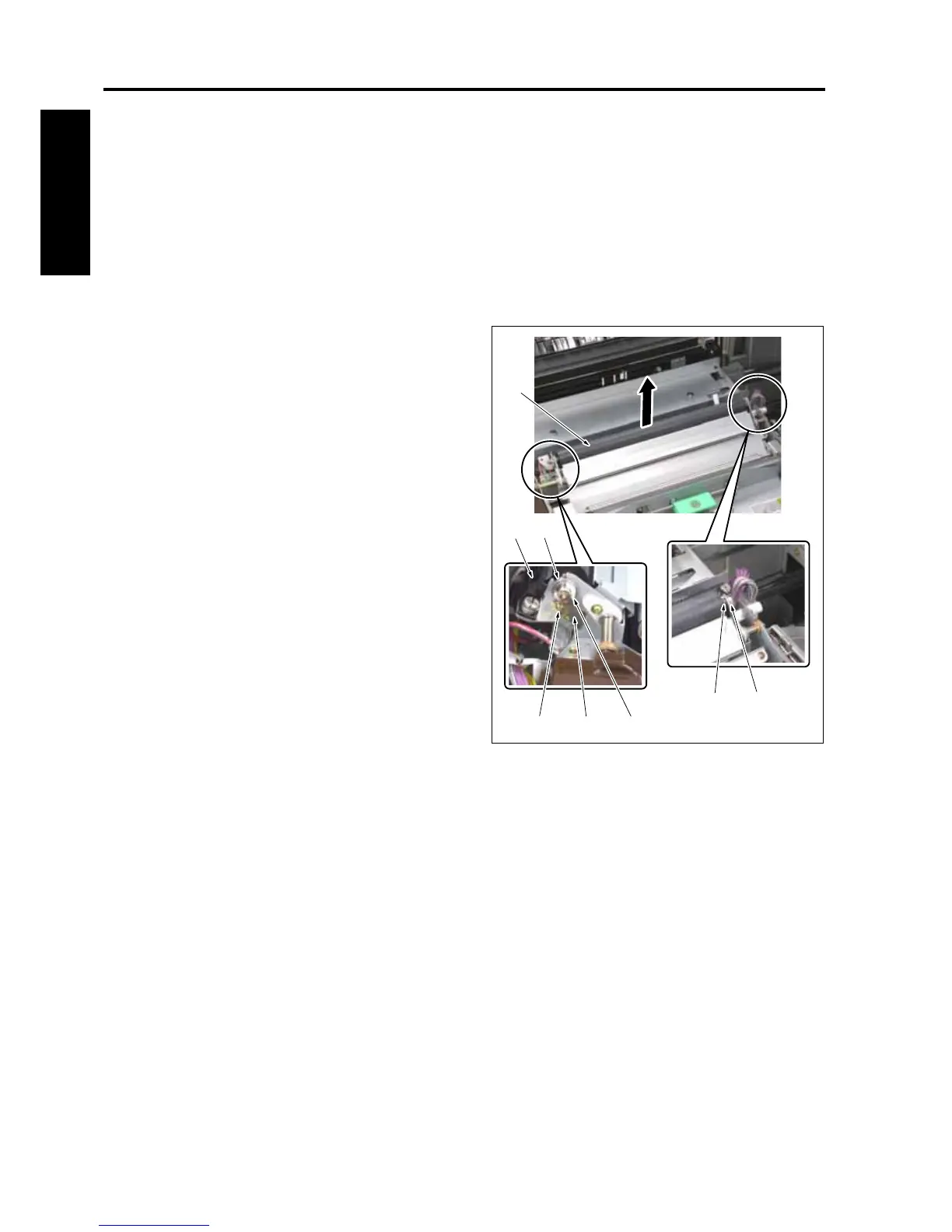
1. Remove the separation discharging plate unit
[1]. (See "10.3 Replacing the separation dis-
charging plate unit.")
2. Remove the screw [2] and then remove the
transfer ground plate unit [3].
3. Remove 2 stop rings [5].
4. Slide each of 2 bearings [6] to the outside and
remove the 2nd transfer roller /L [4].
5. Remove 2 bearings [6] from the 2nd transfer
roller /L [4].
6. Reinstall the above parts following the removal
steps in reverse.
Note:
• Be careful not to touch with bare hands the
2nd transfer roller /L [4] on any sections other
than the shaft section.
• When installing the 2nd transfer roller /L,
install it with the dent on the roller shaft
comes to the rear of the machine (instead of
coming to the side contacting with the trans-
fer earth plate).
[1]
[4]
[6]
[5][6]
[5][3][2]
8050ma3089










 To Next Page