CF5001 Field Service Ver.1.0 Sep 2003 36 MODE
2-105
II ADJUSTMENT
7.8.6 Three-folding adjustment (FN-9 only)
Adjusting the folding positions during the three-
folded copy.
a. Procedure
1. Enter the 36 mode.
2. "36 mode menu screen"
Press the [7. Finisher adjustment] key.
3. "Finisher adjustment mode menu screen"
Press the [6. Three-fold position adj.] key.
4. "Three-Fold adjustment screen"
Press the [COPY SCREEN] key.
5. Set paper in the tray, set originals on RADF,
and press the START button.
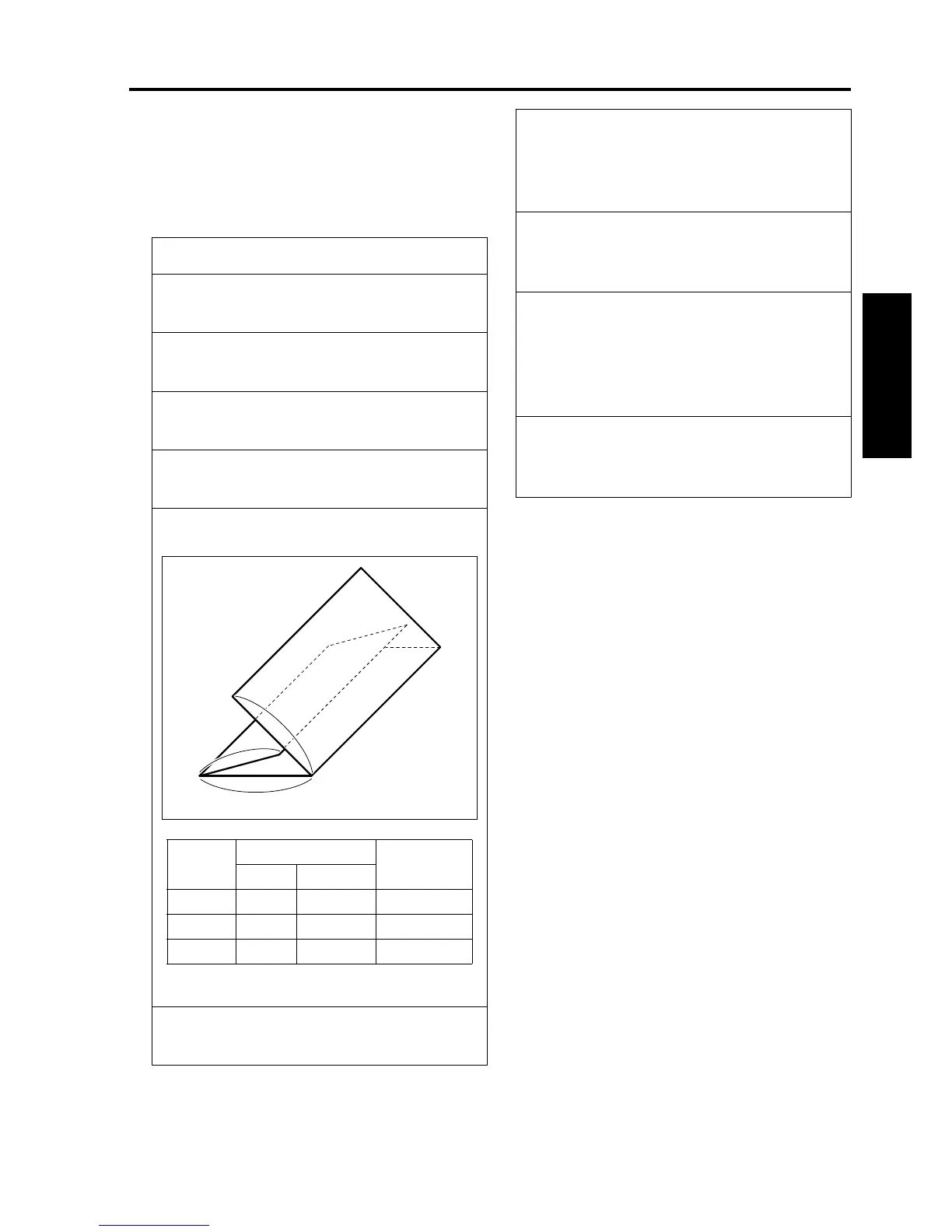
6. Check the three-folded position "a."
7. When the value is not within the standard,
press the C button while pressing the P button.
8050fs1023
a
b
c
Folded
positions
Standard value Specification
A4R 8.5 x 11R
a 95 mm 89.4 mm ± 2 mm
b 101 mm 95 mm ± 2 mm
c 101 mm 95 mm ± 2 mm
8. "Three-Fold adjustment screen"
Press the [NEXT ADJUSTMENT] or [PREVI-
OUS ADJUSTMENT] key to select a desired
paper size.
9. Enter a numeric value through the numeric
keys and press the [SET] key.
• Setting range: -128 to +127, 1 step = 0.1mm
10. Repeat steps 4 to 9 until the standard value is
obtained.
Note:
• See "9. OTHER ADJUSTMENTS" to adjust
the folded positions "b" and "c."
11. Press the [PREVIOUS SCREEN] key to return
to the "Finisher adjustment mode menu
screen."










 To Next Page