FN-9/FN120 Ver.1.0 Sep 2003
1-160
I DIS./ASSEMBLY
1.2 Removing and reinstalling of
the top cover /1
A. Procedure
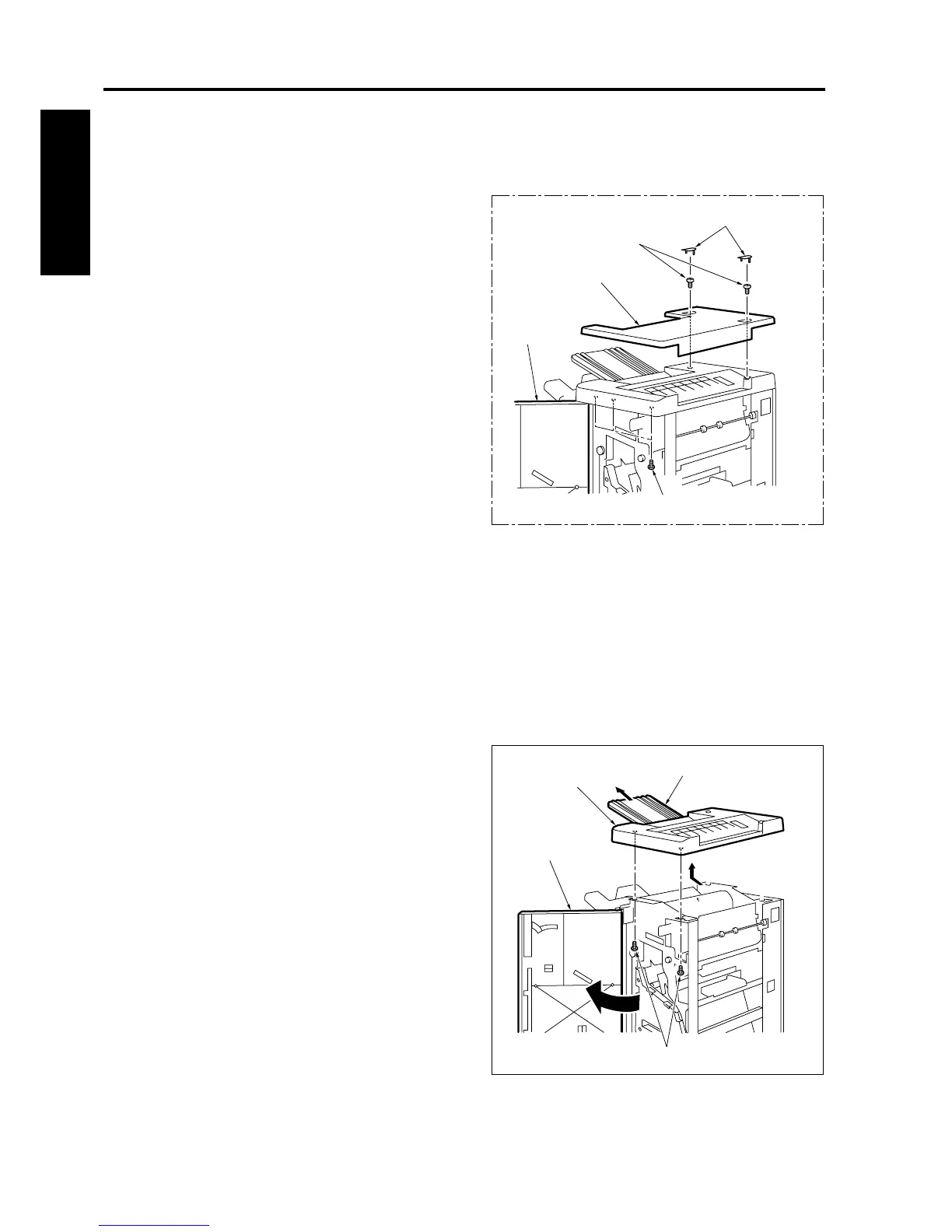
1. Remove 2 caps [1].
2. Open the finisher door [2] and remove 5 screws
[3]. And then remove the top cover /1 [4].
3. Reinstall the above parts following the removal
steps in reverse.
1.3 Removing and reinstalling of
the top cover /2
Note:
• When an optional PI has been installed, be
sure to remove it.
A. Procedure
1. Remove the top cover /1.
2. Open the finisher door [1].
3. After removing 2 screws [2], pull out the sub-tray
[3] and remove the top cover /2 [4].
4. Reinstall the above parts following the removal
steps in reverse.
[3]
[1]
[2]
[3]
[4]
fs2153002
[4]
[3]
[1]
[2]
fs2153003










 To Next Page