CF5001 Field Service Ver.1.0 Sep 2003 OTHER ADJUSTMENTS
2-141
II ADJUSTMENT
9.8 FNS adjustment of the shift
position
A. Procedure
1. Remove the following parts.
• Top cover or optional PI (if installed)
• Top cover/2
2. Turn on the main body, and then drive the shift
motor (M702) in the 47 mode (code 75-2/75-3).
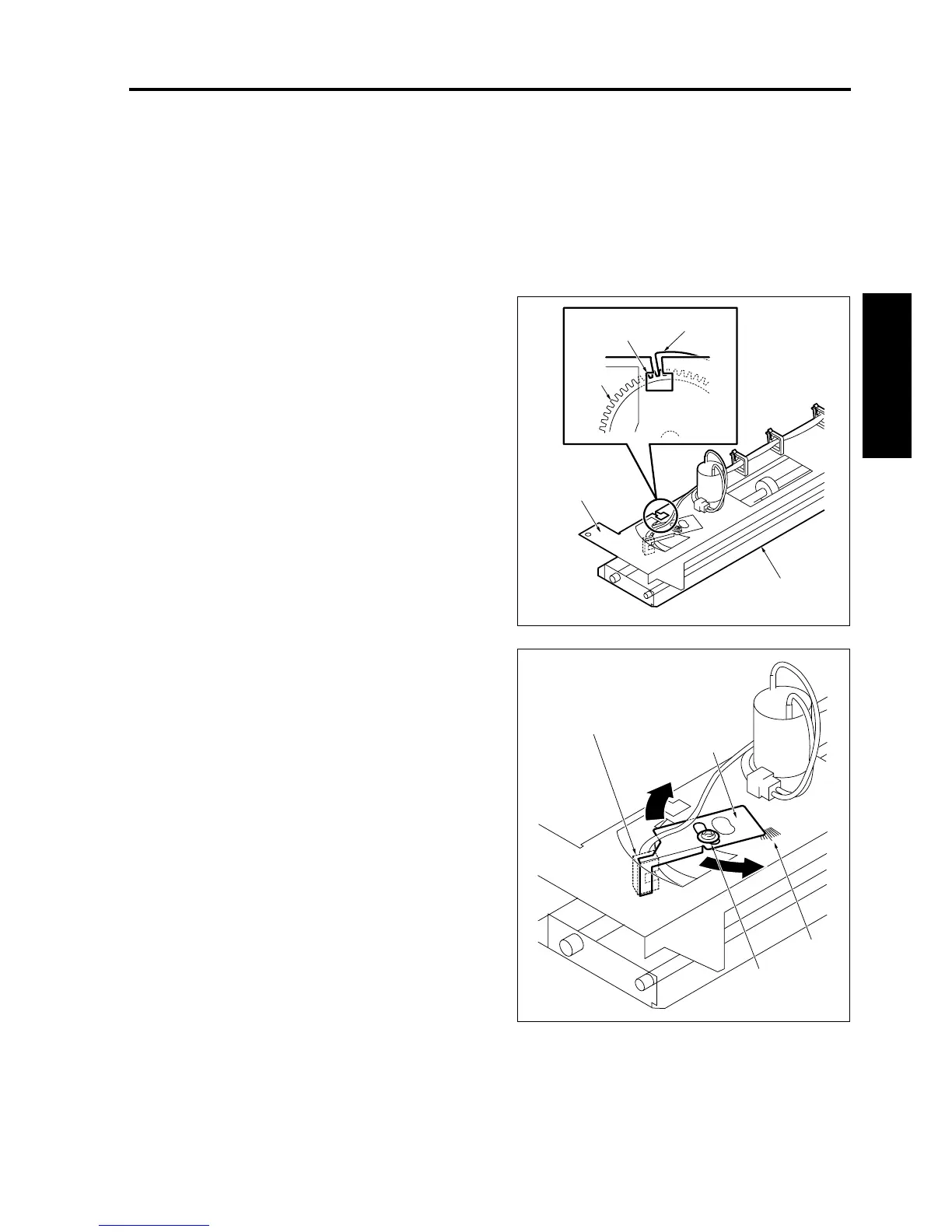
3. Check whether the edge of the actuator [5] for
the slide gear is placed in the notched hole [3] at
the slide stay [2] for the shift unit [1] for both the
HP search (home position) and the shift posi-
tion.
If not, perform the following adjustment.
4. Loosen the bracket screw [2] for the shift HP
sensor (PS718) and adjust the position of the
bracket [4] based on the mark [3].
5. Tighten the bracket screw [2] when the adjust-
ment is complete.
6. Reinstall the above parts following the removal
steps in reverse.
8050fs1081
[5]
[3]
[4]
[2]
[1]
8050fs1082
[2]
[3]
[4]
[1]










 To Next Page