6867
Measurement
2
■ Data management (Target)
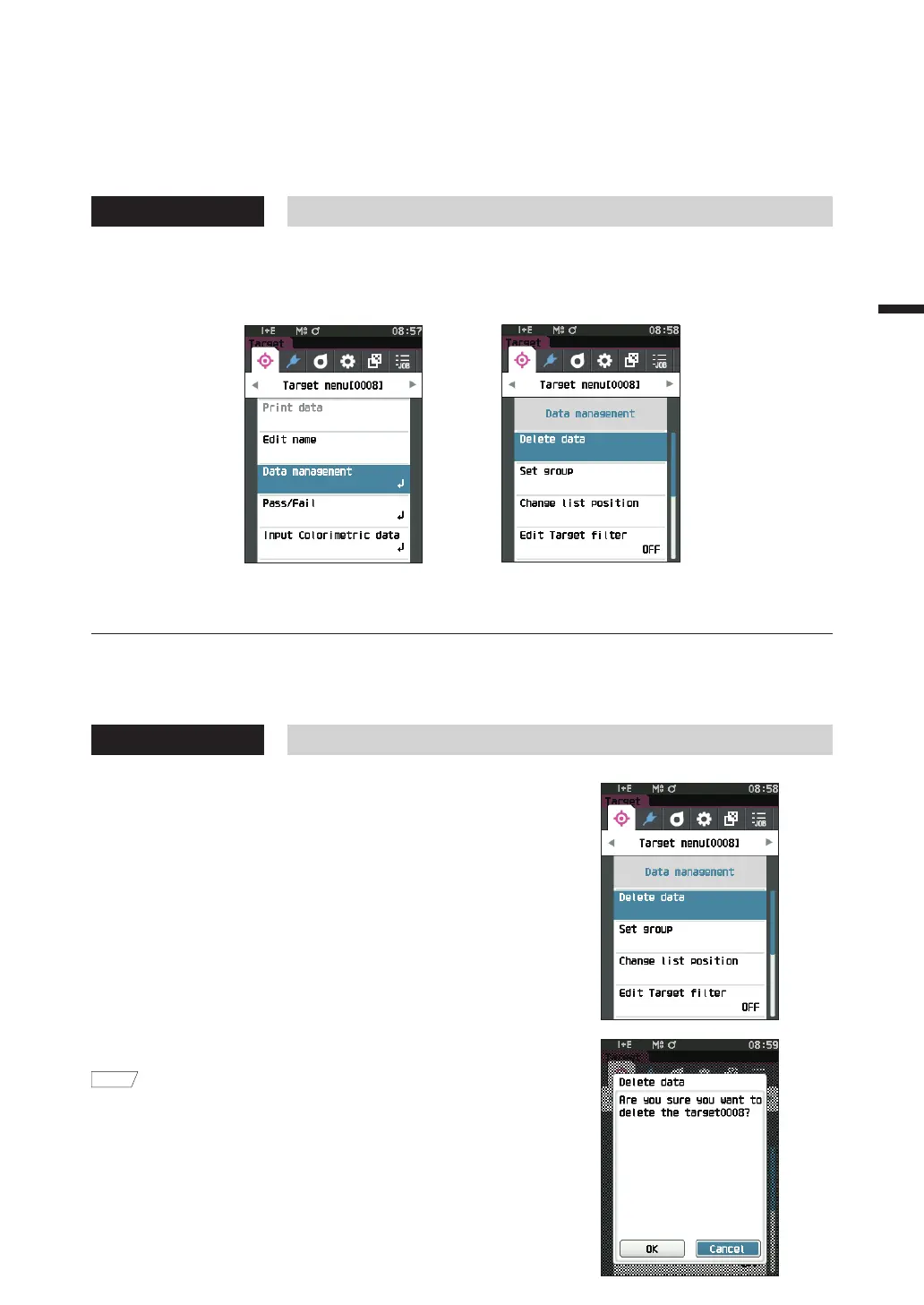
Target data management allows users to enforce target data restrictions, perform grouping, change list positions,
edit target filters, protect data, and delete all data.
Operating Procedure Start the procedure from the <Target menu> screen.
1
Use [
] or [
] to move the cursor to “Data management”, and then press the [Confirmation] key
to display the <Data management> screen.
□ Delete
Delete the target data.
Display the target to be deleted on the <Target> screen in advance.
Operating Procedure
Start the procedure from the <Target menu> - <Data management> screen.
1
Use [
] or [
] to move the cursor to “Delete data”,
and then press the [Confirmation] key.
The <Delete data> screen is displayed.
2
Use [
] or [
] to move the cursor to “OK” and press
the[Confirmation] key to delete.
Memo
Even if deletion is performed, numbers do not shift upward.
That number for that measurement is instead left blank.
• When the deletion is complete, the screen returns to the
<Target> screen.
• Moving the cursor to “Cancel” and pressing the
[Confirmation] key will cancel the deletion, and the
screen will return to the <Data management> screen.













 To Next Page