E-5
3. Configuration procedures
<ADF settings>
(1) Close the dual scan document feeder.
(2) Plug the power cord into the power outlet and
turn ON the power switch.
(3) Display the Service Mode screen.
(For details of how to display the Service Mode
screen, see the service manual.)
(4) Touch “System 2.”
(5) Touch “ .”
(6) Touch “ADF Settings.”
(7) Touch “Dual Scan Document Feeder.”
(8) Touch “END.”
(9) Touch “Exit” on the Service Mode screen.
(10)Turn OFF and ON the power switch.
Note:
When displayed the Service Mode screen, be sure
to turn off the power after exiting the Service Mode
screen and wait for 10 seconds or more before
turning on.
4. Adjustment procedures
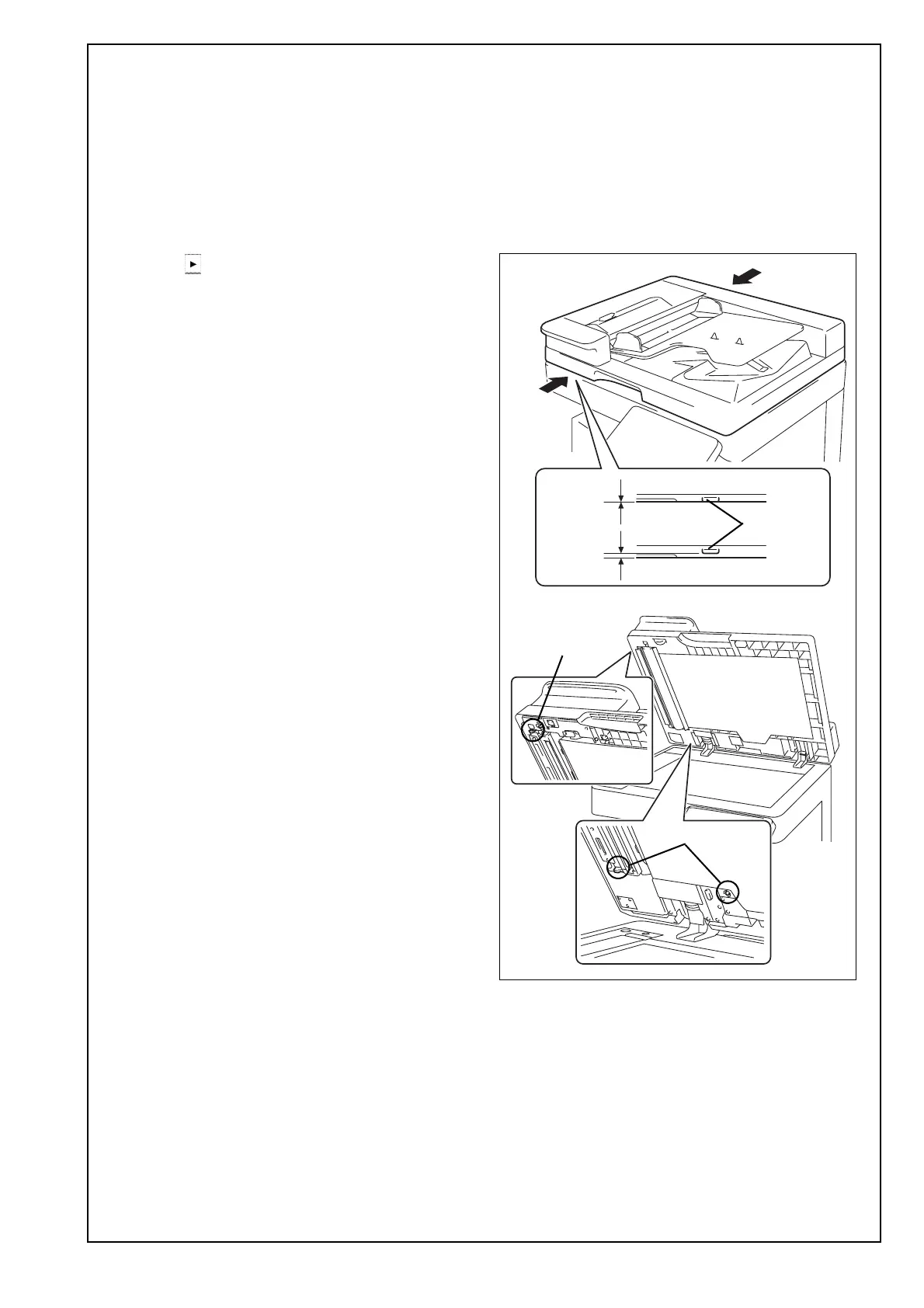
<Adjusting the height>
(1) Check the clearance between the upper face of
scanner and the protrusion on the dual scan doc-
ument feeder side. (Three spots)
Note:
There must be no clearance between the protru-
sion on the dual scan document feeder and the
upper face of scanner.
Protrusion
Protrusion
<OK>
<NG>
Protrusion












 To Next Page