14 GETTING UP AND RUNNING
GETTING UP AND RUNNING
INSERTING THE LITHIUM-ION BATTERY
This digital camera uses one NP-200 lithium-ion battery. Before using the
battery, read the safety warnings on pages 3 and 4 of this manual. When
replacing the battery, the camera should be turned off.
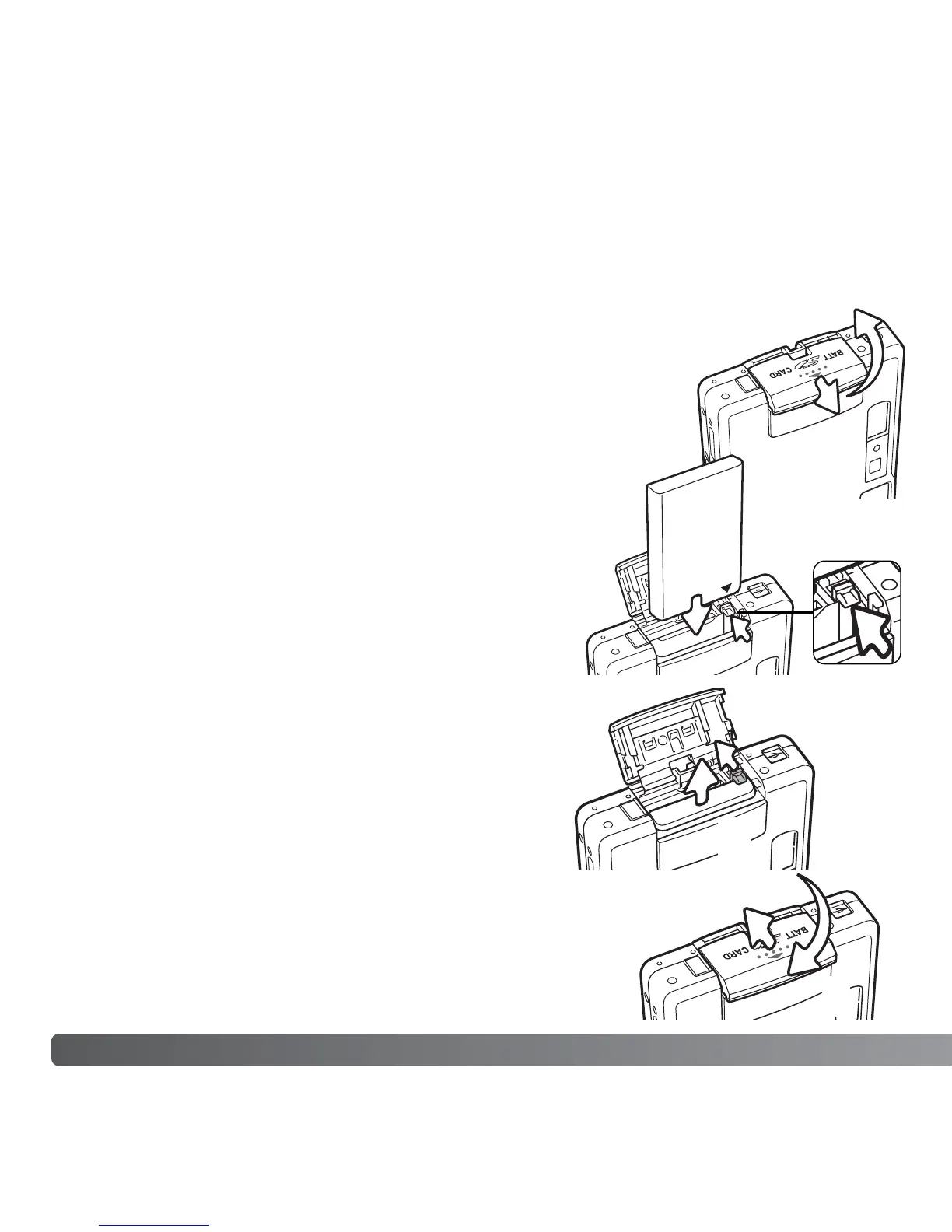
Slide the battery-chamber door toward the front of the camera to
release the safety catch (1). Open the door.
1
2
3
4
Move the battery latch towards the back of the camera to
insert the battery (2). Slide the battery into the battery
chamber with the battery terminals first until it is caught by
the latch.
To remove the battery, move the latch towards the back
of the camera until the battery is released (3). Pull the
battery out of the chamber.
Close the battery-chamber door (4) and slide it
toward the back of the camera to engage the safety
catch.
After installing the battery, the set-time/date
message may appear on the monitor. The clock and
calendar is set in section 3 of the setup menu (p. 20).
An internal battery protects the clock, calender, and
memory settings for more than 24 hours if the
camera is used for at least 5 minutes before
removing the battery.



 To Next Page
 Loading...









