Using the Utility Mode (Fax)
6
Fax Kit (FX-3) 6-53
Specifying the Setting for “PSTN/PBX”
The connected wiring system can be set to either PSTN (Public Switched
Telephone Network) or PBX (Private Branch Exchange).
For a PBX system, the outside line access number (or extension number)
must be specified. The outside line access number (or extension number)
is programmed in the [#] key.
To specify the telephone wiring system
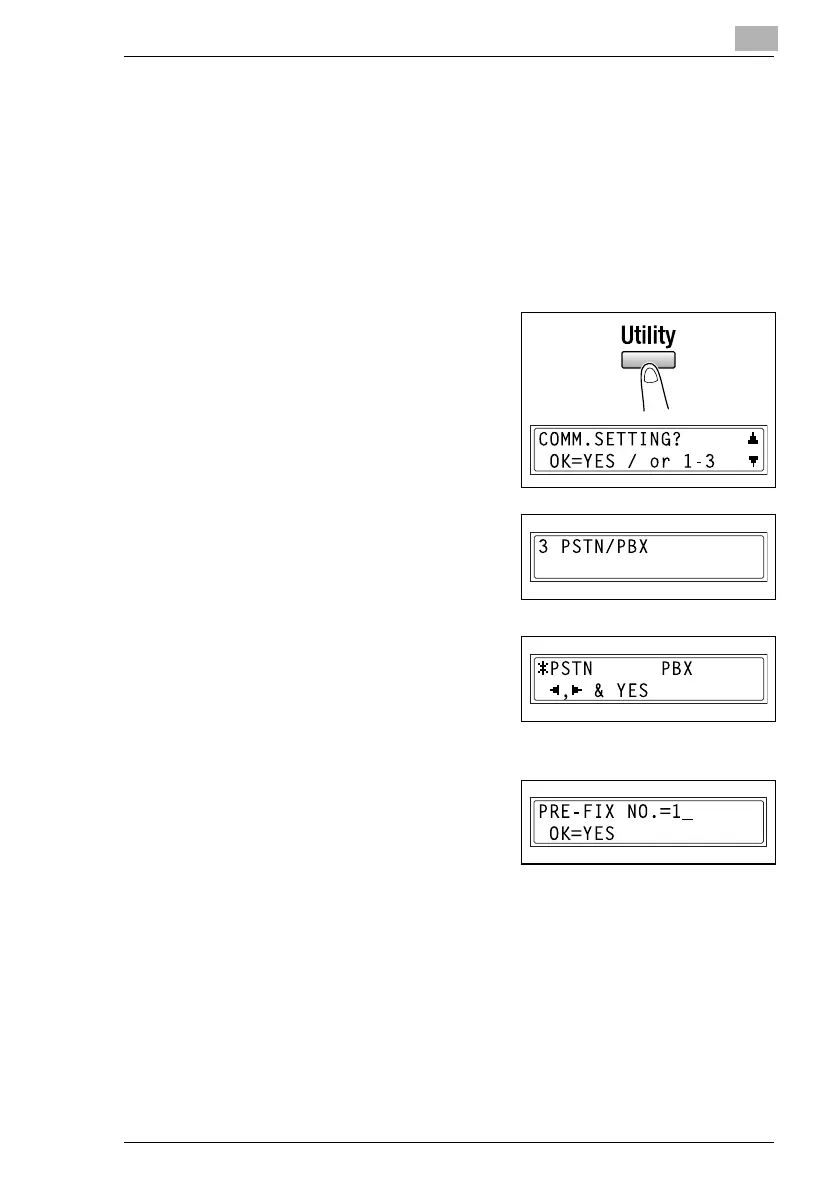
1 Press the [Utility] key nine times.
“COMM. SETTING” appears.
2 Press the [3] key from the 10-Key
Pad to select “PSTN/PBX”.
3 Using the [ ] and [ ] keys, select
either “PSTN” (Public Switched
Telephone Network) or “PBX”
(Private Branch Exchange), and
then press the [Yes] key.
4 If “PBX” was selected, use the 10-
Key Pad to enter the number that
should be dialed to access the
outside line, and then press the
[Yes] key.
The “COMM.SETTING” menu appears again.
Ö
Ö













 To Next Page