Using the Utility Mode
5
Fax Kit (FX-3) 5-7
To select the “ADMIN. MANAGEMENT” menu
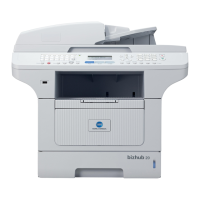
1 Press the [Utility] key.
“MACHINE SETTING?” appears.
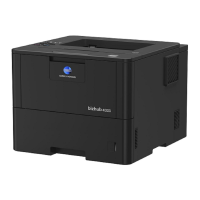
2 Press the [ ] key three times to
select “ADMIN. MANAGEMENT?”.
3 From the 10-Key Pad, press the key
([1] through [3]) for the “ADMIN.
MANAGEMENT” function that you
wish to set.
H The “ADMIN. MANAGEMENT”
functions are as follows:
1 AUTO SHUT OFF
2 COPY TRACK
3 REMOTE MONITOR
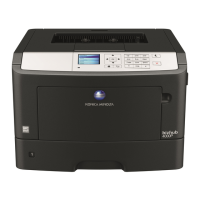
4 Using the 10-Key Pad, enter the 6-
digit administrator access number,
and then press the [Yes] key.
Tip
If, at any time, you wish to quit setting an “ADMIN. MANAGEMENT”
function, press the [No] key. When the message “STOP SETTING?”
appears, press the [Yes] key to quit.
Ö






 To Next Page