EasyManua.ls Logo

Korg A5 - Other Useful Functions; Comparison with Preset Data; Using Volume Pedal

Korg A5
17 pages
Print Icon
To Next Page IconTo Next Page
To Previous Page IconTo Previous Page
Loading...
OTHER
USEFUL
FUNCTIONS
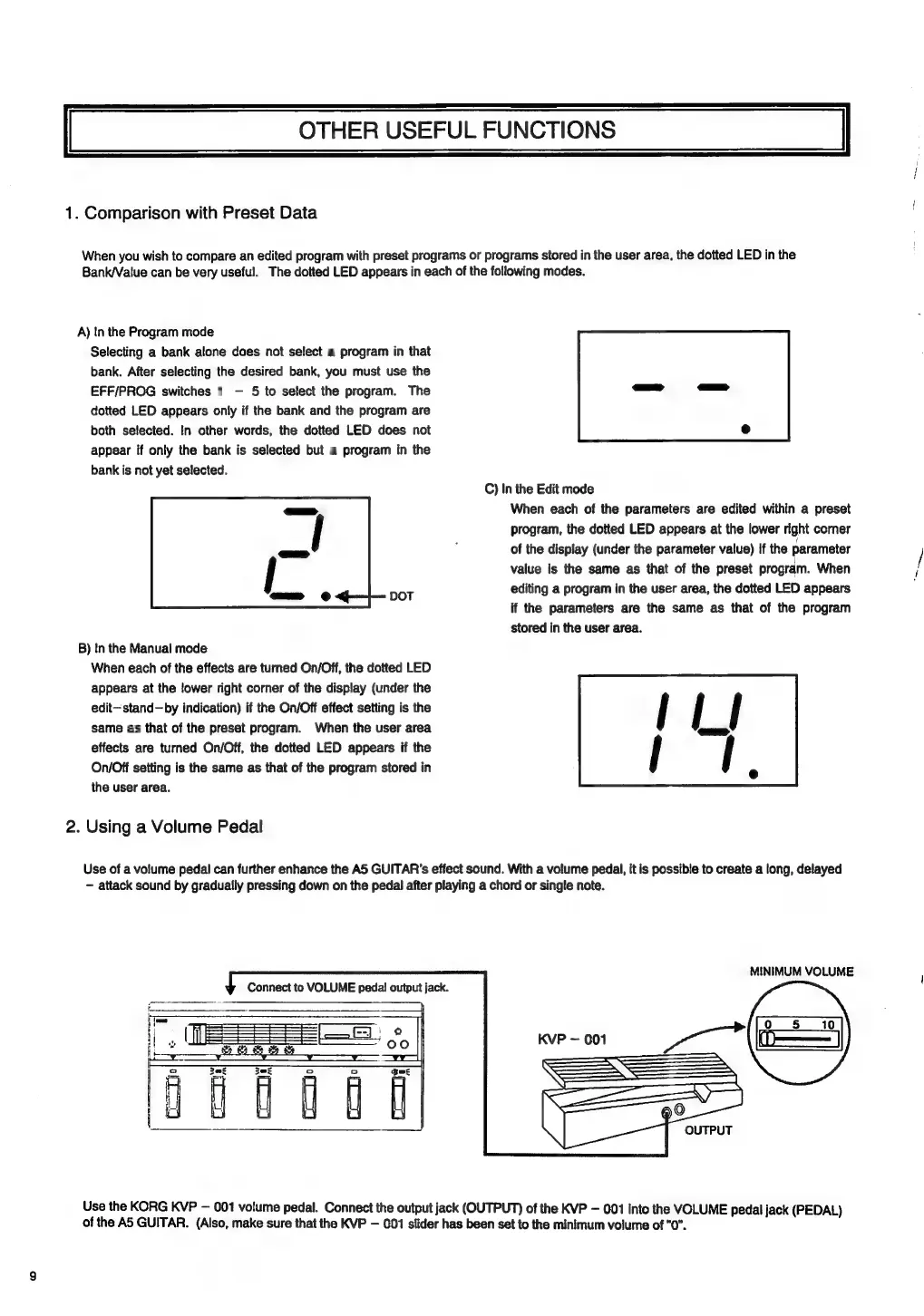
1.
Comparison
with
Preset
Data
When
you
wish
to
compare
an
edited
program
with
preset
programs
or
programs
stored
in
the
user
area,
the
dotted
LED
in
the
Bank/Value
can
be
very
useful.
The
dotted
LED
appears
in
each
of
the
following
modes.
A)
In
the
Program
mode
Selecting
a
bank
alone
does
not
select
a
program
in
that
bank.
After
selecting
the
desired
bank,
you
must
use
the
EFF/PROG
switches
1
5
to
select
the
program.
The
dotted
LED
appears
only
if
the
bank
and
the
program
are
both
selected.
In
other
words,
the
dotted
LED
does
not
appear
if
only
the
bank
is
selected
but
a
program
in
the
bank
is
not
yet
selected.
C)
In
the
Edit
mode
When
each
of
the
parameters
are
edited
within
a
preset
program,
the
dotted
LED
appears
at
the
lower
right
corner
of
the
display
(under
the
parameter
value)
if
the
parameter
value
is
the
same
as
that
of
the
preset
program.
When
editing
a
program
in
the
user
area,
the
dotted
LED
appears
if
tte
parameters
are
the
same
as
that
of
the
program
stored
in
the
user
area.
DOT
B)
In
the
Manual
mode
When
each
of
the
effects
are
turned
On/Off,
the
dotted
LED
appears
at
the
lower
right
corner
of
the
display
(under
the
edit—stand—by
indication)
if
the
On/Off
effect
setting
is
the
same
as
that
of
the
preset
program.
When
the
user
area
effects
are
turned
On/Off,
the
dotted
LED
appears
if
the
On/Off
setting
is
the
same
as
that
of
the
program
stored
in
the
user
area.
2.
Using
a
Volume
Pedal
Use
of
a
volume
pedal
can
further
enhance
the
A5
GUITAR's
effect
sound.
With
a
volume
pedali,
it
is
possible
to
create
a
long,
delayed
attack
sound
by
gradually
pressing
down
on
the
pedal
after
playing
a
chord
or
single
note.
MINIMUM
VOLUME
Connect
to
VOLUME
peda!
output
jack.
Use
the
KORG
KVP
001
volume
pedal.
Connect
the
output
jack
(OUTPUT)
of
the
KVP
001
into
the
VOLUME
pedal
jack
(PEDAL)
of
the
A5
GUITAR.
(Also,
make
sure
that
the
KVP
001
slider
has
been
set
to
the
minimum
volume
of
"0”.

Related product manuals