EasyManua.ls Logo

Korg A5 - Operating Individual Effects; [Manual;Edit Mode] +-+ 0000

Korg A5
17 pages
Print Icon
To Next Page IconTo Next Page
To Previous Page IconTo Previous Page
Loading...
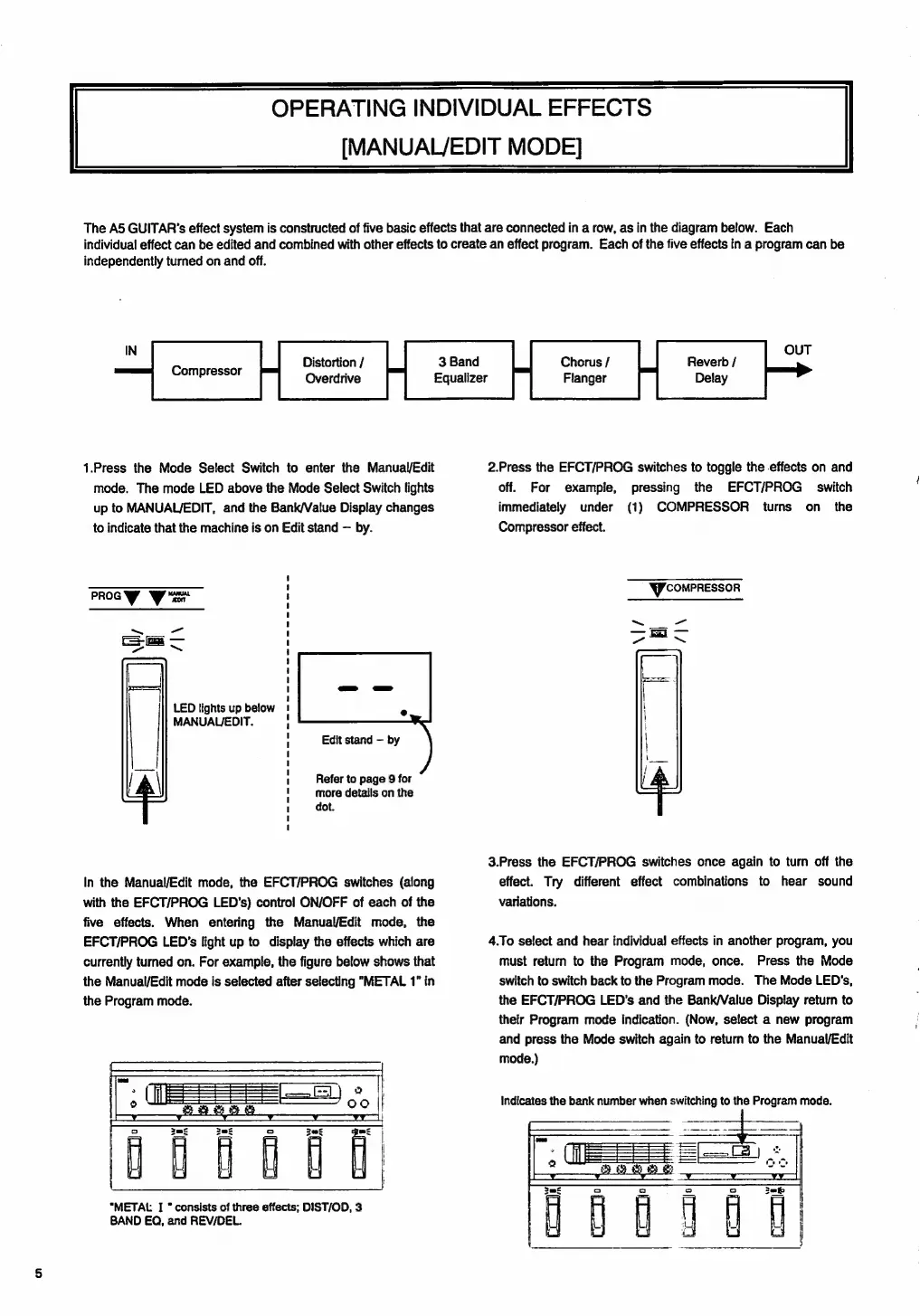
OPERATING
INDIVIDUAL
EFFECTS
[MANUAL/EDIT
MODE]
The
A5
GUITAR's
effect
system
is
constructed
of
five
basic
effects
that
are
connected
in
a
row,
as
in
the
diagram
below.
Each
individual
effect
can
be
edited
and
combined
with
other
effects
to
create
an
effect
program.
Each
ofthe
five
effects
in
a
program
can
be
independently
turned
on
and
off.
Distortion
/
Overdrive
Compressor
1.Press
the
Mode
Select
Switch
to
enter
the
Manual/Edit
mode.
The
mode
LED
above
the
Mode
Select
Switch
lights
up
to
MANUAL/EDIT,
and
the
Bank/Value
Display
changes
to
indicate
that
the
machine
is
on
Edit
stand
by.
PROG
Was
>.
LED
lights
up
below
MANUAL/EDIT.
Edit
stand
by
Refer
to
page
9
for
more
details
on
the
dot.
In
the
Manual/Edit
mode,
the
EFCT/PROG
switches
(along
with
the
EFCT/PROG
LED's)
control
ON/OFF
of
each
of
the
five
effects.
When
entering
the
Manual/Edit
mode,
the
EFCT/PROG
LED's
light
up
to
display
the
effects
which
are
currently
tumed
on.
For
example,
the
figure
below
shows
that
the
Manual/Edit
mode
is
selected
after
selecting
"METAL
1"
in
the
Program
mode.
Tm
"METAL
I
consists
of
three
effects;
DIST/OD,
3
BAND
EQ,
and
REVDEL.
£
Def
=
28°
Equalizer
OUT
Chorus
/
Flanger
Reverb
/
Delay
2.Press
the
EFCT/PROG
switches
to
toggle
the
effects
on
and
off.
For
example,
pressing
the
EFCT/PROG
switch
immediately
under
(1)
COMPRESSOR
turns
on
the
Compressor
effect.
gr
comPRESSOR
3.Press
the
EFCT/PROG
switches
once
again
to
turn
off
the
effect.
Try
different
effect
combinations
to
hear
sound
variations.
4.To
select
and
hear
individual
effects
in
another
program,
you
must
return
to
the
Program
mode,
once.
Press
the
Mode
switch
to
switch
back
to
the
Program
mode.
The
Mode
LED's,
the
EFCT/PROG
LED's
and
the
Bank/Value
Display
return
to
their
Program
mode
indication.
(Now,
select
a
new
program
and
press
the
Mode
switch
again
to
return
to
the
Manual/Edit
mode.)
indicates
the
bank
number
when
switching
to
the
Program
mode.

Related product manuals