EasyManua.ls Logo

Korg A5 - Effect Parameter List

Korg A5
17 pages
Print Icon
To Next Page IconTo Next Page
To Previous Page IconTo Previous Page
Loading...
EFFECT
PARAMETER
LIST
1.
COMPRESSOR
[COMPRESSORI]
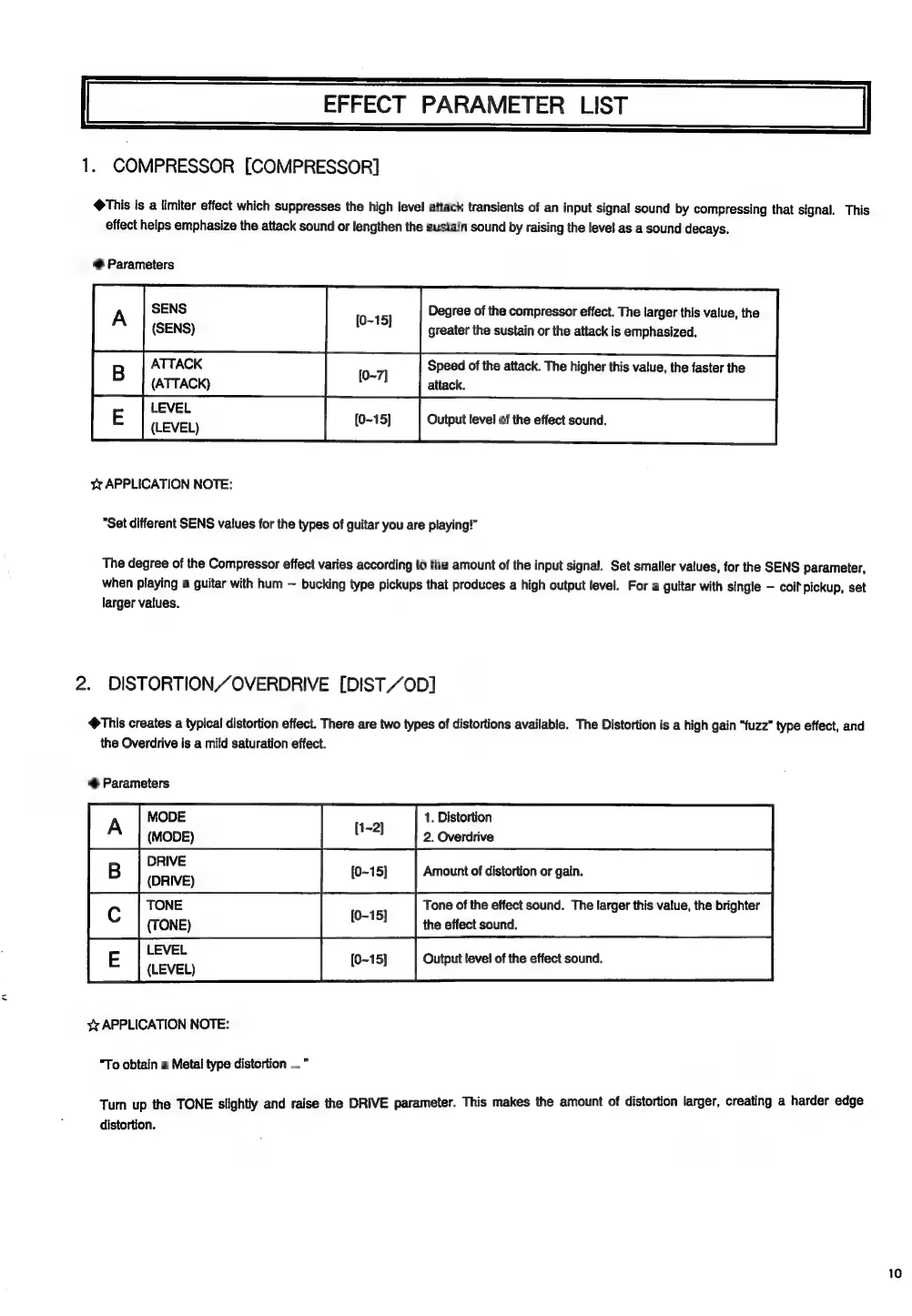
«This
is
a
limiter
effect
which
suppresses
the
high
level
attack
transients
of
an
input
signal
sound
by
compressing
that
signal.
This
effect
helps
emphasize
the
attack
sound
or
lengthen
the
sustain
sound
by
raising
the
leve!
as
a
sound
decays.
®
Parameters
Al
[ee
ATTACK
[0-7]
Speed
of
the
attack.
The
higher
this
value,
the
faster
the
(ATTACK)
i
attack.
LE
cai
Pt
Output
level
of
the
effect
sound.
x
APPLICATION
NOTE:
"Set
different
SENS
values
for
the
types
of
guitar
you
are
playing!”
Degree
of
the
compressor
effect.
The
larger
this
value,
the
greater
the
sustain
or
the
attack
is
emphasized.
The
degree
of
the
Compressor
effect
varies
according
to
the
amount
of
the
input
signal.
Set
smaller
values,
for
the
SENS
parameter,
when
playing
a
guitar
with
hum
bucking
type
pickups
that
produces
a
high
output
level.
For
a
guitar
with
single
coil
pickup,
set
larger
values.
2.
DISTORTIONZOVERDRIVE
[DIST
//0D]
@This
creates
a
typical
distortion
effect.
There
are
two
types
of
distortions
available.
The
Distortion
is
a
high
gain
"fuzz”
type
effect,
and
®
Parameters
the
Overdrive
is
a
mild
saturation
effect.
A
MODE
1.
Distortion
(MODE)
2.
Overdrive
Da
Amount
of
distortion
or
gain.
(DRIVE)
TONE
Tone
of
the
effect
sound.
The
larger
this
value,
the
brighter
(TONE)
the
effect
sound.
i
Output
level
of
the
effect
sound.
{LEVEL)
x
APPLICATION
NOTE:
sie
"To
obtain
a
Metal
type
distortion
...
*
Tum
up
the
TONE
slightly
and
raise
the
DRIVE
parameter.
This
makes
the
amount
of
distortion
larger,
creating
a
harder
edge
distortion.

Related product manuals