EasyManua.ls Logo

Korg A5 - Saving Effects [Program Write]

Korg A5
17 pages
Print Icon
To Next Page IconTo Next Page
To Previous Page IconTo Previous Page
Loading...
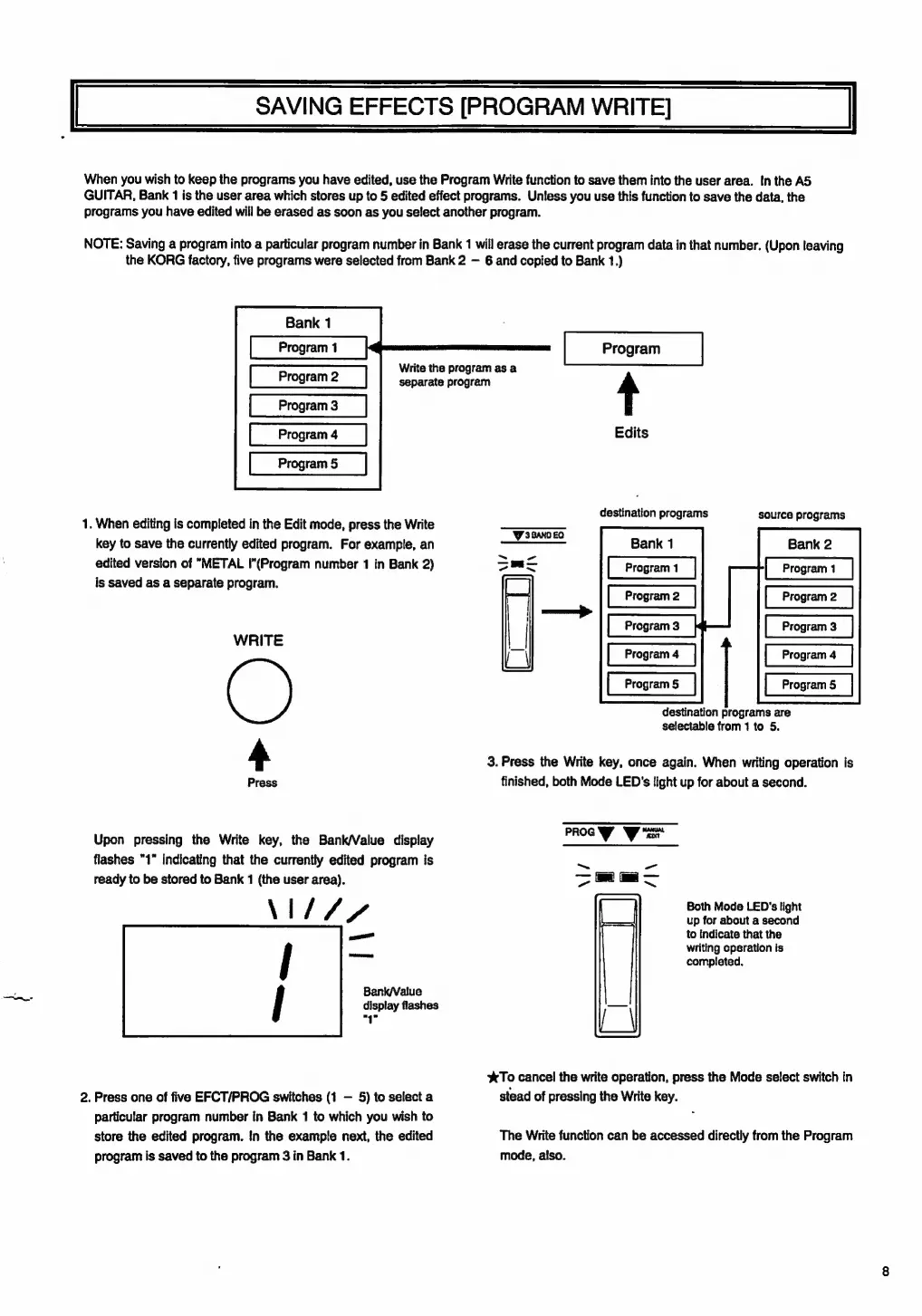
SAVING
EFFECTS
[PROGRAM
WRITE]
When
you
wish
to
keep
the
programs
you
have
edited,
use
the
Program
Write
function
to
save
them
into
the
user
area.
In
the
AS
GUITAR,
Bank
1
is
the
user
area
which
stores
up
to
5
edited
effect
programs.
Unless
you
use
this
function
to
save
the
data,
the
programs
you
have
edited
will
be
erased
as
soon
as
you
select
another
program.
NOTE:
Saving
a
program
into
a
particular
program
number
in
Bank
1
will
erase
the
current
program
data
in
that
number.
(Upon
leaving
the
KORG
factory,
five
programs
were
selected
from
Bank
2
6
and
copied
to
Bank
1.)
Program
2
Program
3
Program
4
Program
5
—.
.
When
editing
is
completed
in
the
Edit
mode,
press
the
Write
key
to
save
the
currently
edited
program.
For
example,
an
edited
version
of
"METAL
|”(Program
number
1
in
Bank
2)
is
saved
as
a
separate
program.
WRITE
4
Press
Upon
pressing
the
Write
key,
the
Bank/Value
display
flashes
"1"
indicating
that
the
currently
edited
program
is
ready
to
be
stored
to
Bank
1
(the
user
area).
\I1///
Bank/Value
display
flashes
"4°
2.
Press
one
of
five
EFCT/PROG
switches
(1
5)
to
select
a
particular
program
number
in
Bank
1
to
which
you
wish
to
store
the
edited
program.
In
the
example
next,
the
edited
program
is
saved
to
the
program
3
in
Bank
1.
Write
the
program
as
a
separate
program
4
Edits
destination
programs
source
programs
Bank
2
Program
1
Program
2
Program
3
Program
4
Program
5
destination
programs
are
selectable
from
1
to
5.
3.
Press
the
Write
key,
once
again.
When
writing
operation
is
finished,
both
Mode
LED's
light
up
for
about
a
second.
PROG
W*s
-_
Prati
pi
i
tu
Be
Both
Mode
LED's
light
|.
up
for
about
a
second
to
indicate
that
the
writing
operation
is
completed.
XTo
cancel
the
write
operation,
press
the
Mode
select
switch
in
stead
of
pressing
the
Write
key.
The
Write
function
can
be
accessed
directly
from
the
Program
mode,
also.

Related product manuals