EasyManua.ls Logo

Korg A5 - Connection with Guitar 00000000000

Korg A5
17 pages
Print Icon
To Next Page IconTo Next Page
To Previous Page IconTo Previous Page
Loading...
CONNECTION
WITH
GUITAR
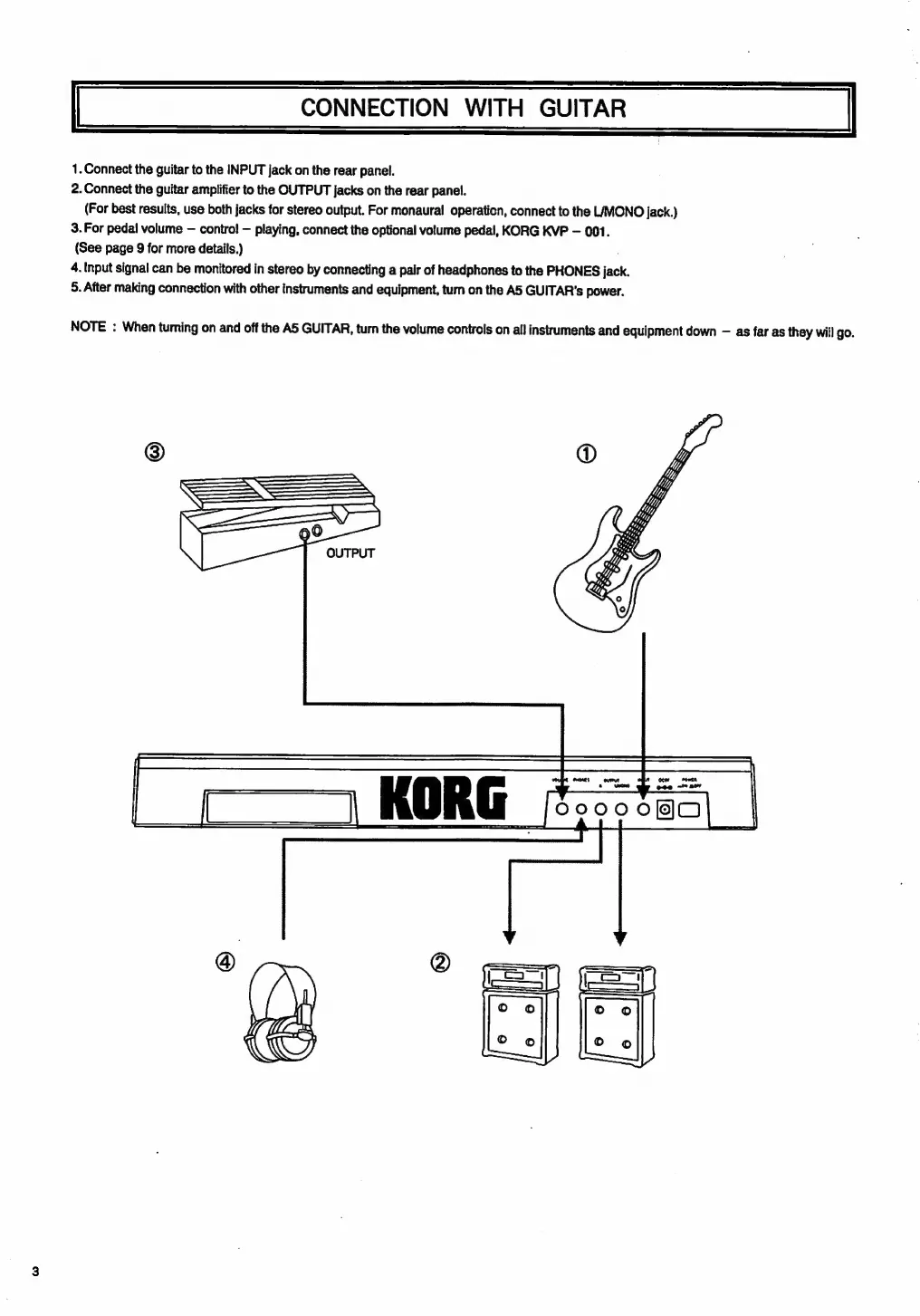
1.
Connect
the
guitar
to
the
INPUT
jack
on
the
rear
panel.
2.
Connect
the
guitar
amplifier
to
the
OUTPUT
jacks
on
the
rear
panel.
(For
best
results,
use
both
jacks
for
stereo
output.
For
monaural
operation,
connect
to
the
LIMONO
jack.)
3.
For
pedal
volume
contro!
playing,
connect
the
optional
volume
pedal,
KORG
KVP
001.
(See
page
9
for
more
details.)
4.
Input
signal
can
be
monitored
in
stereo
by
connecting
a
pair
of
headphones
to
tte
PHONES
jack.
5.
After
making
connection
with
other
instruments
and
equipment,
tum
on
the
A5
GUITAR's
power.
NOTE
:
When
turning
on
and
off
the
A5
GUITAR,
turn
the
volume
controls
on
all
instruments
and
equipment
down
as
far
as
they
will
go.

Related product manuals