EasyManua.ls Logo

Korg A5 - Page 9

Korg A5
17 pages
Print Icon
To Next Page IconTo Next Page
To Previous Page IconTo Previous Page
Loading...
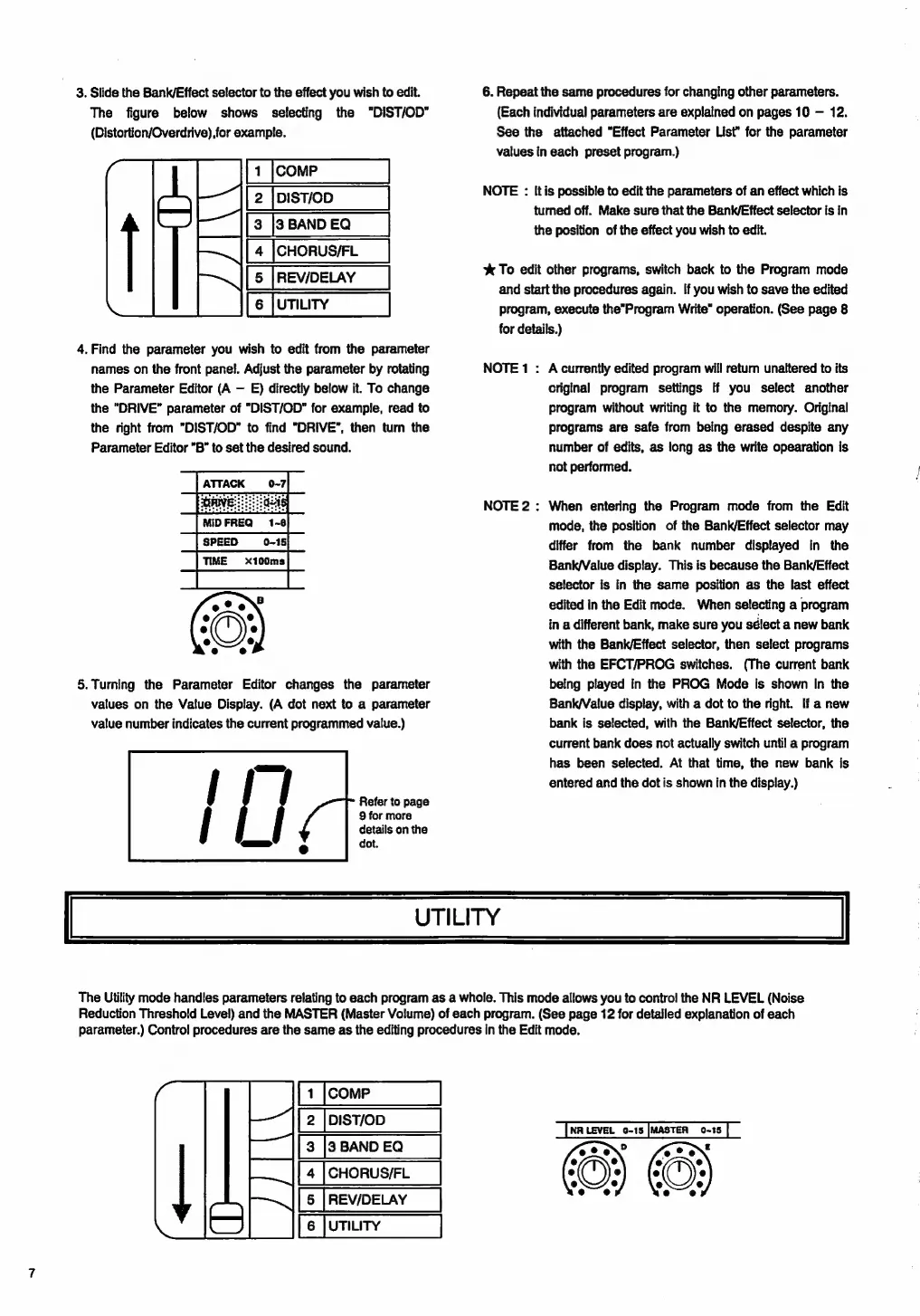
3.
Slide
the
Bank/Effect
selector
to
the
effect
you
wish
to
edit.
The
figure
below
shows
selecting
the
"DIST/OD”
{Distortion/Overdrive).for
example.
DIST/OD
3
BAND
EQ
CHORUS/FL
REV/DELAY
UTILITY
li
ni
4.
Find
the
parameter
you
wish
to
edit
from
the
parameter
names
on
the
front
panel.
Adjust
the
parameter
by
rotating
the
Parameter
Editor
(A
E)
directly
below
it.
To
change
the
"DRIVE"
parameter
of
"DIST/OD"
for
example,
read
to
the
right
from
"DIST/OD"
to
find
"DRIVE",
then
tum
the
Parameter
Editor
"B"
to
set
the
desired
sound.
MIDFREQ
1-8
SPEED
0-15
5.Turning
the
Parameter
Editor
changes
the
parameter
values
on
the
Value
Display.
(A
dot
next
to
a
parameter
value
number
indicates
the
current
programmed
value.)
Refer
to
page
9
for
more
details
on
the
dot.
6.
Repeat
the
same
procedures
for
changing
other
parameters.
(Each
individual
parameters
are
explained
on
pages
10
12.
See
the
attached
"Effect
Parameter
List'
for
the
parameter
values
in
each
preset
program.)
NOTE
:
Itis
possible
to
edit
tte
parameters
of
an
effect
which
îs
turned
off.
Make
sure
that
the
Bank/Effect
selector
is
in
the
position
of
the
effect
you
wish
to
edit.
X
To
edit
other
programs,
switch
back
to
the
Program
mode
and
start
the
procedures
again.
lf
you
wish
to
save
the
edited
program,
execute
the”Program
Write”
operation.
(See
page
8
for
details.)
NOTE
1
:
A
currently
edited
program
will
retum
unaltered
to
its
criginal
program
settings
if
you
select
another
program
without
writing
it
to
the
memory.
Original
programs
are
safe
from
being
erased
despite
any
number
of
edits,
as
long
as
the
write
opearation
is
not
performed.
NOTE
2
:
When
entering
the
Program
mode
from
the
Edit
mode,
the
position
of
the
Bank/Effect
selector
may
differ
from
the
bank
number
displayed
in
the
Bank/Value
display.
This
is
because
the
Bank/Effect
selector
is
in
the
same
position
as
the
last
effect
edited
in
the
Edit
mode.
When
selecting
a
program
in
a
different
bank,
make
sure
you
sélect
a
new
bank
with
the
Bank/Effect
selector,
then
select
programs
with
the
EFCT/PROG
switches.
(The
current
bank
being
played
in
the
PROG
Mode
is
shown
In
the
Bank/Velue
display,
with
a
dot
to
the
right.
If
a
new
bank
is
selected,
with
the
Bank/Effect
selector,
the
current
bank
does
not
actually
switch
until
a
program
has
been
selected.
At
that
time,
the
new
bank
is
entered
and
the
dot
is
shown
in
the
display.)
UTILITY
The
Utility
mode
handies
parameters
relating
to
each
program
as
a
whole.
This
mode
allows
you
to
contro!
the
NR
LEVEL
(Noise
Reduction
Threshold
Level)
and
the
MASTER
(Master
Volume)
of
each
program.
(See
page
12
for
detailed
explanation
of
each
parameter.)
Control
procedures
are
the
same
as
the
editing
procedures
in
the
Edit
mode.
COMP
DIST/OD
3
BAND
EQ
CHORUS/FL
REV/DELAY
UTILITY

Related product manuals