Playingwithdierentsounds
7
Playing with dierent sounds
Selecting a grand piano
y
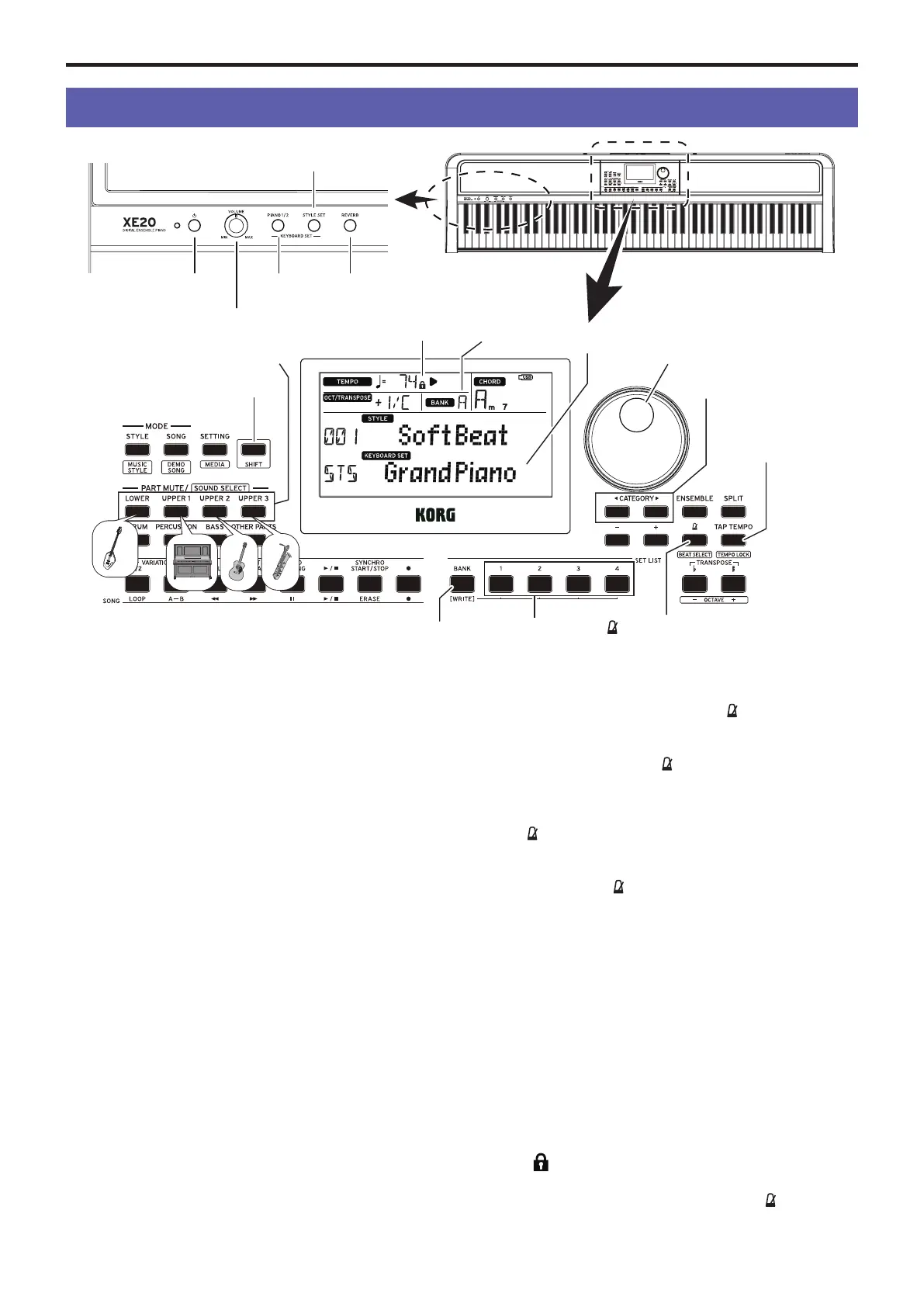
Press the PIANO1/2 buon.
This will quickly select the grand piano sound. You can
switchbetweenpianos1and2witheachpressofthebuon.
Piano 1: German Piano
Piano 2: Italy Piano
Selecting sounds in the style set
The keyboard set is a group of sounds used in keyboard
performance.Dierentsoundslikepiano, strings, synthesizer,
drums and so on are assigned to the four parts (lower and upper
1–3). These four parts together are called a keyboard part.
Tip:
See the “Voice Name List” (PDF) for a list of the keyboard
sets and sounds.
1.
Press the STYLE SET buon.
The keyboard set that is most suitable for the style will be
recalled.
Selecting a set list
Setlistsareusedtosaveandquicklyrecallyourfavoriteseings
(style,tempo,eectsandsoon;seepage12“Savingtheset
list (WRITE)”).
The recommended set lists are stored in locations 1–4 of banks
A and B. Bank A-1 will be selected right after the power is
turned on. The keyboard set will be “German Piano.”
1.
Press the BANK/WRITE buon several times to select the
bank.
Tip:
Pressingthisbuonwhileholdingdownthe[SHIFT]
buonwillselectbanksinreverseorder.
2.
Use buons 1–4 to select the set list.
Playing in time with the metronome
You can practice along with the tempo and beat of the metronome.
y
Turning on the metronome: Press the
(metronome)/[BEAT
SELECT]buontoturnthemetronomeon(thebuonwill
light),andpressthebuonagaintomakeitstop.
y
Seing the beat: Press the
(metronome)/[BEATSELECT]
buonanumberoftimeswhileholdingdownthe[SHIFT]
buon.
y
Adjusting the volume: Turn the dial while holding down
the
(metronome)/[BEATSELECT]buon.
Tip:
Whenseingthebeat(timesignature)andvolume,
youcanalsopressaspecickeyonthekeyboardwhile
holding down the
(metronome)
/[BEATSELECT]buon.
(See the “Owner’s Manual (PDF)” for details.)
Adjusting the tempo
y
Turn the dial while holding down the [SHIFT] buon.
y
Press the TAP TEMPO/[TEMPO LOCK] buon to match
the number of beats of the style at the tempo timing you
wish to set. (For instance, if you want to set a 4/4 beat, press
thebuonfourtimes;andfora3/4beat,pressthebuon
three times.)
Note:
PressingtheTAPTEMPO/[TEMPOLOCK]buon
any more times will start the accompaniment (tap start
function).
y
Tempo lock:PresstheTAPTEMPO/[TEMPO LOCK]buon
whileholdingdownthe[SHIFT]buon(thetempolock
icon
will light in the display).
Tip:
Whenseingthetempo,youcanalsopressaspecic
key on the keyboard while holding down the
(metronome)
/
[BEATSELECT]buon.(Seethe“Owner’sManual(PDF)”
for details.)
Power button
VOLUME knob
PIANO1/2
button
STYLE SET button
REVERB button
Keyboard part
[SHIFT] button
Tempo lock icon
Bank
Dial
Keyboard set name
CATEGORY buttons
TAP TEMPO/
[TEMPO LOCK
Buttons 1–4
BANK/WRITE button
(metronome)/


 To Next Page