8.2 User area
Figure 8-2 Charging point view - overview
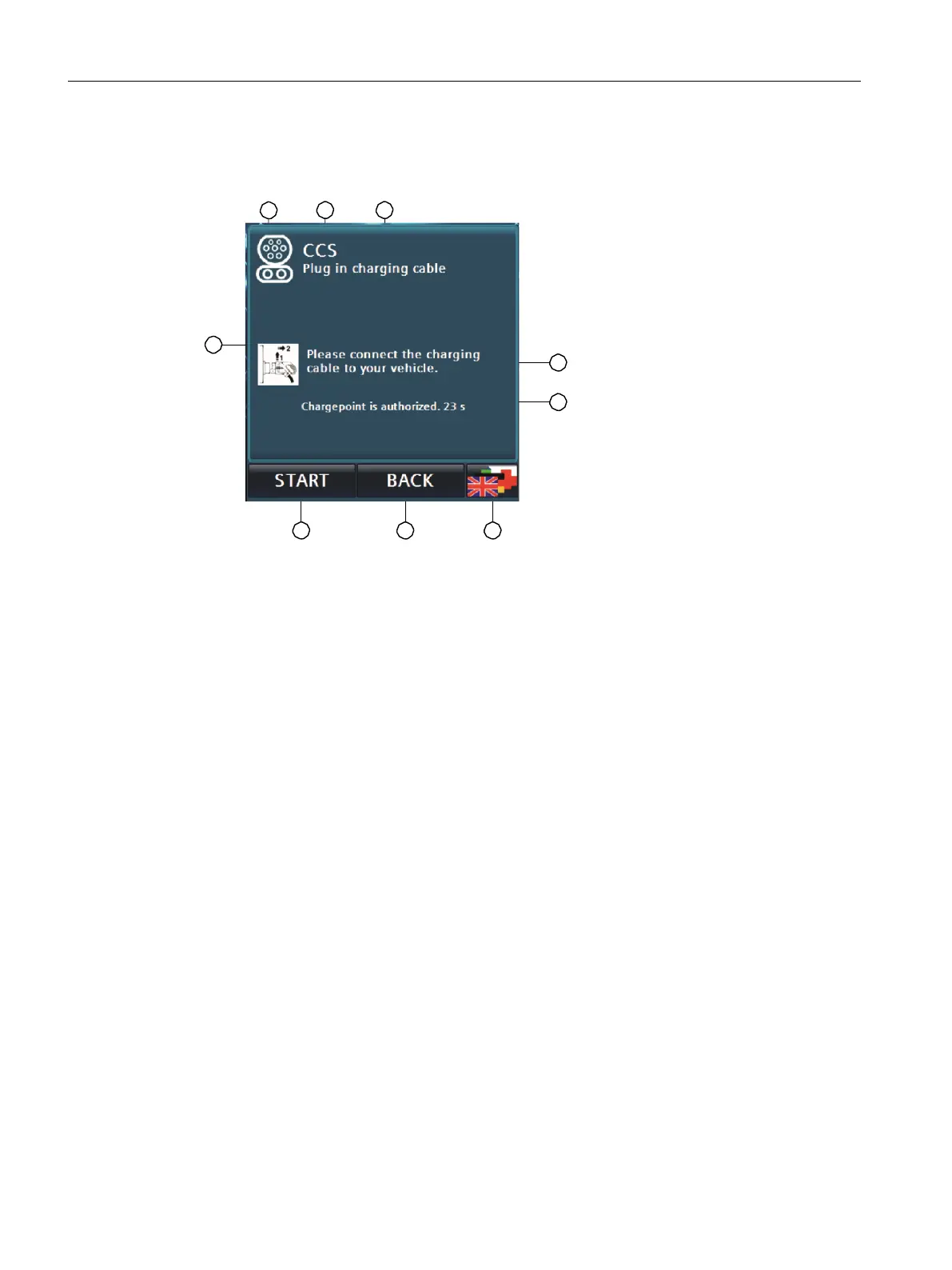
Detailed view of a charging point
① Charging point type Symbol
② Charging point type Text
③ State of the charging point
④ Text on the condition / expected user action
⑤ Additional information
⑥ Menu bar: Language selection
⑦ Menu bar: Back to the main menu
⑧ Menu bar: <START>/<STOP> button if required
⑨ Symbol for the state / expected user action
Fig. 8-3 DC charging point view Details on the example for CCS charging point
8.2.3 User functions
8.2.3.1 Start charging process
There are 3 ways to start a charging process. The procedure preferred by this visualisation is to first
connect the vehicle to the charging station and then to authorise.
Alternatively, you can select the charging point manually by tapping on the respective charging point
in the main screen. Carry out the authorisation before connecting the vehicle to the station.



 To Next Page