MAL-OPS-0969 Version 2.2 4
2. D3M Functionality
2.1 Powering On
To turn the D3M on, the central button should be pressed and held down for
five seconds.
2.2 D3M Status Screen
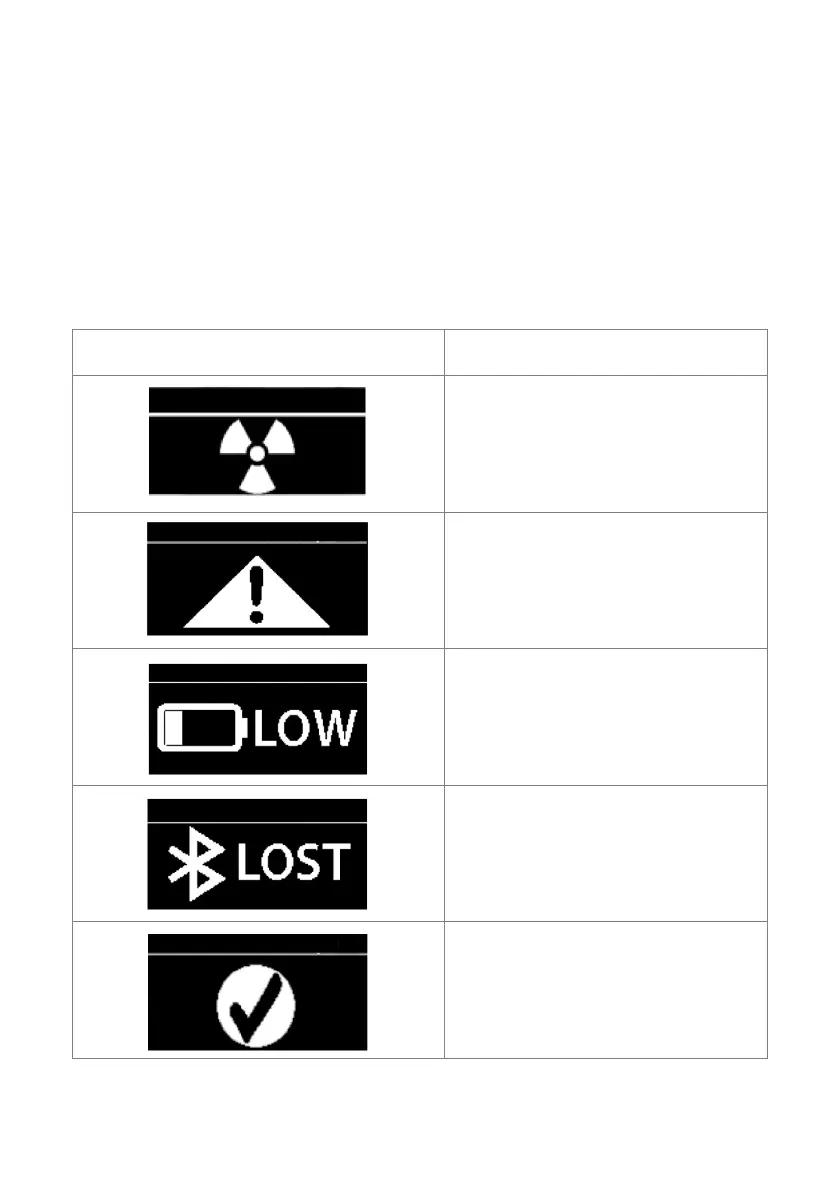
The following table shows the meaning of the symbols that can appear on the
status screen on the D3M.
A threshold alarm for dose or when
the accumulated dose has been
exceeded.
A system fault has been detected.
The fault number is displayed in the
top left, e.g. !43.
Battery is low (less than 10%).
Bluetooth connection has been lost.
Note that the text will say “LOST” as
opposed to “OFF” when Bluetooth is
off.
System is ready. Bluetooth is
connected, there are no system
faults, no thresholds for alarms have
been breached and the battery level
is above 10%.



 To Next Page