-A8-
5.3 Adjustments
5.3.1 Adjusting the Operation mode
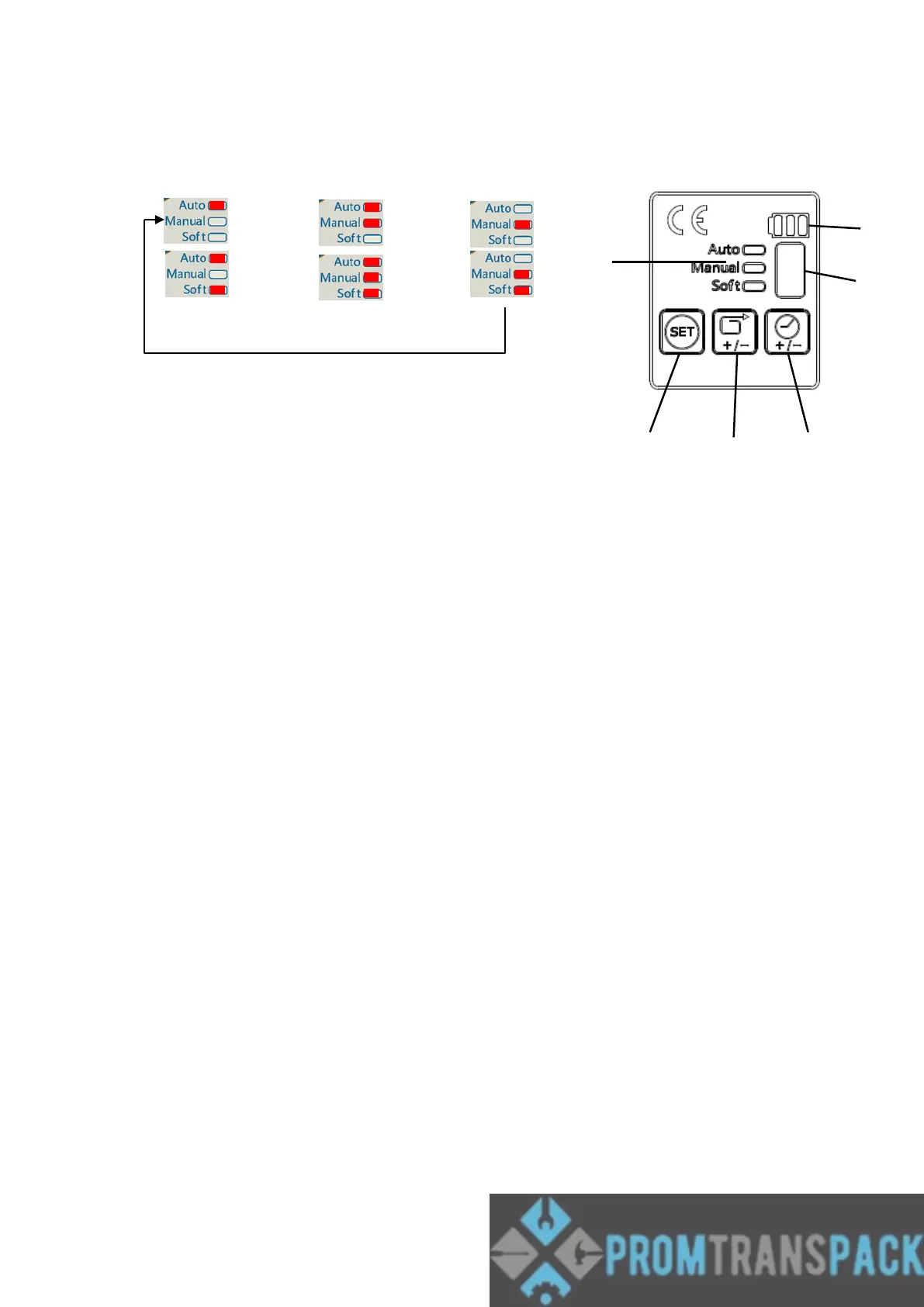
(Auto) → (Semi) → (Manu) →
→ →
Press and hold the button “B” for 1 sec, if the tool beeps and flashes the indicator, the
tool is for adjusting the operation mode now. Press then release the button “B” to change
the mode, and the mode sequence is as the cycle above. Or press and keep holding the
button “B”, then the mode will be changed automatically with the sequence.
Caution!
If the soft indicator is light on, the current tension setting is in low force range, and it
takes longer to complete tensioning as the tensioning wheel is slower. This mode is
suitable for fragile product or while using PP straps.
5.3.2 Adjusting the strap Tension force
Press and hold the button “C” for 1 sec, if the tool beeps,
the tool is for adjusting the tension force now. The
digital display shows the current setting. Press then
release the button “C” to change the tension force range,
and the mode sequence is as the cycle below. Or press
and keep holding the button “C”, then the tension force
range will be changed automatically with the sequence.



 To Next Page