OC60-E2, OC95-E2, WSM ENGINE
S-28
Balancer
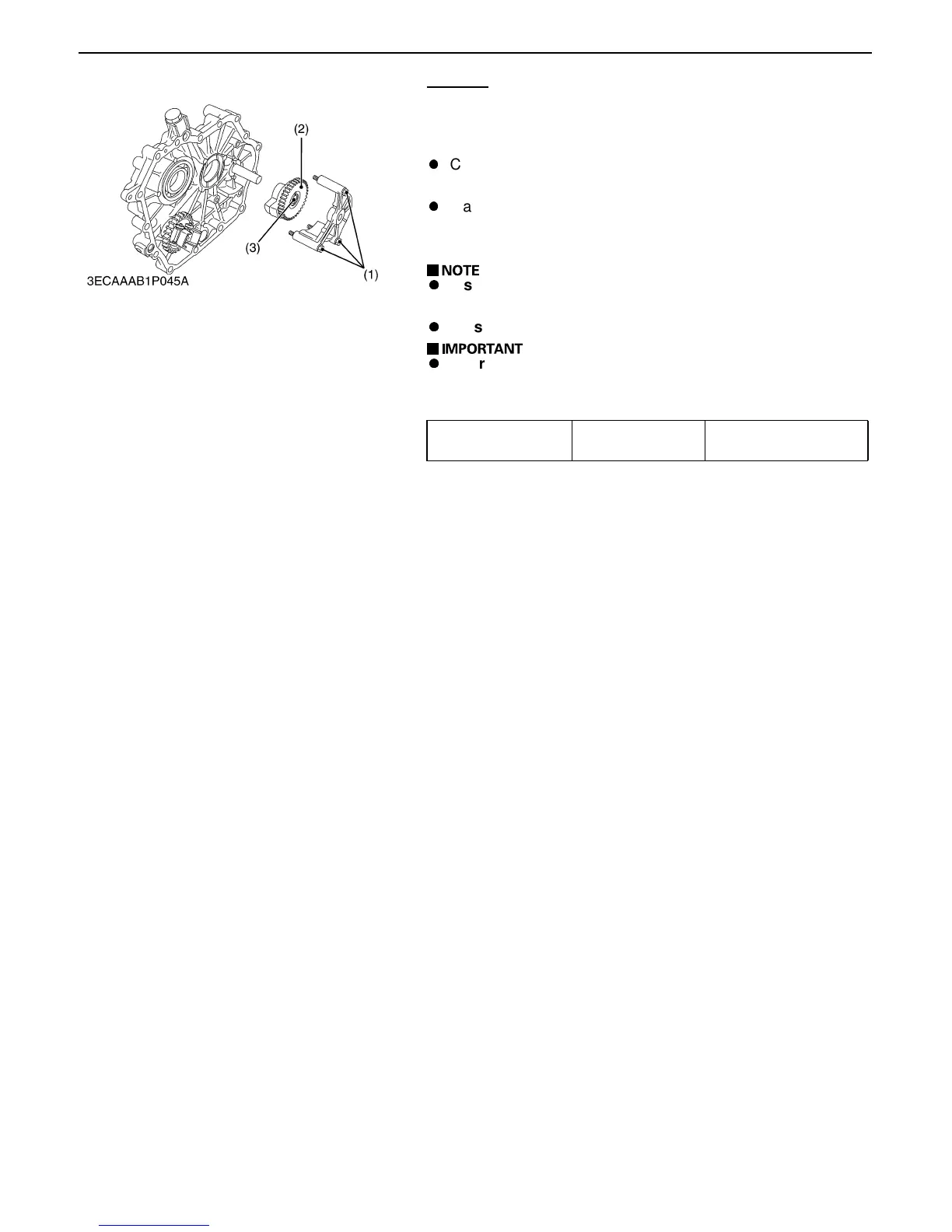
1. Remove the balancer case mounting screws (1).
2. Take out the balancer (2).
(When reassembling)
A
Clean up the balancer needle bearing (3) and balancer shaft
(at the side cover), and apply oil to them.
A
Make sure the needle bearing turns smoothly. Install the
balancer onto the balancer shaft from the balancer side.
Finally place the balancer casing in position.
A
Install the balancer with the gear facing toward the
balancer casing. See the picture.
A
Be sure that the balancer turns smoothly.
A
For replacing the bearing, clean up a new bearing and the
drive-in opening. Force the bearing into position with its
side mark facing outward.
Side Clearance Factory spec.
0.12 to 0.37 mm
0.0047 to 0.0146 in.
(1) Balancer Case Mounting Screw (3) Balancer Needle Bearing
(2) Balancer
0000009231E



 To Next Page