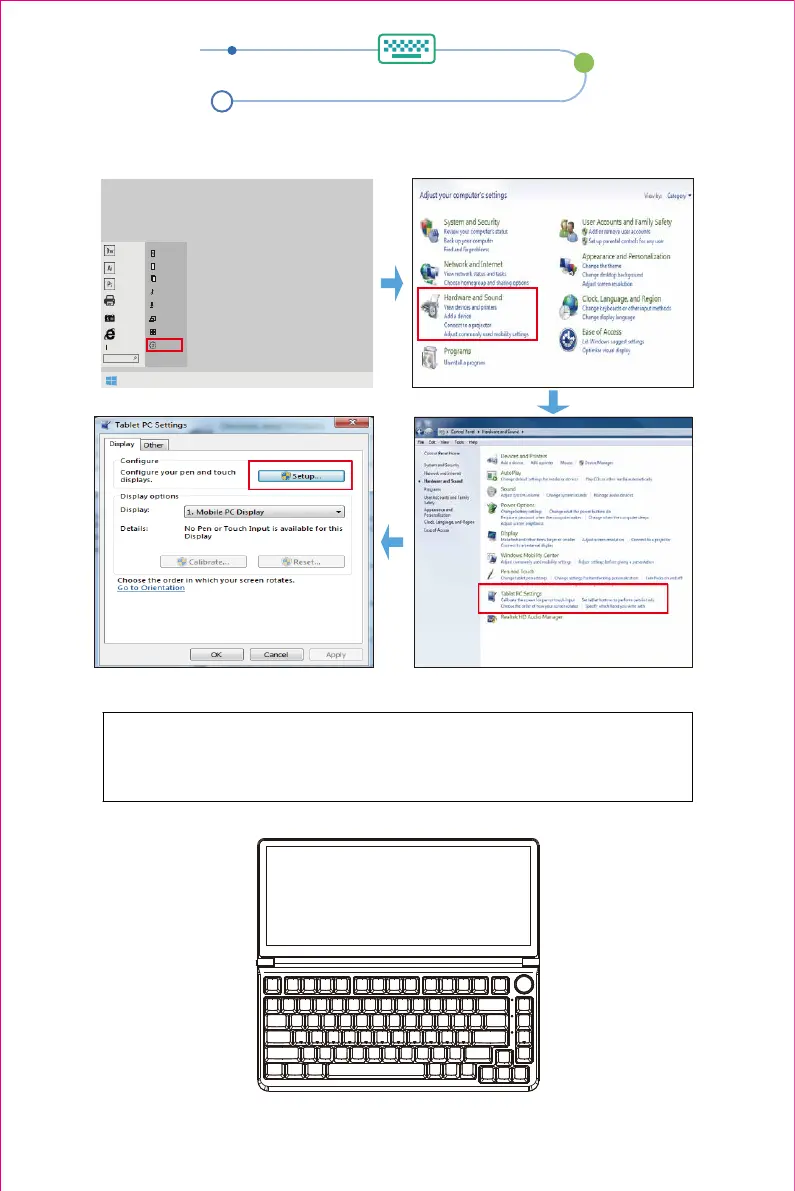
Touch settings
Windows 7 System Touch Settings
1.Click the Start button → Click Control Panel → Choose Tablet PC Settings.
Administrator
Document
Picture
music
Download
Computer
Connect
Control panel
Operation....
2.The following text appears on the main screen.
Press ENTER to go to the next screen
Click the keyboard screen to complete the settings
Touch this screen to identify it as the touchscreen
If this is not the Tablet PC screen, press Enter to move to the next screen. To close the tool, press Esc
Touch this screen to identify it as the touchscreen
If this is not the Tablet PC screen, press Enter to move to the next screen. To close the tool, press Esc
9


 To Next Page