Installation
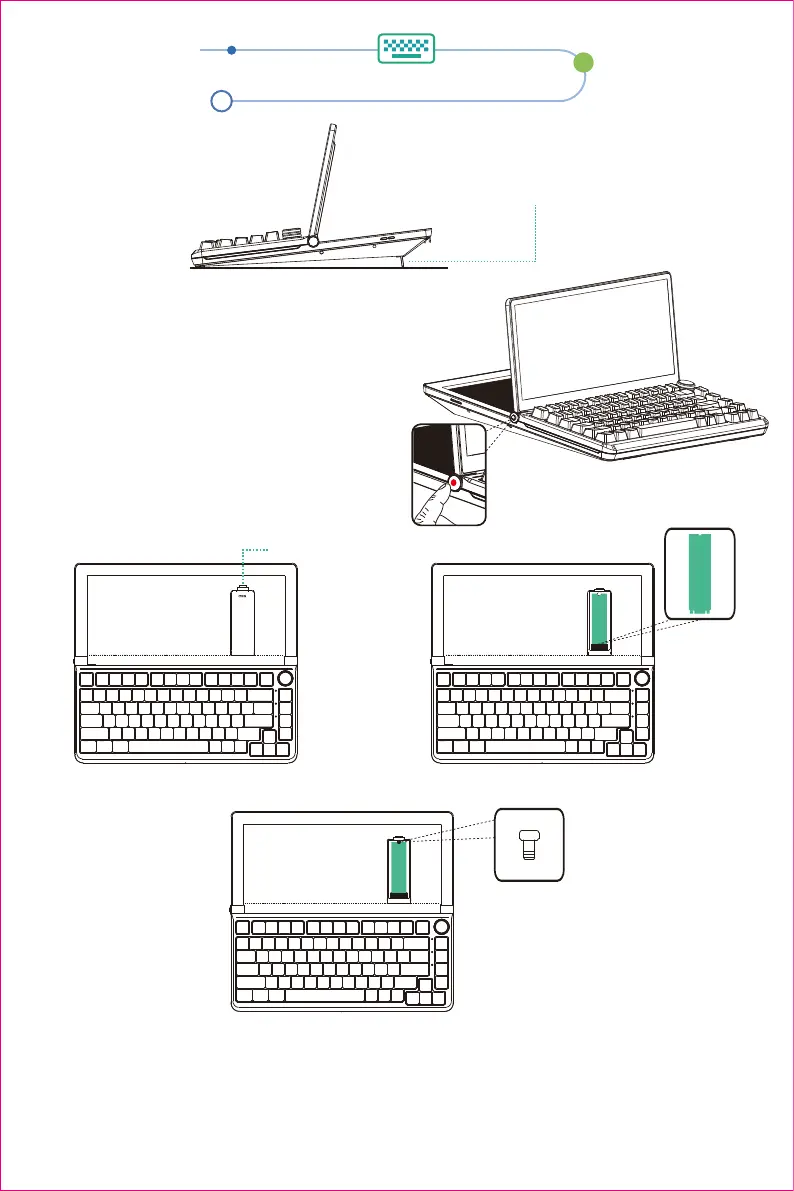
1.Open support frame
2.Screen opening and storage
Two-level adjustable stand
2.1 Please hold down the button to adjust the angle
of the screen to the appropriate position, and then
release the button to fix the screen angle.
2.2 In the process of opening and storing the
screen,the screen angle locking button must
be pressed,otherwise it will damage the
screen and cause the lock to fail.
3.Hard disk installation
Step 1: Press to open the
hard disk cover.
Step 3: Press the silicone buckle into the hole position, cover the hard disk cover to complete
the installation.
Note: 1. Connect the hard disk box to the computer, and the computer can read the disk drive to
complete the installation.
2. When connecting with a 3-in-1 data cable, the USB3.0 and solid state hard drive transfer
rate can only reach USB2.0 (12-480 Mbps).
Step 2: Slowly insert the M.2 hard
disk into the M.2 card slot.
Press the buckle to open the hard disk cover
2


 To Next Page