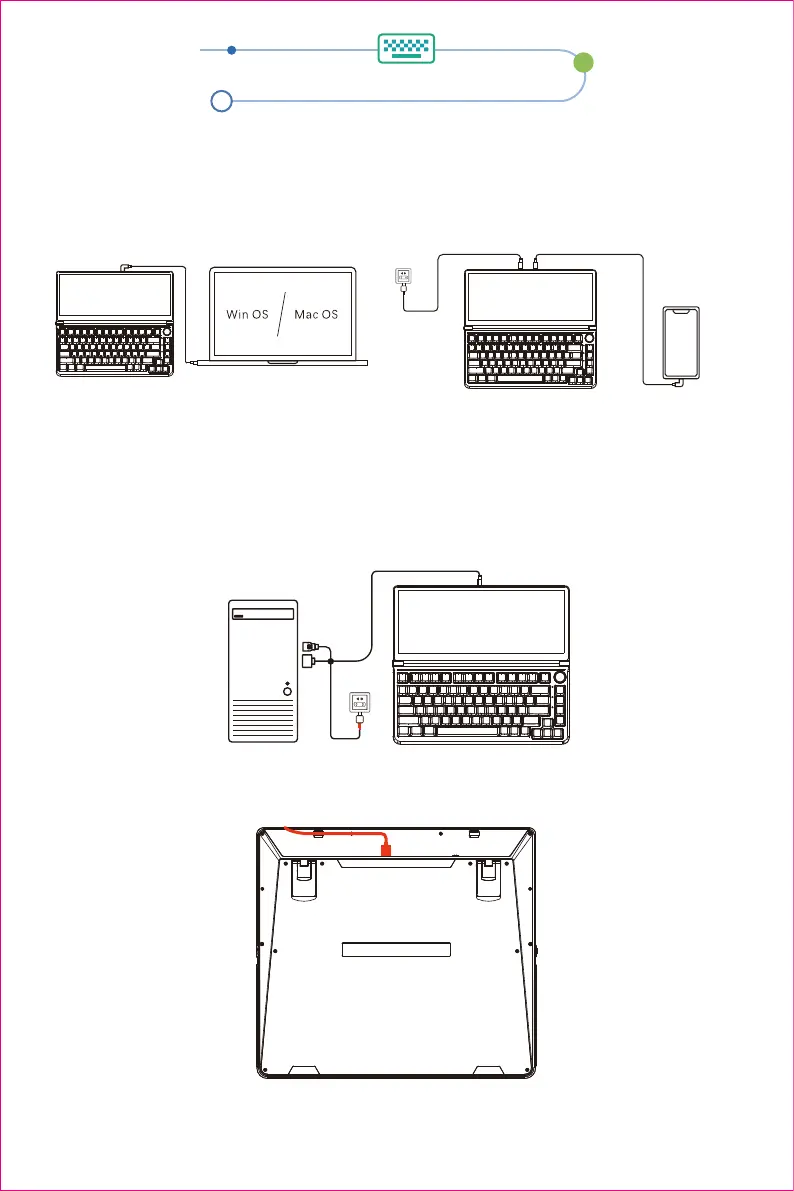
1.TYPE-C interface computer/mobile phone connection method
2.HDMI interface computer / mobile phone connection method
3.they way to secure the cable
TYPE-C notebook one-line communication TYPE-C mobile phone one-line communication
Only a TYPE-C notebook/mobile phone with signal + power supply + video can achieve one-line
communication.
Note:Desktop/laptop/mini PC with HDMI output port can be directly connected to display
It can be connected via TYPE-C TO HD+2USBA cable, the computer end is connected to the
HDMI interface and USB interface, and the keyboard end is connected to the TYPE-C connector.
Product connection method
Note: The data line connected to the computer must be connected to the TYPE-C interface of the product to
achieve video and data transmission.
Note: To prevent poor contact or damage to the TYPE-C interface of the product during the
operation of the product, please insert the data line into the slot.
Desktop host connection method
4


 To Next Page