Preparing to Copy
2-8
Specifying Paper Type and Size for the Cassettes and MP Tray
After loading paper in the cassettes 1 or 2 or the optional side feeder (cassette 5), specify the paper
type. Refer to Specifying the Paper Type on page 2-9 for details.
After loading paper in the cassettes 3 or 4, specify both the paper type and size. Refer to Specifying
the Paper Size below and Specifying the Paper Type on page 2-9.
After loading paper in the MP tray, specify both the paper type and size. Refer to Specifying the
Paper Size for the MP Tray on page 2-11 and Specifying the Paper Type to the MP Tray on
page 2-14.
Specifying the Paper Size
Specify the paper size when using the cassettes 3 and 4. For automatic detection of the paper size,
specify [Auto Detection] and select [Centimeter] or [Inch] as the unit.
The following paper sizes are available.
11 × 17", 8
1/2
×14", 11×8
1/2
", 8
1/2
×11", 5
1/2
×8
1/2
", 8
1/2
×13
1/2
", 8
1/2
× 13" (Oficio 2), A3, B4,
A4, A4R, B5, B5R, A5R, Folio, 8K and 16K
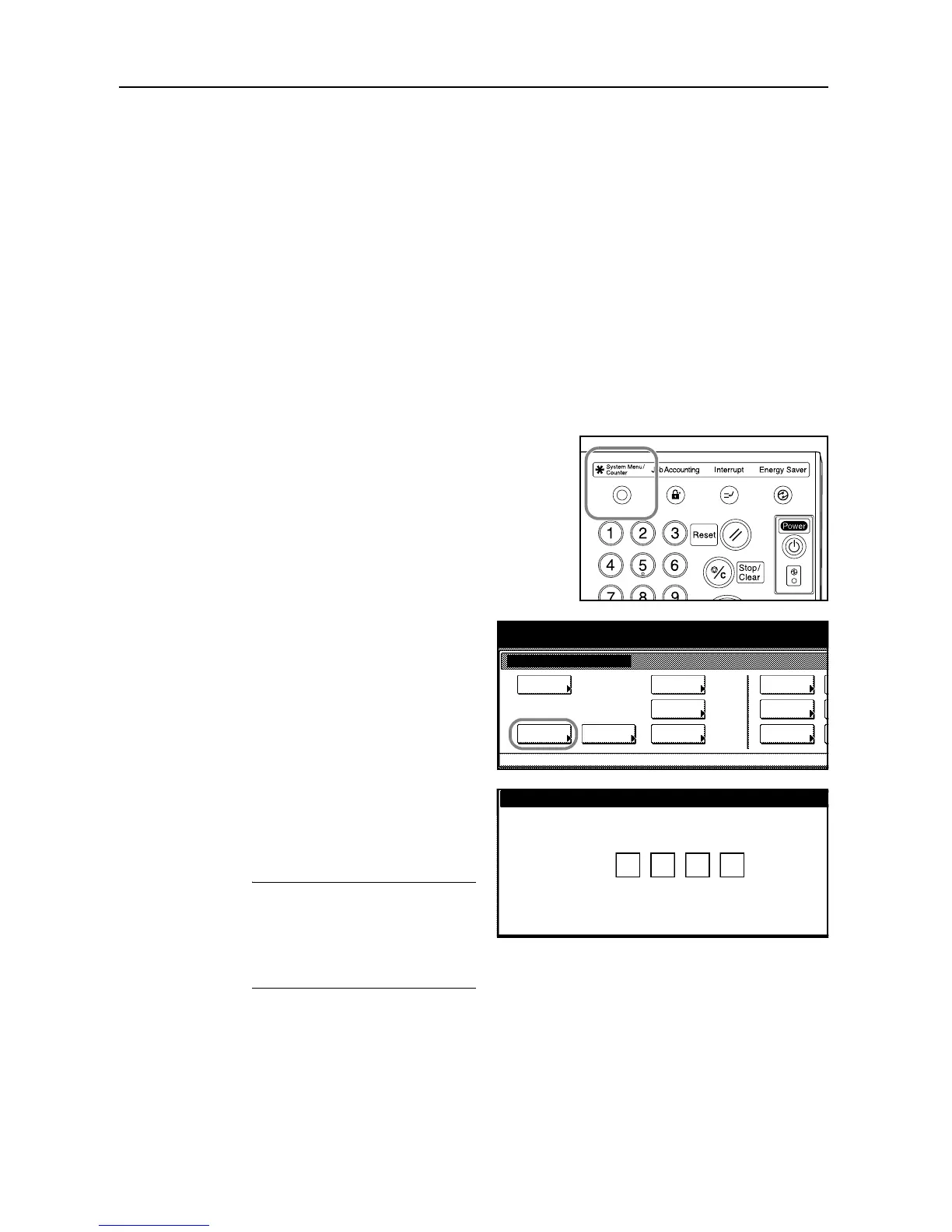
1
Press the System Menu/Counter key.
2
Press [Machine Default].
3
Use the numeric keys to enter the
four-digit management code. By default,
the management code is 6000 for the 60
cpm model and 8000 for the 80 cpm
model.
NOTE: When installing the optional
security kit, enter the eight-digit
management code. By default, the
management code is 60006000 for the
60 cpm model and 80008000 for the 80
cpm model.
System Menu / Counter
Job
System Menu
Management
BOX
Repor t
Print
Language
MP tr a y
Orig. Size
Registe r
Management
Document
Default
Machine
Default
Copy
Setting
Accounting
Enter the administrator number.




 To Next Page