Basic Operation
3-8
Preset Zoom
Reduces or enlarges at preset magnifications.
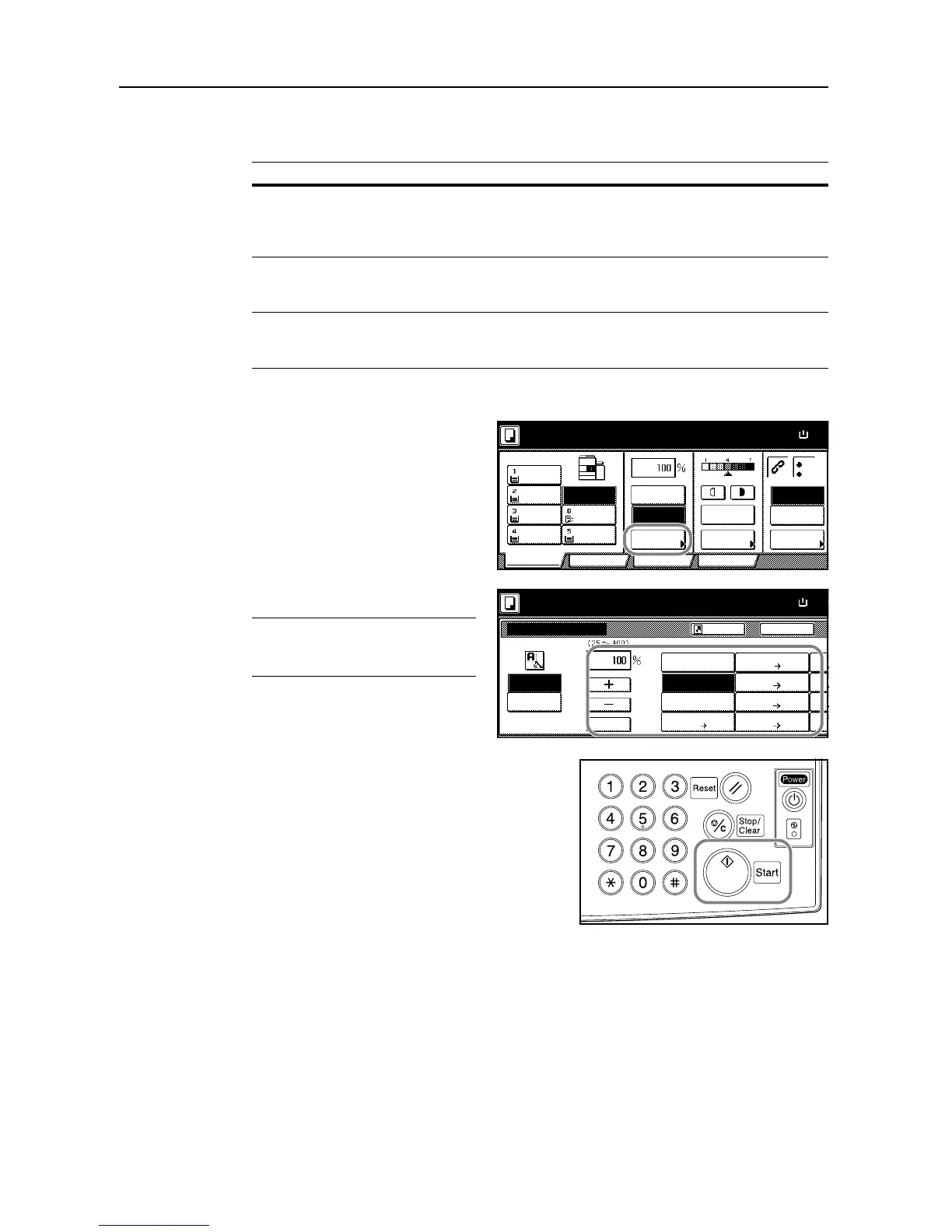
Follow the steps as below to use preset zoom.
1
Place the originals in the document
processor or on the platen and press
[Reduce/Enlarge].
2
Select the magnification.
NOTE: You can also adjust the
magnification in 1 % increments as
desired by pressing [+] and [-].
3
Press the Start key to start copying.
Zoom Level
Inch models 200 % (5
1/2
×8
1/2
"J11 × 17"), 154 % (5
1/2
×8
1/2
"J8
1/2
× 14"),
129 % (8
1/2
×11"J11 × 17"), 121 % (8
1/2
×14"J11 × 17"),
78 % (8
1/2
× 14"J8
1/2
× 11"), 77 % (11 × 17"J8
1/2
×14"),
64 % (11 × 17"J8
1/2
× 11"), 50 % (11 × 17"J5
1/2
×8
1/2
")
Metric models 200 % (A5JA3), 141 % (A4JA3, A5JA4), 127 % (FolioJA3),
106 % (11 × 15"JA3), 90 % (FolioJA4), 75 % (11 × 15"JA4),
70 % (A3JA4, A4JA5)
Metric models (Asia
Pacific)
200 % (A5JA3), 141 % (A4JA3, B5JB4), 122 % (A4JB4, A5JB5),
115 % (B4JA3, B5JA4), 86 % (A3JB4, A4JB5),
81 % (B4JA4, B5JA5), 70 % (A3JA4, B4JB5)
Ready to copy.
11x8





 To Next Page