EasyManua.ls Logo

Kyocera 6030 - Page 65

Kyocera 6030
124 pages
Print Icon
To Next Page IconTo Next Page
To Previous Page IconTo Previous Page
Loading...
Basic Operation
3-9
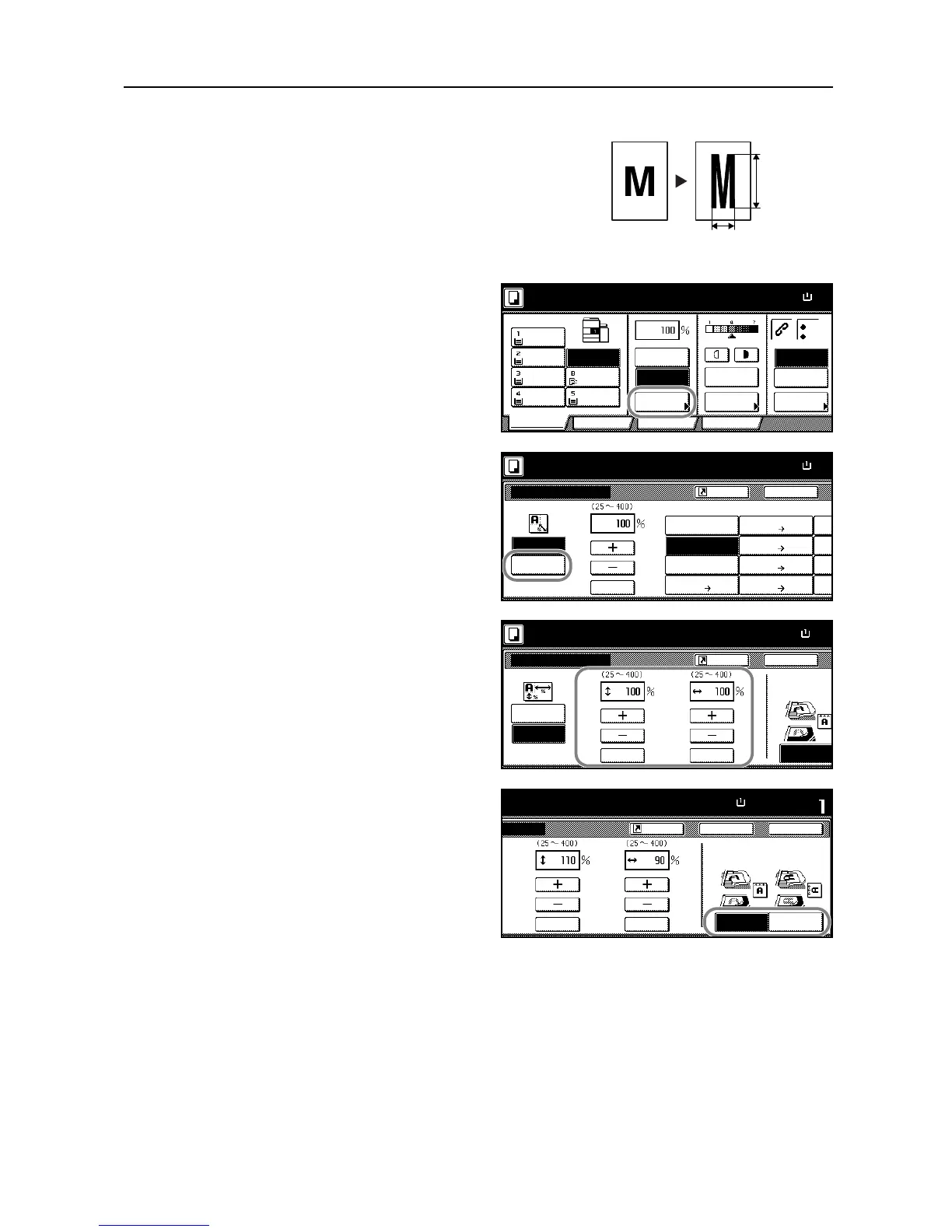
XY Zoom
Select vertical and horizontal magnifications
individually. Reduce or enlarge original images in 1 %
increments between 25 and 400 % (25-200 % with the
document processor).
Follow the steps as below to use XY zoom.
1
Place the originals in the document
processor or on the platen and press
[Reduce/Enlarge].
2
Press [XY Zoom].
3
Press [+] or [-] to change the displayed
magnification as desired.
You can also enter the magnification
directly using the numeric keys by
pressing [# keys] ([#-Keys]).
4
Select the orientation of the original.
Height
Width
Ready to copy.
11x8
½
Paper Size
ProgramFunctionUser choice
Basic
11x8½"
Plain
11x8½"
Recycled
11x17"
Plain
8½x11"
Plain
11x8½"
Plain
MP tr a y
Plain
APS Auto %
Reduce
100%
Exposure
Auto
Staple
Staple
Left Top
Staple Off
100%
/Enlarge Mode
Exposure
/Punch
Ready to copy.
Back
Reduce/Enlar ge
Standard
XY Zoom
Auto %
100%
400%
200%
8½x11" 11x17"
129%
8½x14" 11x17"
121%
8½x14" 8½x11"
78%
11
x
64
%
50
%
25
%
5½x8½" 8½x14" 11
x
77
%
# key s
11x8
½
Paper Size
100%
5½x8½" 11x17"
154%
Shortcut
Zoom
11
x
Back
Select Original I
m
Direction.
Top Edge
Reduce/Enlar ge
Ready to copy.
Paper Size
11x8
½
Standard
XY Zoom
XY
# keys # keys
100%
Shortcut
Zoom
Set
Back Close
e
to copy.
Paper Size
11x8½"
# keys
Top Edge
Left Top
Select Original Image
Direction.
# keys
YX
Y: X:110% 90%
Shortcut
Edge