Preparing to Copy
2-10
3
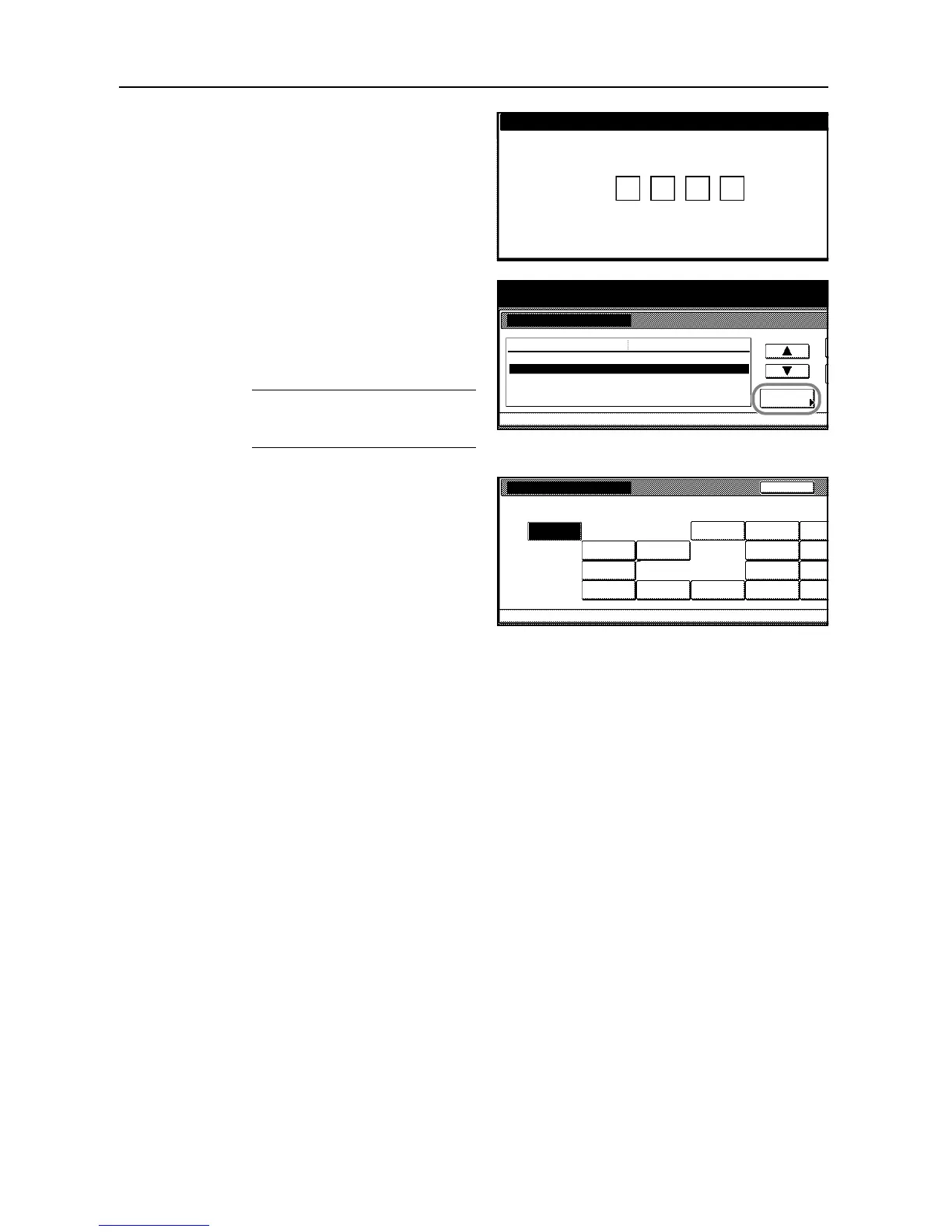
Use the numeric keys to enter the
four-digit management code. By default,
the management code is 6000 for the 60
cpm model and 8000 for the 80 cpm
model.
4
Press [S] or [T] to choose from Paper
type (1st drawer) (Paper type [1st
cassette]) through Paper type (5th
drawer) (Paper type [5th cassette]).
Press [Change #] to begin changing
settings.
NOTE: Paper type (5th drawer) (Paper
type [5th cassette]) is displayed when
installing the optional side feeder.
5
Select the paper type and press [Close].
6
Press [Close].
7
Press [End]. The touch panel will return to the [Basic] screen.
Enter the administrator number.
System Menu / Counter
System Menu
Machine De fa ul t
Paper size (4th drawer)
Paper type (1st drawer)
Default menu Setting mode
Auto/ Inch
Paper type (2nd drawer)
Paper type (3rd drawer)
Paper type (4th drawer)
Plain
Recy cl ed
Plain
Plain
Change #
Paper type (1st drawer)
Custom
Custom
Custom
Custom
Machi ne De fa ul tSystem Menu
Bond
ColorRecy cl e d
Plain
Preprinted
Letterhead
Thick
High
Custom 1
Custom 2
Custom 3
Custom 4
Back
Select and display paper type.
-
paper
Quality





 To Next Page